Buying priorities
Start with the requests you want to make without reaching for your phone, then check how much connected setup and privacy management you are willing to take on.
| Priority |
What to check |
Your needs |
| Hands-free routines |
Check whether the exact device supports the music, radio, podcast and information services you use. Confirm that Wi-Fi and the required account are suitable for streamed audio and voice requests. Consider whether physical controls remain practical when voice use is unavailable. |
I want to start audio, set timers or ask simple questions while cooking, cleaning or moving around the home. Ofcom's smart-speaker research found that participants commonly used devices for content and household-management tasks such as timers, alarms and reminders. |
| Privacy and permissions |
Review the companion app's requested permissions before setup. Check for microphone or camera controls, listening indicators, recording-management settings and the trade-off when voice functions are switched off. |
I want to decide which permissions I grant and have a clear way to pause voice or camera use. The Information Commissioner's Office notes that smart-product setup can involve permission choices for information collection. |
| Home compatibility |
Confirm the exact model's Wi-Fi, phone, app and account requirements. For lights, plugs, thermostats or cameras, check each accessory's stated compatibility rather than relying on an ecosystem name. Verify any Matter, Thread, Zigbee or hub capability model by model. |
I want the speaker or display to fit the phone, home network and connected products I already use. This matters most when smart-home control is part of the reason for buying. |
Joybuy product options
Joybuy product options for the Bluetooth-speaker route: these are for phone- or tablet-controlled listening at home rather than built-in, room-based voice assistance.
 No image available
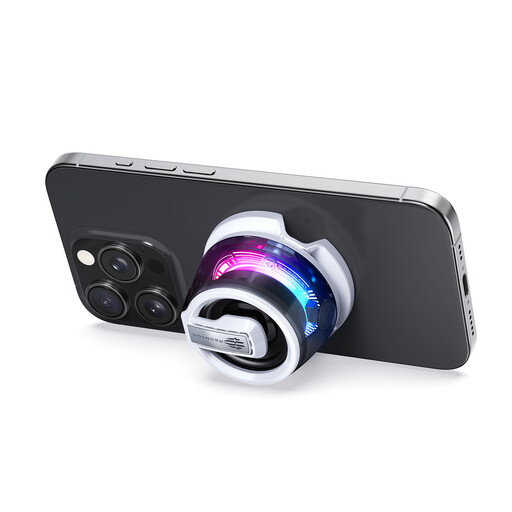
Red Magic Rock Magnetic Bluetooth Speaker – White
For phone- or tablet-led audio at home, with a magnetic base and phone-stand use for a compact personal setup.
The listing states Bluetooth 5.3, a maximum 10 m connection distance, a built-in microphone, battery power, and compatibility with smartphones and tablets.
It does not replace a built-in smart speaker for room-based voice requests, timers, reminders or smart-home control. Check battery playback and charging details, and confirm the supplied colour before purchase.
Joybuy
 No image available
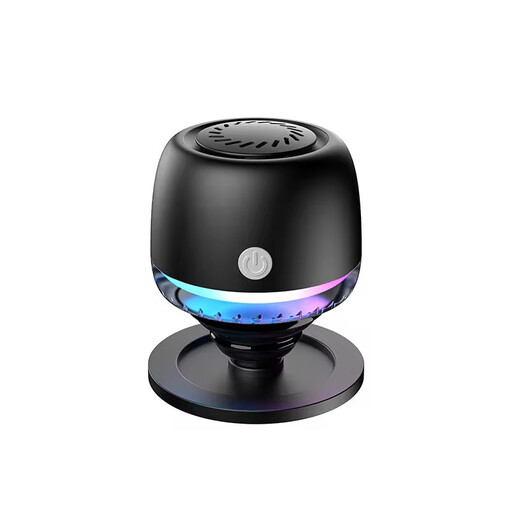
Verbex M99 Black Bluetooth Speaker Phone Stand
For phone-controlled music, calls and hands-free phone viewing in a compact desktop or home setup.
The listing states Bluetooth connection, up to 10 m transmission distance, phone-holder use, voice-call functionality and a 500–800 mAh battery range.
Built-in voice-led timers, reminders, information requests and connected-home control are not stated. Check playback time, charging time and audio output before purchase; the supplied safety information says not to use it near bathtubs or sinks.
Joybuy
Questions to consider
Do I need home Wi-Fi for a smart speaker or smart display?
For connected voice-assistant functions, treat home Wi-Fi and the required account or app setup as prerequisites to check for the exact model. Apple lists Wi-Fi internet access and a compatible iPhone or iPad for HomePod setup, while Amazon identifies Wi-Fi and Bluetooth connectivity for Echo Pop.
Can a smart speaker control lights or a thermostat in a one-person home?
It can do so only when the speaker, app or account and the specific accessory are compatible. The Information Commissioner's Office gives the example of a smart speaker connecting to a smart thermostat over the internet, but this is not a guarantee for every speaker or thermostat.
How should I check privacy before setting up a smart speaker or display?
Review what the companion app asks to access, including possible microphone, location, camera, contacts or photos permissions, and revisit privacy settings when needed. On Echo devices, Amazon says the microphone-off control prevents Alexa from responding to voice commands until the microphone is switched back on.
Is there a UK security rule for internet-connected speakers?
Yes. The UK consumer connectable-product security regime took effect on 29 April 2024. The National Cyber Security Centre states that manufacturers of consumer smart devices must meet basic cyber-security requirements, including not supplying devices with easily discoverable shared default passwords; also check the seller, manufacturer support information and model documentation for the device you are considering.


