Households keeping a usable older TV
If the picture still suits you and the TV has a working HDMI input, a stick or box can provide a separate streaming interface without replacing the screen. Check that the device carries the apps you use.


Keep a TV with a working HDMI input and a screen that still suits the household, and add a streaming stick or box if its built-in apps are the problem. Consider replacing the TV when the display itself no longer meets your needs or you want an integrated setup. Whichever route you choose, check required UK apps on the exact model; if Wi-Fi is unreliable at the TV, a box with built-in Ethernet offers a wired option where a cable can reach the router.
If the picture still suits you and the TV has a working HDMI input, a stick or box can provide a separate streaming interface without replacing the screen. Check that the device carries the apps you use.
Homes using BBC iPlayer, ITVX or Channel 4 alongside subscriptions need to check each service against the exact TV or player model. ITV and Channel 4 publish device-specific support information.
Consider how everyone will navigate menus and use the remote. Check screen-reader controls on the device and subtitles or audio description in the particular apps and programmes you watch.
Decide whether the screen needs replacing before comparing streaming interfaces. Then check the apps, connections and controls the household will use.
Choose it when: The existing HDMI TV still suits the room, but its built-in streaming interface does not.
Trade-off: A stick uses an HDMI port and depends on a suitable connection and power arrangement at the TV.
Choose it when: You are keeping the screen and need features such as built-in Ethernet on a suitable model.
Trade-off: A wired connection avoids the player-to-router Wi-Fi link, but it still needs a practical cable route and adequate broadband.
Choose it when: The current display no longer suits the household or you want the streaming interface built into a new screen.
Trade-off: A new TV still needs exact-model app checks, as well as room-fit and installation planning.
| Priority | What to check | Your needs |
|---|---|---|
| Required apps | Check BBC iPlayer, ITVX, Channel 4 and your subscription apps against the exact UK device model. Check any required app features too. | Everyone needs to find the services they actually watch on the main screen, not just an app with a familiar platform name. |
| Existing screen | For a stick or box, check for a working HDMI input and a suitable power arrangement. Match any 4K or HDR feature to the TV and content you will use. | If the current picture still works for us, I would rather update the streaming interface than replace the screen solely for its apps. |
| Connection | Test streaming at the TV location. If Wi-Fi is troublesome, check for built-in Ethernet on the exact player and a practical cable route. | Playback on our shared TV needs to work where it sits, even when other household devices are connected. |
| Everyday controls | Check the remote and menu controls, then check profiles or parental controls in the apps your household uses. | Different people use this screen, so changing programmes and finding the right account should be manageable for them. |
| Accessibility | Check device screen-reader settings separately from subtitles and audio description in each app and programme. | I need the controls and the programmes we watch to work with the access features used in our home. |
ITV publishes device and model conditions for ITVX, while Channel 4 identifies supported device families. Support for one model does not establish support for every older model in the family.
List your required services and check each provider’s current UK device information for the exact TV, stick or box.
4K viewing needs a compatible screen and content. Amazon says the Fire TV Stick 4K Max needs a compatible router to use Wi-Fi 6E.
Check the TV, router and connections already in the room before deciding which device features matter.
Google specifies a separately sold certified HDMI 2.1 cable for Google TV Streamer; Apple also specifies a separately sold HDMI cable for Apple TV 4K.
Built-in Ethernet can bypass the player’s Wi-Fi link to the router, but it does not improve the broadband service itself.
Try streaming at the TV location first. If local Wi-Fi is the problem, check whether a player with Ethernet and a cable route will suit the room.
According to GOV.UK, the UK TV Licence requirement covers watching or recording programmes as they are broadcast and watching on-demand BBC programmes on iPlayer; the viewing device does not remove that requirement.
Check your household’s viewing against the current GOV.UK TV Licence guidance, rather than deciding by whether the TV has an aerial.
A streaming-stick route for keeping a TV with an HDMI input.
A streaming-player platform available on external devices as well as TVs.
A separate streaming box with documented built-in accessibility settings.
An integrated option when replacing the display as well as its streaming interface.
Another integrated-TV route for households choosing a new screen.
These options cover a streaming stick for keeping an HDMI TV and smart TVs for replacing the screen. Choose the route first, then check the exact model’s UK apps and fit for your room.
 No image available
An HDMI-connected stick with a voice remote for adding a separate streaming interface to an existing TV. The listing specifies 4K, Dolby Vision and HDR10+; viewing in those formats depends on compatible equipment and content. Check the required UK apps on this exact model.
 No image available
A 50-inch integrated Google TV option if the display itself needs replacing. The listing also specifies Wi-Fi and HDMI inputs. Confirm room fit and required UK apps on the exact model; clarify its refresh-rate specification before relying on it.
 No image available
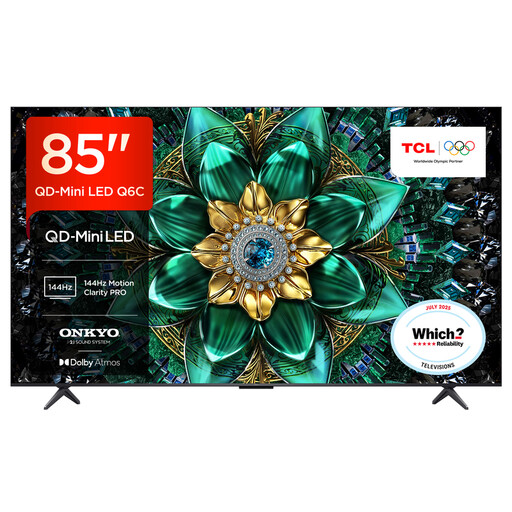
An 85-inch integrated Google TV option for replacing a screen that no longer suits the household. The listing specifies HDMI 2.1 inputs and Wi-Fi. Check placement and installation requirements, along with required UK apps on this model.
 No image available
A 75-inch integrated Google TV option when a new display is part of the plan. The listing specifies 4K HDR and HDMI 2.1 inputs. Check that the screen fits the room and that the exact model carries the household’s required UK apps.
 No image available
A 65-inch integrated Google TV option for replacing the shared screen. The listing specifies a 144Hz native refresh rate; that figure alone does not determine streaming quality. Check room fit and UK app support for this exact model.
Yes, if its screen still suits you and it has a working HDMI input for a compatible stick or box. The added device supplies its own streaming interface; it cannot change the TV’s panel resolution or physical condition. Check its UK app support before buying.
Check BBC iPlayer, ITVX, Channel 4 and the subscription services your household uses on the exact device model. ITV publishes platform-specific ITVX support, and Channel 4 identifies supported devices; support for one model does not guarantee it for another.
Consider a box when you want a wired connection and can run a cable to the router. Google lists built-in Gigabit Ethernet on Google TV Streamer, while Apple lists Ethernet only on its Apple TV 4K Wi-Fi + Ethernet configuration. Check apps and TV connections whichever device you choose.
According to GOV.UK, you need a TV Licence to watch or record programmes as they are broadcast or to watch on-demand BBC programmes on iPlayer. Using a smart TV, stick or box does not change the requirement; check current GOV.UK guidance against what your household watches.
No. A device’s menu controls and an app’s programme features are separate checks. Google and Apple document built-in accessibility settings, while subtitles and audio description need checking in the apps and programmes your household uses.