Who this suits

Phone-heavy notification managers

People who want to screen calls, read or respond to messages, check calendars and see navigation prompts while their phone stays in a pocket or bag. They need a smartwatch with confirmed phone compatibility and app-level notification controls. Apple Support, Wear OS by Google Help and Samsung UK describe these phone-linked notification options.

Glance-and-vibrate alert users

People who mainly want incoming-call vibration, message alerts and selected app notifications, with less need for on-wrist typing, maps or apps. A fitness tracker can fit this routine when its companion app and phone permissions support the alerts needed. Xiaomi UK documents app and incoming-call alerts for its Smart Band range.

Traditional-watch wearers wanting selected alerts

People who prefer a less screen-led watch but still want calls, texts, calendar alerts and selected third-party notifications. A hybrid watch is most relevant when its iOS or Android requirements and background-app permissions match the paired phone. Withings Support lists these requirements for ScanWatch 2.

What to check before buying

Full smartwatch

Choose it when: You want more than alerts, including message actions, calendar access, directions, apps or wrist calls.

Consider: Features depend on the phone, operating system, app support and notification settings; cellular use also needs the right model and plan.

Fitness tracker

Choose it when: Incoming calls, messages and selected app alerts matter more than an app-focused wrist interface.

Consider: Do not assume replies, maps, calling controls or app functions match those of a full smartwatch.

Hybrid watch

Choose it when: Selected calls, texts and calendar alerts are enough and you prefer conventional-watch styling.

Consider: Notification delivery can rely on companion-app access and background operation, making it less suitable for reliable replies or navigation.

Priority What to check Your needs
Notification actions Check whether the exact model can only mirror alerts or can also display, dismiss, reply to or act on them. Confirm the apps you use most. I want to know whether a wrist alert lets me take a quick action or simply tells me to reach for my phone.
Phone compatibility Match the watch generation to your phone model and operating-system version. Check the manufacturer’s current compatibility information, not just the brand name. My chosen device needs to pair with the phone and software version I already use.
Connection type Distinguish Bluetooth-linked use from a cellular model. For phone-independent calls or data, check LTE hardware, activation and operator conditions. I need to decide whether alerts near my phone are enough or whether calls and messages away from it matter.
Permissions and security Review companion-app notification access, app selections, background operation and privacy permissions. Check the stated period for important security updates. I want only useful alerts on my wrist and clear information about ongoing software support.

Common buying mistakes

  • Buying by brand without checking the exact phone, OS and watch generation

    Compatibility is model-specific: Apple Watch requirements differ by generation, and Samsung lists different Android requirements for recent Galaxy Watch models.

    Identify your phone model and operating-system version, then check the manufacturer’s compatibility information for the precise watch model before ordering.

  • Assuming an alert-only tracker provides full smartwatch interaction

    A tracker may deliver phone alerts, but replies, maps, app use and calling controls vary substantially by model and connection type.

    List what you expect to do after an alert: read, dismiss, reply, call back, navigate or pay. Verify each function on the exact model.

  • Treating LTE as automatic phone-free service

    A cellular watch needs suitable hardware, activation and operator conditions. Google states that Pixel Watch LTE and its Android companion phone must use the same operator network for full talk, text and data functionality.

    Confirm that the watch is an LTE version, then check operator plan availability, charges and network requirements before purchase.

    An LTE watch plan can add an ongoing mobile-service cost.

  • Ignoring notification permissions and update-support information

    A paired device can still miss alerts when phone notifications, companion-app access, previews, background operation or focus settings prevent delivery. UK smart-device rules require manufacturers to state the minimum period for important security updates.

    Enable only the apps you need, test a call, message and calendar alert during setup, review privacy permissions and note the stated security-update period.

Relevant brand options

Apple

A phone-integrated smartwatch route for iPhone users who need configurable wrist notifications and, depending on the app, actions such as message replies or callbacks.

  • Apple Support says notifications can mirror iPhone settings or be customised for individual apps.
  • Check the exact Apple Watch, iPhone and iOS combination against Apple’s compatibility requirements.

Google Pixel Watch

An Android smartwatch route for people who want Google-oriented messages, calendar access, navigation and, on suitable cellular versions, calls and texts away from the paired phone.

  • Wear OS by Google Help lists calls, texts, emails, calendar events and app notifications for connected watches.
  • For Pixel Watch LTE, Google requires a compatible carrier plan and the watch and Android companion phone to use the same operator network.

Samsung

An Android-led smartwatch route, particularly relevant to Galaxy phone users who want granular app-notification settings on a Galaxy Watch.

  • Samsung UK says you can choose which apps send notifications to a Galaxy Watch and adjust how they appear.
  • Compatibility and available functions vary by Galaxy Watch and phone combination; some Health Monitor features are limited to Galaxy phones.

Withings

A hybrid-watch route for people who want conventional-watch styling with calls, texts, emails, calendar alerts and selected third-party app notifications.

  • Withings Support lists iOS 16 or later and Android 12 or later for ScanWatch 2.
  • Notification delivery requires phone permissions, selected app toggles and the companion app to remain active in the background.

Xiaomi

A fitness-band route for people who mainly want low-effort phone alerts and incoming-call vibration.

  • Xiaomi UK states that Smart Band 9 Pro supports app notifications and incoming-call alerts when connected to a phone.
  • Xiaomi’s up-to-21-day Smart Band 10 battery figure is based on manufacturer typical-use testing and will vary with settings and use.

Joybuy product options

Joybuy smartwatch options for people who want calls, messages, notifications and everyday phone access from the wrist.
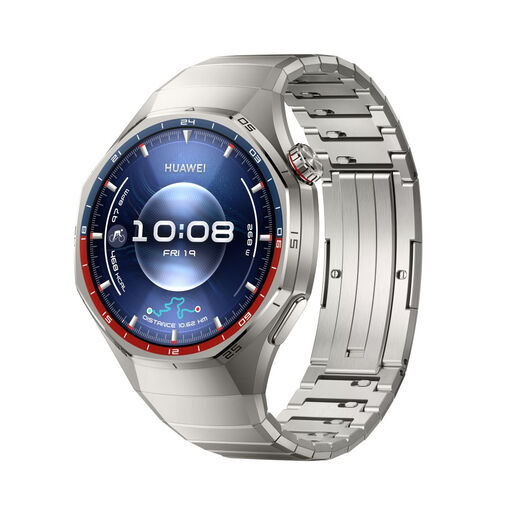
HUAWEI Watch GT6 Pro 46mm Titanium Smartwatch in Silver

HUAWEI Watch GT6 Pro 46mm Titanium Smartwatch – Silver

For paired-phone users who want Bluetooth calls, app notifications, calendar sync and quick SMS replies.

Stated support starts at iOS 13.0 or Android 8.0. It uses Bluetooth; check supported notification apps, permissions and the stated UK security-update period before buying.

Joybuy
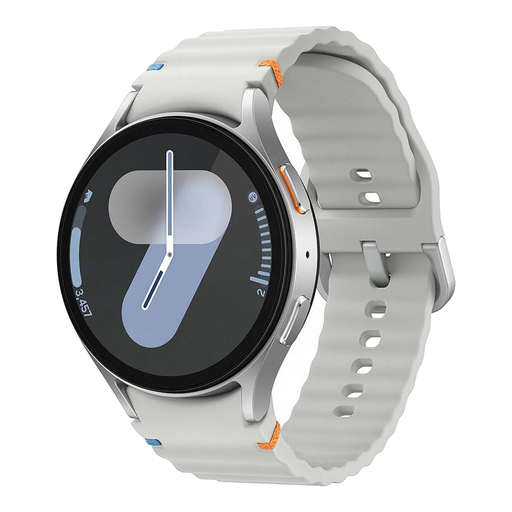
Samsung Galaxy Watch7 44mm 4G LTE Smart Watch in Silver

Samsung Galaxy Watch7 44mm 4G LTE Smart Watch – Silver

For Android users who want configurable wrist alerts and may value calls away from the paired phone.

This 44mm model lists 4G LTE eSIM, Bluetooth and Wi-Fi. Confirm phone compatibility, UK eSIM support and the required mobile plan before purchase.

Joybuy
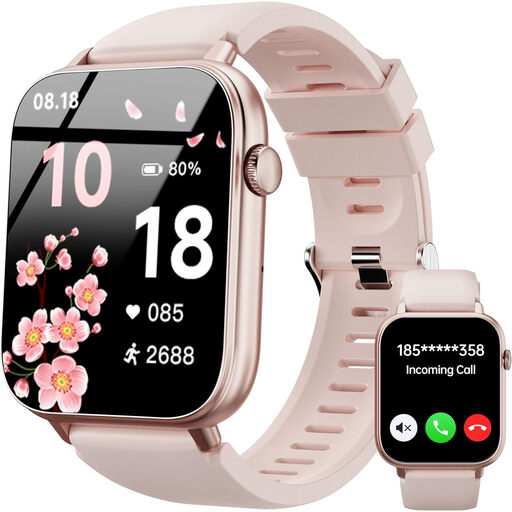
OUKITEL V3 Pink Smartwatch

OUKITEL V3 Pink Smartwatch

A paired-phone option for incoming calls, SMS and selected app-message alerts on Android or iOS.

The listing specifies a speaker, microphone and 1.83-inch touch display. Check the companion app, minimum phone OS and whether the message and calendar functions meet your needs.

Joybuy
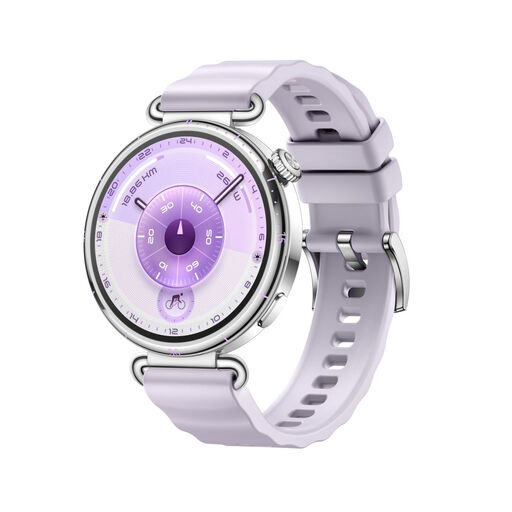
HUAWEI WATCH GT 6 41mm Smartwatch in Lilac

HUAWEI WATCH GT 6 41mm Smartwatch – Lilac

For paired-phone users who mainly want glanceable notifications and call management from the wrist.

The listing states Bluetooth connectivity and support from iOS 13.0 or Android 8.0. Confirm supported apps, reply functions and the applicable battery figure for this variant.

Joybuy
Apple Watch Series 11 GPS plus Cellular 46mm Silver Aluminium Case with Purple Fog Sport Band S/M

Apple Watch Series 11 GPS + Cellular 46mm – Silver Aluminium, Purple Fog Sport Band S/M

For iPhone users seeking calls, texts, Siri and notifications from the wrist, including cellular connectivity where supported.

This GPS + Cellular model lists 5G/LTE. Check the exact iPhone and iOS requirement, plus UK operator plan and network availability, before buying.

Joybuy

Frequently asked questions

Will a smartwatch show every notification from my phone?

Not automatically. Wear OS uses the phone’s notification settings, while Apple Watch can mirror iPhone app settings or use app-specific settings. Check that the apps you care about can send alerts to the exact watch and that it supports the action you expect after receiving one.

Can I make calls and receive texts without carrying my phone?

Only if the watch and connection arrangement support it. A Pixel Watch LTE needs a cellular-capable model and carrier plan; Google states that the watch and Android companion device must use the same operator network for full talk, text and data functionality. A Wi-Fi model needs a Bluetooth connection for calls.

Should I check phone compatibility before choosing an Apple Watch or Galaxy Watch?

Yes. Apple publishes model-specific iPhone, iOS and watchOS requirements. Samsung UK lists different Android requirements by Galaxy Watch generation and notes that functions can vary with the phone and watch pairing.

What UK security information should I look for before buying an internet-connected watch?

Check the manufacturer’s stated minimum period for important security updates. UK smart-device security rules cover consumer smart devices including smartwatches and wearable fitness trackers; keep the watch and companion app updated and use two-step verification where it is offered.

Can I rely on a hybrid watch for WhatsApp, texts and calendar alerts?

Only after checking the companion app’s permissions and background-operation requirements. Withings says ScanWatch 2 can receive calls, texts, calendar events and selected third-party notifications, but needs notification access, selected app settings and the Withings app to remain active in the background.