Runners comparing pace and distance
If you compare treadmill sessions over time, look for an indoor running mode and a calibration process you can use. Outdoor GPS specifications alone do not explain how the watch records distance indoors.


Choose a watch with an indoor running workout and a distance-recording method that suits how you track progress; do not choose on outdoor GPS specifications alone. Apple Watch offers an Indoor Run workout for iPhone users, while Garmin documents treadmill calibration against the machine’s display. If you prefer an Android-linked watch or tracker, check phone compatibility and the exact model’s indoor workout features before buying.
If you compare treadmill sessions over time, look for an indoor running mode and a calibration process you can use. Outdoor GPS specifications alone do not explain how the watch records distance indoors.
If you want to start a run quickly and review it afterwards, check that the watch works with your phone and saves workouts in the app you intend to use.
If you run intervals or watch your pace and heart rate during a session, check which measurements the exact model can show while the indoor workout is in progress.
For treadmill sessions, decide whether your main priority is a distance record you can check against the console, feedback during the run, or a workout log that fits your phone.
| Concern | What to check | Who this matters to |
|---|---|---|
| Distance and pace | Look for an Indoor Run or Treadmill activity and check how the exact model calibrates distance against an outdoor run or treadmill display. | If I compare one run with the next, I want an indoor distance record I can check against the console. Around 42% of consumers put distance and pace agreement first. |
| Live workout feedback | Check which pace, heart-rate and interval measurements appear during an indoor run, and whether custom workouts require a particular model or app. | During intervals, I want to see the measurements I use without waiting until the run is over; around 33% of consumers prioritise live workout feedback. |
| Phone and app fit | Confirm phone compatibility and the companion app; if equipment syncing matters, check the treadmill as well. | I need to start a session and find its record in an app that works with my phone. For around 25% of consumers, that straightforward setup is the primary concern. |
A treadmill run is not recorded as an outdoor GPS route. Garmin says its Treadmill activity uses the watch accelerometer or a paired sensor for distance; Google Health explains that Fitbit can calculate non-GPS distance from steps and stride length.
Check the indoor workout mode and its calibration options separately from outdoor GPS features.
Apple describes equipment syncing for compatible cardio machines, not for every treadmill.
Look for the Apple Watch connection marking and contactless reader on the treadmill you actually use. Otherwise, judge the watch on its standalone Indoor Run recording.
Apple documents outdoor calibration to improve distance and pace estimates. Garmin offers treadmill calibration after a model-dependent minimum recorded distance and notes that changing treadmills can call for recalibration.
Follow the calibration instructions for your watch, then compare its records with the treadmill display across your usual sessions.
Samsung says feature availability varies by Galaxy Watch model and describes its health features as general wellness and fitness tools, not medical diagnostic devices.
Check the exact model’s available workout features and compatible-phone requirements before relying on a particular measurement.
An iPhone-centred route for recording Indoor Run workouts, with equipment syncing where the treadmill is compatible.
A running-watch route worth considering if checking recorded distance against the treadmill display is central to your training log.
Pixel watches and Fitbit trackers offer different ways to keep exercise records in Google’s fitness ecosystem.
A Galaxy Watch route for people who want to review exercise and activity information in Samsung Health.
These choices cover an Apple Watch for iPhone-linked workout logging and a Fitbit tracker for phone-linked exercise records. If matching treadmill-console distance is your priority, check the indoor mode and calibration options of the exact model before choosing either one.
 No image available
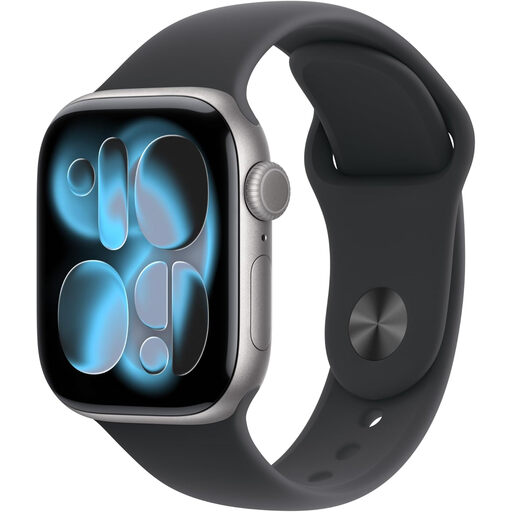
Consider this model if you use an iPhone and want to log workouts in the Apple Watch ecosystem. If agreement with the treadmill display matters, check the exact model’s indoor workout and calibration instructions; syncing with gym equipment also requires a compatible treadmill.
 No image available
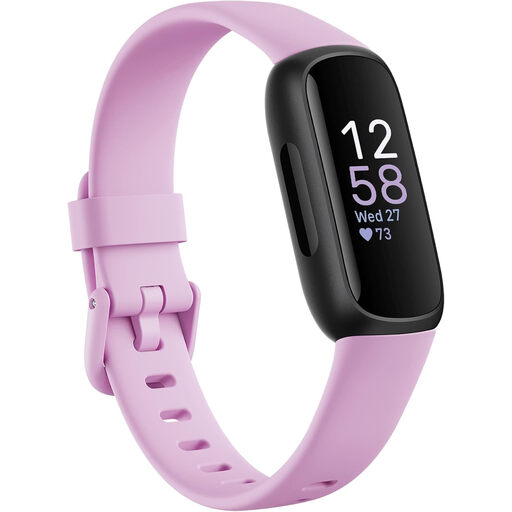
Consider this fitness tracker if you want phone-linked exercise and heart-rate records. Check whether its available exercise modes and distance settings meet your treadmill-logging needs; a non-GPS distance estimate need not match the treadmill display.
Indoor distance can be calculated from movement or stride data rather than a GPS route, so the two readings need not agree. Garmin describes accelerometer or paired-sensor distance for its Treadmill activity, while Google Health describes a steps-and-stride-length calculation for Fitbit distance without GPS. Check your watch’s calibration options if consistent comparisons matter to you.
Follow Apple’s outdoor calibration instructions before relying on indoor pace and distance comparisons. Apple advises around 20 minutes of outdoor walking or running in an open area with good GPS reception and suggests repeating calibration at different speeds if you train at different speeds; it says this can improve distance, pace and calorie estimates when GPS is limited or unavailable.
After the watch has recorded the minimum distance required by your model, Garmin says to choose Calibrate & Save and enter the distance shown on the treadmill. Check your model’s instructions for that minimum before planning a calibration run.
Yes, if that treadmill supports Apple Watch connection. Apple says to look for Connects to Apple Watch or Connect to Apple Watch on the equipment and hold the watch near its contactless reader; check the watch’s gym-equipment detection setting if needed.