Choose a controller for the device and snowboarding game you actually use before deciding between wired and wireless play. A wired pad suits a fixed desk setup if cable reach works for you; wireless gives you more freedom to sit elsewhere, provided your device supports its connection method. Check game support and any features you expect, such as headset audio or DualSense haptics, for that particular setup.
Who is this for?
Players with a particular platform
If you already own a snowboarding game, start with the console generation or PC on which you play it. Ubisoft lists Riders Republic on PlayStation, Xbox and PC, but that does not establish controller support for every game or device.
Students playing at a desk
A direct wired connection may suit you if your screen and seat stay in one place and you would rather manage a cable than controller charging. Check cable reach and any headset connection you need before choosing.
PC players who sit away from the desk
Wireless play may suit a chair or bed setup. Confirm whether your Windows PC and chosen controller use Bluetooth, a receiver or another wireless method, and check which game features work over that connection.
What matters when choosing?
Confirm the game and platform first. Then choose a connection that works in your room and consider extra controls only if you expect to use them.
| Concern |
What to check |
Who this matters to |
| Game and platform compatibility |
Check the game’s controller support, your console generation or PC operating system, and the required connection method. |
If I already own a snowboarding game, the controller must work with the device on which I play it. Around 50% of consumers put game and platform compatibility first. |
| Room setup and connection |
For wired play, check cable type and reach. For wireless play, confirm the device’s connection method and any receiver or adapter needed. |
Moving between a desk and another seat changes how useful a cable or wireless connection feels to me. Roughly 30% of consumers make setup convenience their main concern. |
| Analogue controls and extra buttons |
Confirm the exact model’s stick and trigger specifications, button-mapping options and platform support. |
For repeated steering and tricks, I may want particular stick technology or extra inputs, without assuming they guarantee a longer lifespan. About 20% of consumers prioritise these controls. |
Mistakes to avoid
-
Buying before checking the platform
A controller’s shape does not establish that it works with your console generation, PC or game. Nintendo Switch Pro Controller and Nintendo Switch 2 Pro Controller are distinct products.
Note your exact device and where you own the game, then check controller compatibility with the platform holder or controller maker.
-
Assuming Bluetooth enables every PC feature
PlayStation says DualSense haptics on PC require USB, while adaptive triggers depend on game support. Its headset jack requires a wired PC or Mac connection.
Check the feature you want against both the game and your intended USB or wireless connection.
Depending on the controller and PC, you may also need a suitable USB data cable or wireless adapter.
-
Treating a durability claim as a guarantee
GameSir describes Hall Effect controls on the G7 SE, but a controller specification or manufacturer claim does not establish how long it will last in your hands.
Consider the controls alongside platform support, cable requirements and warranty terms rather than choosing on a lifespan claim alone.
-
Putting an old controller in household rubbish
Electrical products and batteries need an appropriate end-of-life route rather than disposal with ordinary household waste.
In the UK, GOV.UK advises taking unwanted electrical products and batteries to an appropriate collection point for recycling.
Brands to consider for your platform
Xbox
A controller family to consider for Xbox play or a Windows PC setup.
- Xbox Support documents USB cable, Bluetooth and Xbox Wireless Adapter routes for connecting a compatible Xbox controller to Windows.
- Check the controller model and your PC’s wireless hardware; Xbox notes that adapter availability varies by market.
PlayStation
The DualSense route suits PS5 players who may also use controller-supported games on compatible computers or mobile devices.
- PlayStation documents USB-C and Bluetooth connections for DualSense on listed compatible devices.
- On PC, haptics require USB; adaptive triggers depend on game support, and the headset jack requires a wired connection.
Nintendo
Nintendo offers separate full-size Pro Controller models for Switch and Switch 2.
- Nintendo lists motion controls and HD Rumble for the Switch Pro Controller; the Switch 2 Pro Controller has C and mappable GL/GR buttons and an audio jack.
- Choose against your exact console generation and game rather than treating the two controllers as interchangeable.
GameSir
The G7 SE is a wired option for a fixed Xbox or Windows setup.
- GameSir specifies USB-C wired use, Hall Effect sticks and triggers, and two lockable back buttons for the G7 SE.
- Wired play limits seating distance, and GameSir’s anti-drift positioning is not a guarantee of long-term durability.
8BitDo
The Ultimate 2C Wireless Controller is a Windows and Android route rather than an assumed console option.
- 8BitDo specifies 2.4 GHz wireless or wired Windows connection and Bluetooth Android connection for this model.
- Do not assume it works with Xbox, PlayStation or Nintendo consoles; check your game and device before choosing it.
Joybuy controller choices
These controllers cover wired desk play and wireless options for the Xbox, Windows, PS5 and Nintendo Switch 2 setups identified here. Match any choice to your own game and device; connection methods and available features differ by model.
 No image available
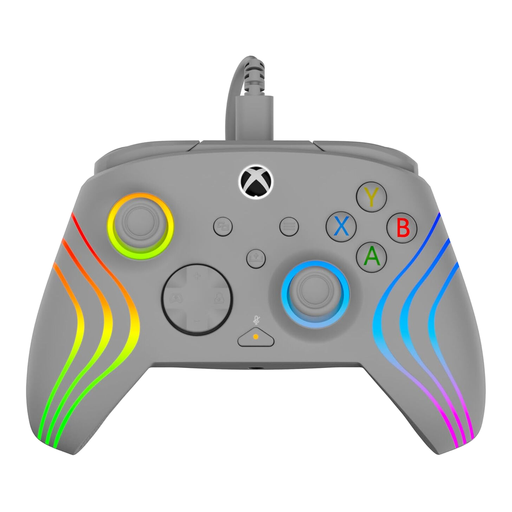
Turtle Beach Afterglow Wave Wired Controller for Xbox, Grey
Consider this wired controller for a fixed Xbox or Windows desk setup, subject to support in your game. Check that its cable can reach your device without obstructing the room.
View on Joybuy
 No image available
Machenike G3 V2 Tri-mode Controller, White
For a Windows setup, compare its connection options with the wireless hardware you have and the game you play. Its product information gives conflicting indications about Switch compatibility, so confirm support for your exact device before buying it for a Nintendo console.
View on Joybuy
 No image available
Sony DualSense HYPERPOP Techno Red Wireless Controller
Consider this DualSense variant if you play on PS5 or use controller-supported games on a compatible PC, Mac or mobile device. PlayStation says PC haptics require USB, adaptive triggers depend on the game, and headset-jack use on PC or Mac requires a wired connection.
View on Joybuy
 No image available
Xbox Wireless Controller, Carbon Black
This wireless controller is a route for Xbox play or controller-supported Windows games. For PC use, Xbox Support documents several connection methods; confirm which method your hardware supports before choosing how to connect it.
View on Joybuy
 No image available
Nintendo Switch 2 Pro Controller, Black
Choose this model for a Nintendo Switch 2 setup only after checking that your intended snowboarding game is available and supports controller play there. Nintendo lists a C button, mappable GL/GR buttons and an audio jack for the Switch 2 Pro Controller; it is distinct from the original Switch Pro Controller.
View on Joybuy
Frequently asked questions
Should I choose a wired or wireless controller for a student room?
Choose wired if you mainly play at a desk and cable reach works for you; choose wireless if you regularly sit farther away and your device supports the controller’s wireless method. For Windows, Xbox Support documents USB, Bluetooth and Xbox Wireless Adapter connection routes for compatible Xbox controllers. If you use USB, check that the cable supports data transfer.
Will every DualSense feature work on my PC?
No: DualSense features on PC depend on the game and connection. PlayStation says haptics require USB, adaptive triggers require game support, and the headset jack requires a wired PC connection. Check the features supported by your particular game before relying on them.
How should I dispose of an old controller in the UK?
Take an unwanted controller or battery to an appropriate electrical-waste or battery collection point rather than putting it in household rubbish, as GOV.UK advises. Check local collection arrangements for the item you have.


