Choose a controller that works with your snowboarding game and the device running it before comparing extra controls. For a small desk, decide whether a wireless connection or a routed cable suits your space, then check whether the features you want work in that game and connection mode.
Who is this for?
Windows and Steam players with limited desk space
If you want to keep part of a small desk clear for other equipment, a controller may suit your setup. Check the individual game: Steam lists controller support for HYPERyuki: Snowboard Syndicate, while its listing for Shredders – The Yard Board Pack says a controller is required.
PS5 players who also use a PC
If you want to use a DualSense controller beyond your PS5, Sony describes Bluetooth and USB connections to supported PCs. Some PC features depend on the game and connection method.
Nintendo Switch players who prefer a conventional pad
If you play on Nintendo Switch and prefer one full controller to detached Joy-Con controllers, the Switch Pro Controller is a platform-specific option. Check your snowboarding game for the controls it uses.
What matters when choosing?
Start with the game and host device; only then decide how the controller will connect and which additional controls you would use.
| Concern |
What to check |
Who this matters to |
| Game and platform compatibility |
Check the game listing for controller support and the controller maker’s stated support for your host device. |
If my snowboarding game runs on a particular console or PC, I need a controller that the game and device will recognise. Around 36% of consumers put compatibility first. |
| Connection at a small desk |
Check the available Bluetooth, 2.4G or wired connection and whether any desired feature requires USB. |
I want room to play without a cable crossing my limited desk space, unless a wired connection is needed for a feature I value. For around 29% of consumers, the connection is the primary concern. |
| Controls and remapping |
Check the stick, trigger and button-mapping options, including whether your game permits useful bindings. |
When I want to adjust trick or steering inputs to my preferences, extra controls matter only if I can use them in the game. Control customisation comes first for around 21% of consumers. |
| Platform-specific features |
Confirm game support and any connection requirements for haptics, adaptive triggers or motion controls. |
If I already play on PlayStation or Nintendo Switch, I may care most about features tied to that platform rather than using one pad across devices. Around 14% of consumers prioritise those features. |
Buying pitfalls
-
Assuming a familiar-looking pad works on every console
8BitDo lists Windows and Android for the Ultimate 2C Wireless Controller, while Nintendo presents its Pro Controller for Nintendo Switch. Similar controls do not establish compatibility with another console.
Check the exact controller model against the device running your snowboarding game before comparing its extra features.
-
Expecting every DualSense feature over wireless PC play
Sony says DualSense haptic feedback on PC requires USB and game support; adaptive triggers also depend on game support.
If either feature affects your choice, check the game’s PC support information and plan for a USB connection where required.
-
Choosing the smallest controller solely to save space
A compact layout may change the controls available for a 3D snowboarding game. For example, 8BitDo describes its Micro controller as intended for 2D games and says it lacks vibration and motion sensing.
Check the game’s required inputs against the compact controller’s actual buttons, sticks and triggers before choosing it for your desk.
-
Putting an old controller in household rubbish
UK government guidance says unwanted batteries and electrical products should not go in household rubbish.
Use an appropriate electrical-waste or battery collection point and follow its instructions for the controller and battery.
Brands to consider for these controller routes
Xbox
Microsoft’s Xbox Wireless Controller is a route for Xbox and Windows PC players who may also use supported mobile devices.
- Microsoft lists Xbox consoles, Windows PC, iOS and Android, alongside Bluetooth, Xbox Wireless and button mapping.
- That compatibility statement does not establish support for every game or feature on each device.
PlayStation
Sony’s DualSense is a PS5-focused controller that can also connect to supported PCs, Macs and mobile devices.
- Sony describes Bluetooth and USB Type-C connection options for supported devices.
- On PC, haptic feedback requires USB and game support; adaptive triggers also depend on the game.
8BitDo
The Ultimate 2C Wireless Controller offers a Windows-and-Android route with additional control options.
- 8BitDo lists Hall Effect sticks and triggers, remappable L4/R4 bumpers, and 2.4G or wired Windows connections.
- The stated compatibility for this model does not include PS5, Xbox or Nintendo Switch.
Nintendo
The Nintendo Switch Pro Controller is a conventional full-controller option for Switch players.
- Nintendo lists motion controls, HD rumble and amiibo functionality for the Pro Controller.
- Its Nintendo Switch product information does not establish compatibility with a PC or another console.
Joybuy controller choices
These controllers cover Xbox and Windows PC choices, a DualSense option for PS5 and supported PC use, and a PS4/PC option. Match the exact game and host device before choosing between wireless convenience, wired play and adjustable controls.
 No image available
Microsoft Xbox One S Elite Wireless Controller Series 2
Consider this wireless controller for an Xbox or PC setup where you want to keep a cable off the desk. Its title lists Xbox One, Xbox Series X/S and PC; check the exact host and your snowboarding game before buying.
View on Joybuy
 No image available
Turtle Beach PDP Victrix Pro BFG Wireless Controller – Black
This wireless model is an option for Xbox or Windows PC play if you want to avoid routing a cable across the desk. The title lists Xbox Series X|S, Xbox One and Windows 10/11 PC; confirm support for your particular game.
View on Joybuy
 No image available
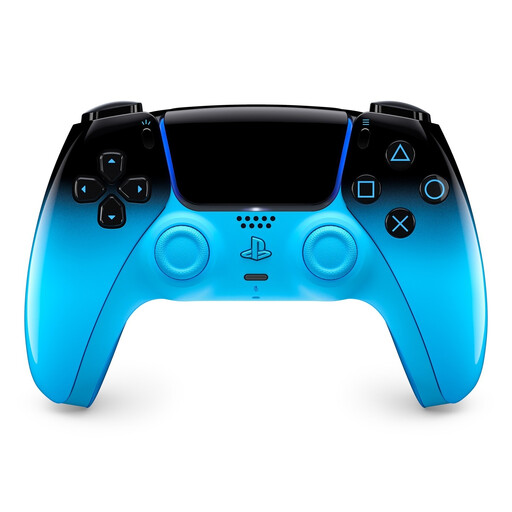
Sony DualSense Wireless Controller – HYPERPOP Rhythm Blue
Consider this PS5 controller if you also play on a supported PC; its title also lists Mac and mobile devices. Sony says PC haptic feedback requires USB and game support, so check your snowboarding game before choosing it for that feature. Confirm the colour variant if it matters to you.
View on Joybuy
 No image available
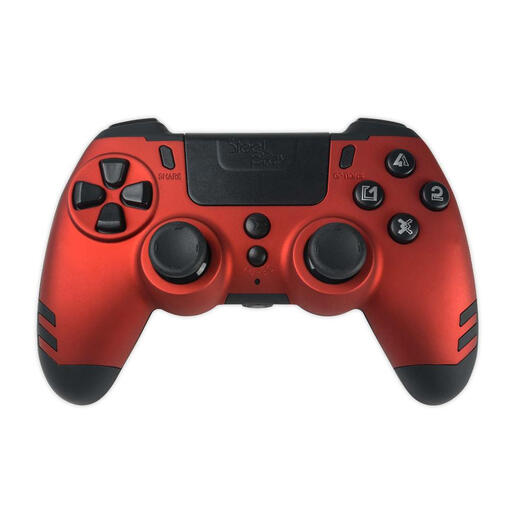
Lexip SteelPlay Slim Pack Wireless Controller – Ruby Red
This wireless model is worth checking if you play on PS4 or PC and want a controller that does not need a cable across your desk. Confirm its connection with your host and game; do not assume this variant has motion sensors.
View on Joybuy
 No image available
Turtle Beach Rematch Advanced Wired Controller – Blue Kitsune
Choose a wired option for Xbox or PC play only if you have a comfortable route for its cable at your small desk. Check that your snowboarding game supports the controller before buying.
View on Joybuy
Common questions
Does every snowboarding game require a controller?
Controller requirements vary by game. Steam lists full controller support and a developer recommendation for HYPERyuki: Snowboard Syndicate, while its listing for Shredders – The Yard Board Pack says a controller is required and keyboard-and-mouse play is unsupported. Check the listing for the title you intend to play.
Will every DualSense feature work wirelessly on PC?
No: Sony says DualSense haptic feedback on PC requires both USB and game support. Adaptive triggers also depend on the game, so check its PC feature information if either feature matters to you.
Can the 8BitDo Ultimate 2C Wireless Controller work with any console?
Do not assume console compatibility for this model. 8BitDo lists Windows use through 2.4G or a wired connection and Android use through Bluetooth; check the exact model and host device before choosing it.
Where should an old rechargeable controller go in the UK?
Take unwanted electrical products and batteries to an appropriate collection point rather than putting them in household rubbish, as UK government recycling guidance advises. Follow the collection point’s instructions for the controller and its battery.


