Choose a controller that works with both your gaming device and the particular snowboarding game before comparing extra features. If you play across devices, check each connection method; haptic feedback, adaptive triggers and custom controls matter only when your game and setup support the features you want to use.
Who needs which controller?
PC snowboarding-game players
Check the individual game before choosing an Xbox-style, PlayStation-style or PC-focused controller. Steam lists Shredders as requiring a controller and offering full Xbox and PlayStation controller support; its listing for Riders Republic says controller support is partial.
PS5 players who may also play on PC
Sony lists DualSense for PS5 and PC use. If haptic feedback or adaptive triggers influence your choice, check the game: Sony says these features depend on game support and may require USB on PC.
Xbox and Windows players sharing one pad
Microsoft lists the Xbox Wireless Controller for Xbox consoles and Windows PC, as well as iOS and Android. Its Xbox Wireless and Bluetooth connections offer options across those devices, but game support still needs checking.
What should you check before buying?
Start with the exact game and platform, then decide how you want to connect and which controls you would actually use.
| Concern |
What to check |
Who this matters to |
| Game and platform compatibility |
Check the game edition’s controller-support listing and the exact controller’s device compatibility. |
If a snowboarding game requires a controller or offers only partial support, I need to know that the pad will work with my version before considering extras. Around 39% of consumers put this compatibility question first. |
| Connection and device switching |
Confirm the supported USB, Bluetooth, Xbox Wireless or receiver connection for each device you intend to use. |
Moving between my console and PC makes connection options important, especially if I want to avoid keeping a separate pad for each. For around 23% of consumers, convenient use across supported devices is the primary concern. |
| Feedback and familiar controls |
Check game support for haptics, adaptive triggers or motion controls, plus any connection conditions. |
I may prefer a familiar console layout or tactile features, but I would want to use those features in my chosen game. Supported controls and feel come first for around 23% of consumers. |
| Custom controls |
Check whether remapping, profiles and trigger settings work on your platform and exact model. |
If I regularly adjust button inputs, configurable controls matter more to me than switching devices or adding feedback effects. Around 15% of consumers make customisation their main priority. |
Buying mistakes to avoid
-
Checking the device but not the game
Connecting a controller does not establish how fully a game supports it. Steam lists full Xbox and PlayStation controller support for Shredders, but partial controller support for Riders Republic.
Check the store page for the exact game edition and platform you plan to play.
-
Assuming DualSense features work in every game
Sony says haptic feedback and adaptive triggers depend on game support and may require a USB connection on PC.
Check the snowboarding game’s feature information and your intended connection before making those features a deciding factor.
-
Assuming third-party controllers work on every console
Platform coverage varies by model: 8BitDo lists specific supported systems for the Ultimate 2 Wireless, while GameSir positions the G7 SE for Xbox and PC.
Match the exact model and variant to your device rather than relying on a brand name or similar-looking controller.
-
Treating a warranty as the only remedy
A manufacturer warranty is separate from your rights against the seller. GOV.UK says sellers must offer a refund for goods that are faulty or not as described.
Keep your order details, test the controller promptly and contact the seller if it is faulty or differs from its listing.
Controller brands to consider
Sony / PlayStation
DualSense is a first-party PS5 option that Sony also lists for PC, Mac and mobile devices.
- Adaptive triggers and haptic feedback are available in supported games.
- On PC, those features may require USB; compatibility with a device does not establish feature support in every snowboarding game.
Xbox / Microsoft
The Xbox Wireless Controller is a first-party route for Xbox consoles and Windows PC.
- Microsoft lists Xbox Wireless and Bluetooth connectivity, device switching and button mapping.
- Check the individual game’s controller-support information before assuming every control works as expected.
Nintendo
The Switch Pro Controller is a full-size first-party option for a snowboarding game played on Nintendo Switch.
- Nintendo lists motion controls and HD rumble.
- Its Switch-focused features do not establish support for PC or Xbox games; check the intended Switch title separately.
8BitDo
The Ultimate 2 Wireless offers a PC- and SteamOS-focused option with a charging dock and configurable controls.
- 8BitDo lists selectable trigger modes and controller profiles for this model.
- Its stated operating-system support should not be taken as universal console compatibility.
GameSir
The wired G7 SE is an Xbox and PC option for players interested in configurable controls.
- GameSir lists Hall Effect sticks, back buttons and profile switching for the G7 SE.
- It requires a cable; GameSir’s durability claims should not be treated as a guarantee of long-term stick performance.
Joybuy controllers for these setups
These controllers cover Xbox and Windows setups, a PS5-and-PC option, and different wired or wireless preferences. Check your snowboarding game’s support before choosing among them.
 No image available
Microsoft Xbox One S Elite Wireless Controller Series 2
Consider this wireless controller if you want adjustable controls for an Xbox or PC setup. Check compatibility with your exact device before buying, as the listing’s platform details differ, and check your snowboarding game separately.
View on Joybuy
 No image available
Turtle Beach PDP Victrix Pro BFG Wireless Controller for Xbox Series X|S, Xbox One and Windows 10/11 – Black
This wireless model suits an Xbox or Windows player who wants configurable controls. Confirm the connection setup you intend to use and check the snowboarding game’s controller support.
View on Joybuy
 No image available
Sony DualSense Wireless Controller – HYPERPOP Techno Red
A wireless option for players using PS5 or PC; the product name also lists Mac and mobile use. Sony says haptic feedback and adaptive triggers require game support and may require USB on PC, so check the snowboarding title before choosing it for those features.
View on Joybuy
 No image available
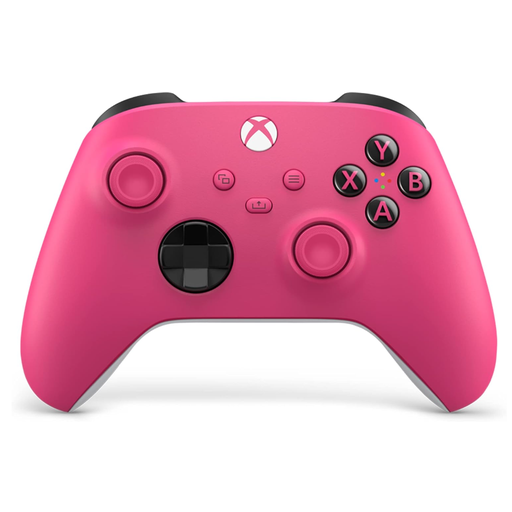
Xbox Wireless Controller – Deep Pink
Consider this wireless controller if you alternate between Xbox and Windows PC. Microsoft lists Xbox Wireless and Bluetooth for the controller; check the connection you plan to use and the support listed for your snowboarding game.
View on Joybuy
 No image available
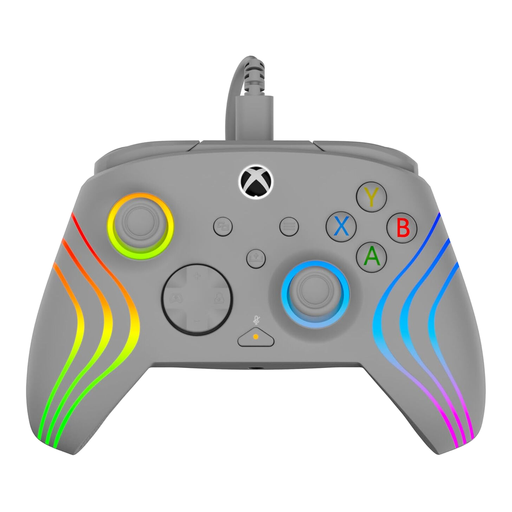
Turtle Beach Afterglow Wave Wired Controller for Xbox – Grey
A wired Xbox controller to consider if a cable suits where you sit; the listing also describes Windows PC use. Check that the stated 10 ft cable reaches your setup and that your snowboarding game supports the controller.
View on Joybuy
Frequently asked questions
Do all PC snowboarding games work with any controller?
No. Steam lists Shredders as requiring a controller and offering full Xbox and PlayStation controller support, while Riders Republic has partial controller support. Check the listing for your exact game edition before choosing a pad.
Will DualSense feedback work in every snowboarding game?
No. Sony says adaptive triggers and haptic feedback are available in supported games and may require USB on PC. Check the game’s feature information for your platform and connection.
Does a wired controller make sense for snowboarding games?
Yes, if a cable suits your seating setup and the controller works with your game and device. The GameSir G7 SE, for example, is a wired Xbox and PC model; check cable reach before choosing a wired pad.
What if a controller bought in the UK is faulty or not as described?
Contact the seller rather than relying only on a manufacturer warranty. GOV.UK says sellers must offer a refund for goods that are faulty or not as described. Keep your order details and explain the fault or difference from the listing; this is distinct from simply changing your mind.


