Choose a backup route around the incident you need to recover from: an external drive provides a local copy, a network-attached storage device can serve several devices, and a backup service can make off-device copies automatically. Keep a separate copy that the same incident cannot readily affect, and test restoration. For customer personal data, the Information Commissioner’s Office says security measures must fit the circumstances and risk; buying storage does not, by itself, establish UK GDPR compliance.
Who needs which approach?
Sole traders needing local recovery
If most customer documents live on one computer, a local copy offers a way to restore them after that device fails or is lost. The National Cyber Security Centre advises keeping backups protected from incidents that could also affect the working files.
Sole traders handling sensitive customer records
Consider who can open the backup and how passwords or encryption keys will be recovered. The Information Commissioner’s Office says security measures should reflect the risks of the personal data being processed, not simply the type of storage purchased.
Sole traders working across devices or cloud services
If files change on several devices or in hosted services, check which locations the backup covers, how long earlier versions remain available and whether you can restore without access to the original device.
What matters when choosing backup storage?
Choose a recovery method you can use in practice, then decide where a separate protected copy will live. A multiple-location arrangement can combine the storage routes below; it is not a competing type of device.
External drive
Choose when: You want a local copy available without relying on an internet connection.
Allow for: A drive kept beside or connected to the computer can be affected by the same incident; secure it separately when not in use.
Network-attached storage
Choose when: Several devices need central storage and you can manage its users, updates and backup settings.
Allow for: A NAS still needs a separate backup destination. Synology cautions that RAID failures and drive failures can cause data loss.
Encrypted storage or backup service
Choose when: Automatic off-device copies or remote restoration matter more than owning the storage hardware.
Allow for: Recovery depends on the selected service’s retention, account access and restore process; customer-data processing may also require supplier and transfer checks.
| Concern | What to check | Who this matters to |
|---|
| Restoring work quickly |
Try restoring an essential file to another device; check whether earlier versions are available if needed. |
If my main computer fails, I need customer files back without waiting for an internet download. Around 31% of consumers put local recovery first. |
| Protecting sensitive files |
Check stored-file encryption, account permissions and how access to passwords or recovery keys is maintained. |
When customer records could cause harm if exposed, I need to control who can read the copies without losing my own access. For around 25% of consumers, protecting sensitive files is the primary concern. |
| Keeping backups current |
Check scheduling, covered devices and services, version retention and the restore destination. |
If I frequently change files, I cannot rely on remembering to connect a drive every time. Routine backup and version recovery come first for around 19% of consumers. |
| Surviving a wider incident |
Check whether another copy is kept separately and whether the main device or account can alter every backup. |
A theft, site incident or compromised account must not take out all my copies at once. Around 25% of consumers prioritise separation across devices or locations. |
Backup mistakes to avoid
-
Treating synchronisation, RAID or one local drive as the whole backup
A local copy can aid recovery but may share a failure, theft or other incident with the working files. Synology also cautions that RAID does not prevent every form of data loss.
Keep another copy at a separate destination and practise restoring a representative set of customer files.
If the working files and only backup are affected together, restoring access can interrupt work or become impossible.
-
Leaving the only external backup connected
The National Cyber Security Centre describes incidents in which ransomware affected both working files and connected backup storage.
Disconnect and securely store a local backup between updates, or restrict which devices and accounts can change backup copies.
-
Choosing encryption without planning recovery
Encrypted files are useful only if authorised people can still obtain the necessary keys or credentials when restoration is needed.
Protect account and key-recovery information, define who can use it and test restoration through the intended method.
Losing the necessary credentials can prevent access even when the backup files remain intact.
-
Assuming a cloud supplier’s security claims settle data responsibilities
For customer personal data, the supplier’s role and actual processing arrangement matter. The Information Commissioner’s Office sets out contract requirements where a supplier acts as a processor; international-transfer rules may also be relevant.
Check the selected service’s written terms, sub-processors, access arrangements, processing locations and restore conditions before placing customer files with it.
Relevant brands for reference
Samsung
Portable SSDs can provide a compact local copy for work done from a laptop.
- Samsung says its Portable SSD T7 supports an AES 256-bit encrypted password and USB 3.2 Gen 2 connectivity.
- Those T7 features do not establish how a particular backup is configured or protected. A portable drive also needs another destination if one local copy is not enough.
Synology
NAS systems for central files and configurable backup workflows.
- Synology documents local, USB and remote backup approaches, including its suggested 3-2-1 copy arrangement.
- Model choice, drives, access settings and maintenance still matter; Synology notes that RAID and drive failures can cause data loss.
QNAP
NAS equipment for central storage and managed account access.
- QNAP describes snapshots and account-protection options for its TS-133 model.
- Features described for the TS-133 should not be assumed for every model, and setup and a separate backup remain necessary considerations.
CrashPlan
Managed backup for automatic off-device copies and file-version recovery.
- CrashPlan states that its service can back up changed files every 15 minutes and offers unlimited file versioning with 90-day deleted-file retention.
- Confirm coverage and retention for the selected plan, then check the restore workflow and supplier terms for customer personal data.
Tresorit
Encrypted cloud storage for workflows where limiting provider access to file contents is a priority.
- Tresorit describes its service as using zero-knowledge end-to-end encryption and offering data-residency options.
- Check the selected service’s access and recovery arrangements, terms and any relevant customer-data transfer implications.
Joybuy options for local storage
These external drives and NAS devices are options for a local backup or central file location. Whichever you choose, plan a separate protected copy and a restore test; a storage device alone does not cover every incident or settle customer-data responsibilities.
 No image available
Western Digital My Passport 2TB Portable Hard Drive, Black
Consider this for a local copy used with one computer; keep another copy separately.
2TB portable external hard drive. Before relying on it for customer files, check how you would restore them and retain access to any backup credentials.
Joybuy
 No image available
Western Digital My Passport Ultra for Mac 5TB Portable Hard Drive, Silver
Consider this for a larger local copy in a Mac-centred workflow, alongside a separate backup destination.
5TB portable external hard drive. For Windows use, check the stated downloadable HFS+ driver requirement and whether it fits your restore workflow.
Joybuy
 No image available
Synology DS225+ 2-Bay Diskless NAS
Consider a central storage device if several computers need access and you can manage its setup and ongoing administration.
Two-bay, diskless NAS: choose compatible drives before use. Check the intended backup destination, user access and restore procedure; RAID or local snapshots do not replace a separate copy.
Joybuy
 No image available
Samsung MU-PG4T0B 4TB USB-C Portable SSD, Black
Consider this for a portable local copy, with another protected destination for incidents affecting the drive.
4TB; USB Type-C and USB 3.2 Gen 2x2 are stated in the product name. Check your computer’s port if interface speed matters, and plan how backup updates and restoration will work.
Joybuy
 No image available
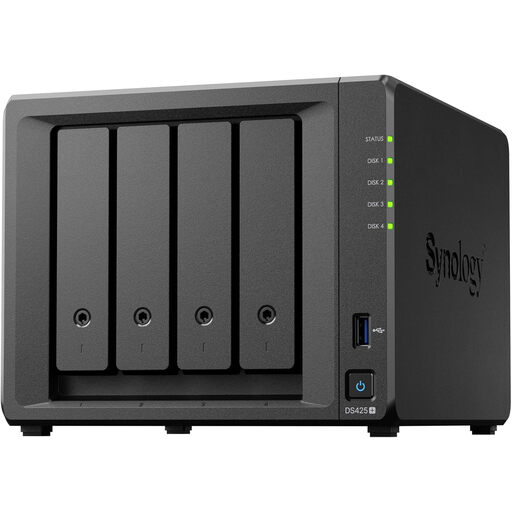
Synology DS425+ 4-Bay NAS
Consider this where several devices need central file access and you can administer the storage and its backups.
Four-bay NAS. Check which drives are included, compatible drive requirements, access settings and how a separate copy would be restored.
Joybuy
Frequently asked questions
Does an encrypted drive, NAS or cloud service make my backups UK GDPR compliant?
No product purchase establishes compliance by itself. The Information Commissioner’s Office says security measures for personal data must be appropriate to the circumstances and risk, including the ability to restore access and availability in a timely manner after an incident; assess how the backup is configured, secured and restored.
Do I need a written contract with a cloud backup supplier?
If the supplier acts as a processor for your customer personal data, the Information Commissioner’s Office says UK GDPR requires a written contract or other legal act containing the applicable Article 28 terms. Check the supplier’s role, terms and sub-processors for the service you intend to use.
Is a NAS with RAID or snapshots enough on its own?
No single NAS feature should stand in for a separate backup. Synology advises keeping copies on different storage and one offsite, and notes that RAID failures and hard-drive failure can still cause data loss; test a restore from another destination.
Where should I keep an external backup drive between backups?
Keep it secure and disconnected from the main computer when it is not being updated. The National Cyber Security Centre warns that incidents can affect connected backup storage; consider a further copy so the drive is not your only recovery route.


