
24/7 Customer Support

Free returns

Same-day & Next-day Delivery

Quality Guaranteed

Unlock Your Welcome Offers: FREE Delivery | Up to 80% OFF | Free 30-day JoyPlus trial
Download the APP
Choosing a replacement or additional gamepad for a PlayStation 5 can seem straightforward, but product listings often blur important differences. The Sony DualSense Grey Camo PS5 controller combines an official Sony design with wireless play, haptic feedback and adaptive triggers, making it a popular option for solo players and multiplayer households.
Before buying, however, it is worth checking compatibility, included accessories and the practical limits of wireless battery life. A stylish finish alone does not guarantee that a controller will suit your games, setup or daily routine.
A listing may describe a product as a “PS5 gamepad” or “wireless controller” without confirming support for haptic feedback and adaptive triggers. These functions are central to the DualSense experience, but their effects depend on the game. Some titles may use both extensively, while others may offer limited support.
Look for the exact feature list rather than relying on general phrases such as “immersive vibration” or “next-generation control”.
The Grey Camo model is listed with up to 12 hours per charge, but actual use can vary. Haptic feedback, adaptive trigger resistance, headset use, speaker volume and game settings all affect battery consumption. A controller with a built-in rechargeable lithium-ion battery is convenient, but it still needs regular charging during busy gaming periods.
Check whether a USB-C cable is included and remember that “fast charging” does not necessarily mean the battery will last for a particular number of hours in every situation.
The Sony DualSense wireless controller is designed primarily for PS5. Bluetooth and USB-C connections may also work with PC, Mac, iOS or Android on selected models and supported games, but compatibility can vary by operating system, game and connection method.
For PS5, pairing by USB-C is generally the most straightforward first setup. For other devices, check whether Bluetooth features such as haptic feedback, adaptive triggers, microphone input or motion controls are supported.
Haptic feedback uses more precise vibration effects than conventional rumble. In supported games, you may feel different textures, impacts or environmental effects through the grips. Adaptive L2 and R2 triggers can alter resistance during actions such as braking, drawing or firing.
These are not universal enhancements across every game. If you mainly play titles that support DualSense functions, they may be a meaningful reason to choose an official Sony controller. If you mostly play older or cross-platform games, the benefit may be less noticeable.
The Grey Camo DualSense uses Bluetooth wireless connectivity and also supports a USB-C wired connection. Wireless play helps reduce cable clutter, while a wired connection can be useful when charging or when you prefer not to rely on the battery.
For competitive play, check your console settings and the individual game requirements rather than assuming that every Bluetooth PS5 controller provides identical features or response characteristics.
The listed Grey Camo specifications include:
The integrated microphone is useful for quick multiplayer chat, while the 3.5mm jack offers a more private audio option. For long sessions, consider whether the controller’s size and 280g weight feel comfortable for the people who will use it.
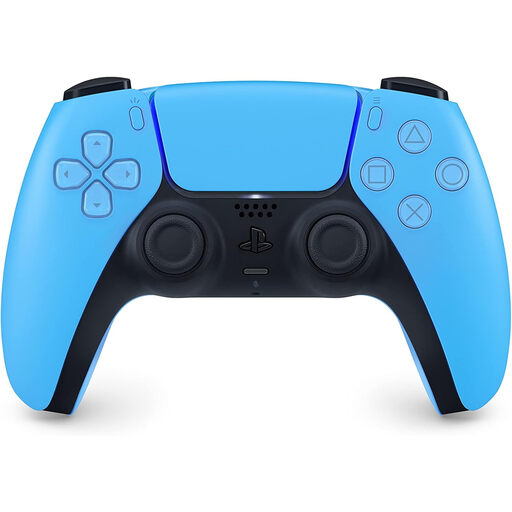
Why This Fits Their Persona: A straightforward additional controller for households that want official Sony features without paying for custom pro controls. The Starlight Blue finish also gives a second player an easy way to distinguish their gamepad.
The specification clearly identifies Bluetooth, USB-C, haptic feedback and adaptive triggers, rather than relying only on a generic wireless label.
Official Sony DualSense design, rechargeable battery, built-in microphone and 3.5mm headset jack.
Why This Fits Their Persona: Suitable for shoppers who prioritise first-party construction, integrated audio features and a distinctive colourway for a carefully arranged gaming setup.
It lists PS5 and PC connectivity separately, helping buyers distinguish genuine platform support from vague multi-device claims.
Bluetooth 5.1 and USB-C connectivity, motion sensors, built-in speaker and microphone.
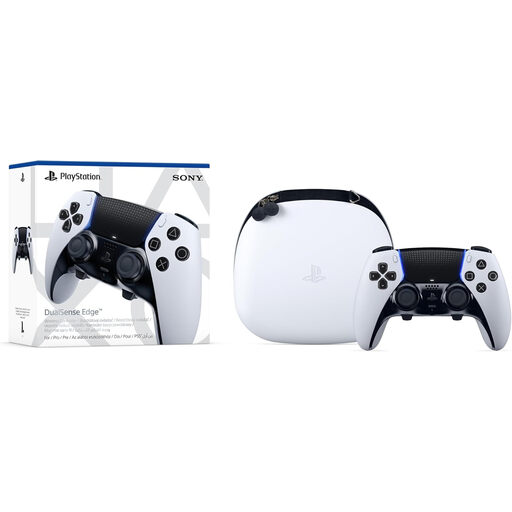
Why This Fits Their Persona: Designed for players who want adjustable controls for competitive sessions or games requiring different layouts and sensitivity settings.
Swappable stick caps, adjustable trigger travel, back buttons and saved control profiles provide tangible customisation instead of decorative upgrades.
Includes multiple stick caps, back-button options, a lockable USB-C cable and carry case.
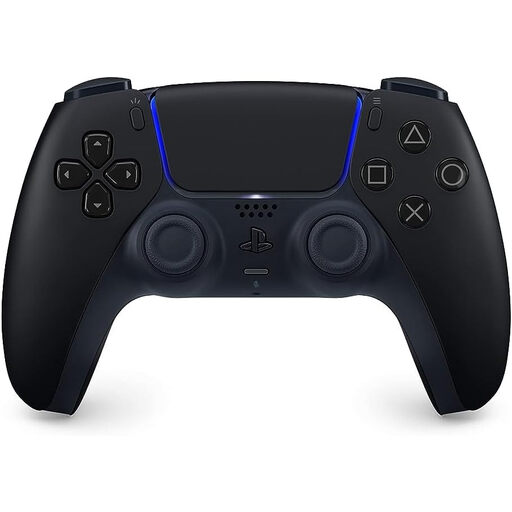
Why This Fits Their Persona: A suitable alternative for gamers who want the standard DualSense feature set in a darker colour that blends with a television cabinet or desk setup.
The listing identifies the rechargeable battery, USB-C charging, audio jack and official Sony licence, allowing a direct feature check.
Haptic feedback, adaptive L2/R2 triggers, motion sensors and an integrated speaker.
We have compiled a complete, real-time list of products that fully satisfy these strict selection criteria and UK safety regulations.
The Grey Camo edition is a sensible match for PS5 owners who want an official Sony controller with a distinctive appearance and the familiar DualSense control layout. Its built-in microphone and headset jack make it practical for multiplayer chat, while wireless Bluetooth operation keeps the seating area tidy.
It may be less suitable if you need extensive button remapping, interchangeable components or advanced competitive settings. In that case, the DualSense Edge offers more customisation, but its additional controls may not be necessary for casual or family gaming.
Yes. The listed Sony DualSense Grey Camo PS5 controller is specified for PlayStation 5 compatibility. Pair it initially using USB-C, then use Bluetooth wireless mode where supported. Game-specific features may vary.
Charging time depends on the power source, cable and remaining battery level. The Grey Camo listing specifies USB-C fast charging and up to 12 hours of play per charge, but actual runtime varies with haptics, adaptive triggers, audio and gameplay settings.
Some DualSense models support PC use through USB-C or Bluetooth, but feature availability differs between games and operating systems. Check the individual product listing and game requirements before buying specifically for PC play.