
24/7 Customer Support

Free returns

Same-day & Next-day Delivery

Quality Guaranteed

Unlock Your Welcome Offers: FREE Delivery | Up to 80% OFF | Free 30-day JoyPlus trial
Download the APP
Replacing built-in television audio or improving a desktop setup can make films, music, gaming and podcasts more enjoyable. However, shopping for soundbars and speakers involves more than comparing wattage or choosing the most feature-heavy box.
The right option depends on your room, listening habits, available connections and tolerance for cables. A compact soundbar may suit a small flat, while a separate system with a subwoofer could be more appropriate for a larger lounge. Use the guide below to avoid common buying mistakes and narrow down the right format.
A high wattage figure does not automatically mean clearer dialogue, stronger detail or better room coverage. Manufacturers may quote different power measurements, and total system output can include a separate subwoofer.
Look at the complete specification: RMS power, channel configuration, driver arrangement and whether the quoted output applies to the whole system. For example, a 2.1-channel system separates bass handling from the main soundbar, while a compact 2.0 model uses one enclosure and a built-in woofer.
A wireless soundbar with subwoofer normally still requires mains power for both the soundbar and subwoofer. Bluetooth reduces signal cables, but it does not remove the need for power sockets. Wireless connections can also introduce compatibility limitations depending on your television, phone or streaming device.
For TV use, check whether the soundbar includes HDMI ARC or eARC. This connection can simplify volume control through a compatible TV remote and generally offers a more dependable connection than relying solely on Bluetooth.
A Dolby Atmos soundbar may include upward-firing drivers or digital processing designed to create a wider sound field. The result depends on ceiling height, room shape, seating position and the content being played. Furniture, open-plan layouts and low or angled ceilings may reduce the perceived overhead effect.
Do not choose surround technology solely because it appears on the box. Consider whether your room layout and television connections can support it.
For a TV soundbar, prioritise the connections you will actually use:
Before ordering, inspect the ports on your TV, games console, computer or streaming box. Also check whether the product includes the required cable.
Measure the space beneath your TV before selecting a soundbar. A unit that is too tall can obstruct the screen or remote sensor. Wall mounting may save cabinet space, but confirm that a suitable mounting method is supported.
For desktop speakers, check each speaker’s width, depth and height, leaving room for ventilation and cable routing. Bookshelf speakers usually need more space and may require a separate amplifier or receiver. Passive speakers cannot operate directly from most TVs or phones without compatible amplification.
A separate subwoofer offers more flexibility for low frequencies, but it also needs floor space and a nearby socket. In a small room, a compact soundbar with a built-in woofer may be easier to position.
If films, news and drama are your main use, look for a dedicated dialogue or voice enhancement mode. A centre channel in a multi-channel home cinema soundbar can help separate speech from effects, although room acoustics and programme mixing still influence clarity.
For music, consider stereo separation, driver design and source quality. A pair of active desktop speakers can create a more defined left-and-right image than a single soundbar. For gaming, HDMI eARC, suitable sound modes and low-latency wireless connections may matter more than headline output figures.
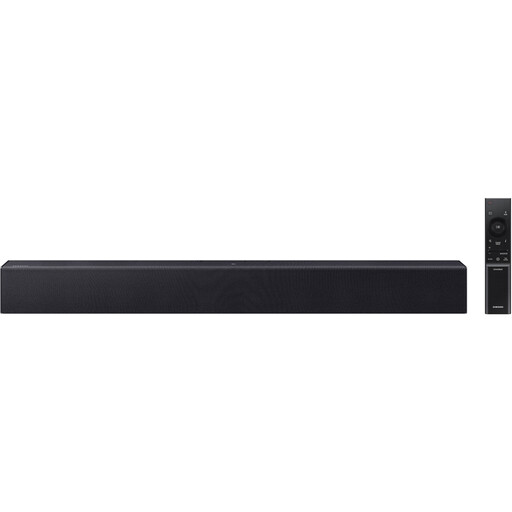
Why This Fits Their Persona: A straightforward choice for smaller UK lounges, bedrooms or flats where a separate subwoofer would add clutter. Its 64.1cm width is suitable for many modest TV cabinets.
The specification clearly states 40W output, 2.0 channels and a built-in woofer rather than implying that a separate bass unit is included.
Voice Enhancement Mode, Night Mode, Bluetooth, HDMI ARC and USB playback are included in one compact unit.

Why This Fits Their Persona: Suitable for households seeking Dolby Atmos compatibility, network streaming and room calibration in a single premium soundbar.
Its nine-transducer layout, HDMI eARC connection and included ADAPTiQ headset provide identifiable features beyond a generic “cinematic” description.
Dolby Atmos, Wi-Fi, Bluetooth, AirPlay 2, Spotify Connect, Chromecast built-in and voice-control compatibility.
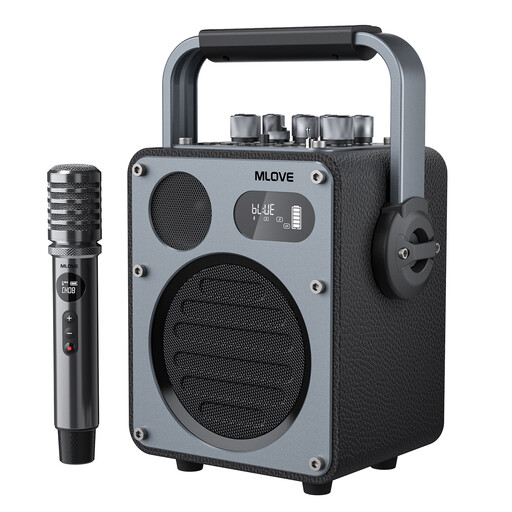
Why This Fits Their Persona: Designed for karaoke hosts, streamers, musicians and party users who need portable playback, microphone support and recording functions.
The use case is clearly defined, with a supplied wireless microphone, dedicated EQ modes and USB-C OTG support rather than relying on vague party-speaker wording.
Bluetooth 5.4, USB and AUX playback, wireless microphone support, a 33.3Wh battery and stated playback of up to 10 hours in music mode.
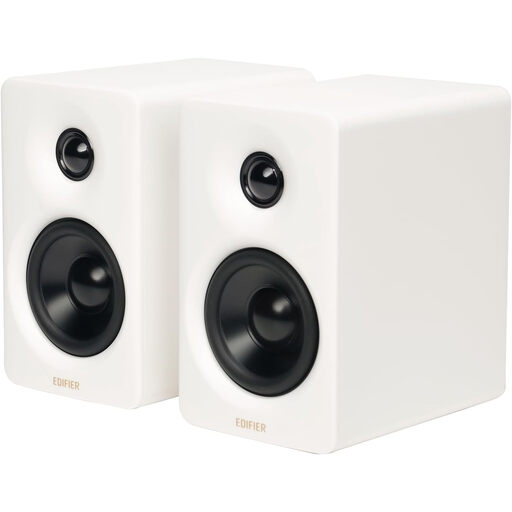
Why This Fits Their Persona: A practical fit for computer desks, study spaces and content-creation setups where stereo separation and wired inputs are useful.
The pair uses stated 66W RMS output and separate mid-bass and tweeter drivers, making the configuration clearer than a single headline wattage.
Bluetooth 5.3 with LDAC support, USB-C and AUX inputs, digital signal processing and bundled angled aluminium stands.
Place a soundbar centrally beneath the TV, with its front grille unobstructed. If using a wireless subwoofer, experiment with positioning rather than placing it inside a cabinet. Keep upward-firing Atmos speakers clear of shelves and ornaments.
Active speakers and soundbars consume electricity whenever switched on, although standby consumption is generally lower. The Samsung HW-B400F/XU lists a standby mode, while the Samsung HW-Q990H/XC specification lists typical consumption of 41W and standby consumption of 0.5W. Actual running cost depends on usage and your electricity tariff.
For UK purchases, check the included plug, warranty terms, returns information and responsible-person details where applicable. Look for appropriate electrical and product compliance information, follow the supplied safety instructions and avoid using damaged cables. Keep volume at a sensible level, particularly during long listening sessions.
We have compiled a complete, real-time list of products that fully satisfy these strict selection criteria and UK safety regulations.
Yes, many soundbars include Bluetooth for music and podcast streaming. However, a pair of stereo speakers may offer more distinct left-and-right separation for desk or hi-fi listening. Choose according to whether your priority is TV dialogue, room-filling sound or music detail.
Not necessarily. A compact soundbar with a built-in woofer can reduce equipment and cable requirements. A separate wireless subwoofer generally provides a dedicated low-frequency channel, but it needs extra floor space and a mains connection.
Lifespan varies with build quality, operating conditions, usage and maintenance. Keep equipment dry, provide ventilation, avoid excessive volume and do not overload connections. Before buying, check the warranty period and whether replacement cables, remotes or compatible accessories are available.