Choose a Wi-Fi speaker if you want to add compatible speakers later for stereo or multi-room listening and are comfortable setting up a home-audio system. A Bluetooth-first speaker is a simpler route for music played from phones in one room, but in either case, check how another person takes control and whether wired sources need an adapter.
Who is the speaker for?
Shared-lounge hosts who need easy handovers
If housemates or guests will take turns choosing music, check how they connect their phones and select the active source. Physical controls may help when the person adjusting the music does not have the controlling phone; two connected devices do not necessarily mean both can play at once.
Households building room-to-room audio
If the lounge speaker may become part of a stereo pair or a wider home system, choose a model with documented support for the pairing or multi-room service you intend to use. Sonos documents stereo pairing for Era 100 and Era 100 SL, while Amazon describes multi-room use across Echo devices.
Listeners who want straightforward background music
If one shared room is the main priority, focus on the connection and controls you will use day to day. For a wired source, check the exact input: Sonos specifies a Line-In Adapter for an auxiliary source on Era 100, and its Bluetooth mode follows initial Wi-Fi setup.
What matters when choosing?
Decide whether the speaker needs to serve one room or a future home-audio system, then check how people will start, adjust and hand over the music.
| Concern | What to check | Who this matters to |
|---|
| Shared playback |
Check pairing steps and how the active phone or source is changed; do not equate two connected phones with simultaneous playback. |
If other people regularly choose the music, I want them to take a turn without a complicated handover. Around 31% of consumers put straightforward shared control first. |
| Lounge ambience |
Consider placement and mains access, then check whether the model has controls you would use at low listening levels. |
For background listening, I want to adjust the sound without making music the focus of the room. Roughly 31% of consumers make manageable lounge ambience their primary concern. |
| Future expansion |
Check stereo-pair compatibility for the exact model and support for your intended multi-room service. |
If I may add a speaker in another room, I want the lounge choice to work with that plan. Around 23% of consumers prioritise future stereo or multi-room use. |
| Device compatibility |
Confirm your streaming service, preferred controls and wired-input requirements, including any adapter. |
When I switch between phones and a wired source, I need the connections to fit what I already use. About 15% of consumers place that compatibility first. |
Buying pitfalls
-
Assuming Bluetooth and Wi-Fi can play together
Source priority varies by model. JBL says Bluetooth playback on Authentics 200 pauses when Wi-Fi playback begins.
Decide which connection will normally provide the lounge music, then confirm how the exact model switches sources.
-
Overlooking the wired-input arrangement
A speaker offering an auxiliary connection may still require an accessory. Sonos specifies its Line-In Adapter for connecting an auxiliary source to Era 100.
Before choosing a speaker for a turntable or another wired device, confirm the input, adapter and cable requirements.
The Sonos Line-In Adapter is a separate accessory to account for in that setup.
-
Equating two connected phones with an easy handover
Marshall says Acton III can connect to two Bluetooth devices, but that alone does not establish simultaneous playback or automatic turn-taking.
Check the exact model’s instructions for selecting the active phone before relying on it for guest use.
-
Choosing voice control without discussing shared-room use
A voice-enabled system brings account setup and household preferences about voice interaction into the decision.
If the household would rather not use voice control in the lounge, compare the physical, Bluetooth and app controls instead.
Brands to consider
Sonos
The Era 100 range is worth considering if this lounge speaker may later join a stereo pair or a multi-room setup.
- Sonos documents Wi-Fi and Bluetooth for Era 100 and stereo-pair support for Era 100 and Era 100 SL.
- Era 100 needs initial Wi-Fi setup before Bluetooth mode; an auxiliary source uses the Sonos Line-In Adapter.
JBL
Authentics 200 offers a Wi-Fi and Bluetooth route for households choosing among supported streaming and control methods.
- JBL lists AirPlay, Chromecast built-in, Spotify Connect and Alexa Multi-Room Music among Authentics streaming options, as well as physical volume, bass and treble controls.
- JBL says Bluetooth playback pauses when Wi-Fi playback starts on Authentics 200, so the usual source needs to be clear.
Amazon Echo
Echo Studio is an option for a household that already wants to use Alexa across its speakers.
- Amazon describes music across multiple Echo devices and pairing Echo Studio with a second Echo Studio.
- Consider the Alexa account and app setup, and whether voice interaction is welcome in the shared room.
Joybuy speaker choices
These Edifier models offer different starting points for lounge listening: three are presented with multi-room features, while the compact M60 focuses on Bluetooth and wired connections. Check placement and shared-source controls against your room before choosing.
 No image available
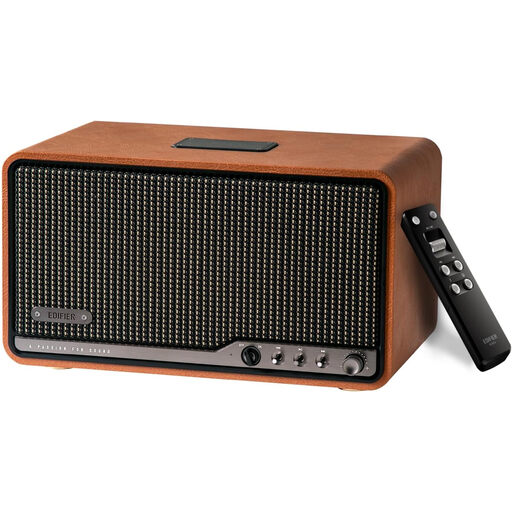
Edifier S300 Multi-Room Tabletop Speaker, Brown
Consider this tabletop model if you want to start with a lounge speaker and check options for music in other rooms. Confirm its supported pairing method and how another listener takes control before relying on either feature.
View on Joybuy
 No image available
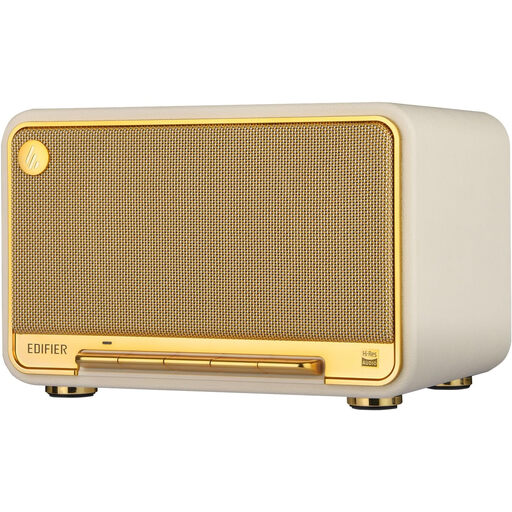
Edifier D32 Tabletop Speaker
This model is a choice to examine if you want AirPlay 2 alongside phone and wired-input options in the lounge.
Its product title lists 60 W RMS, Bluetooth 5.3, USB-C and AUX inputs, and 11-hour playtime. Check the power arrangements for longer listening sessions and how it switches between people’s sources.
View on Joybuy
 No image available
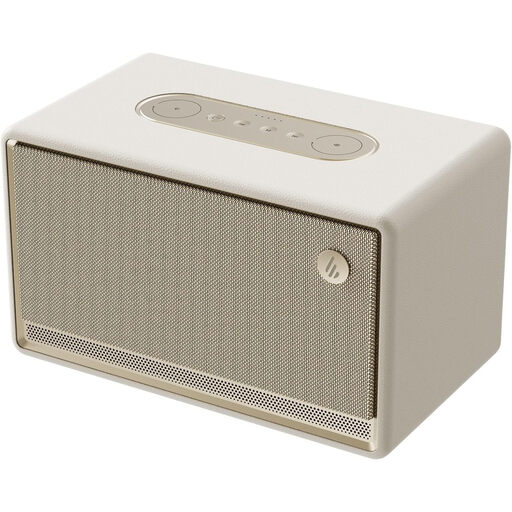
Edifier ES300 Tabletop Speaker, Ivory
Consider the ES300 if a tabletop speaker with Bluetooth is your starting point and multi-room use is also on your checklist.
The title specifies Bluetooth 5.3 and 12-hour playtime. Check its charging arrangements for continuous lounge use and confirm how listeners change the active source.
View on Joybuy
 No image available
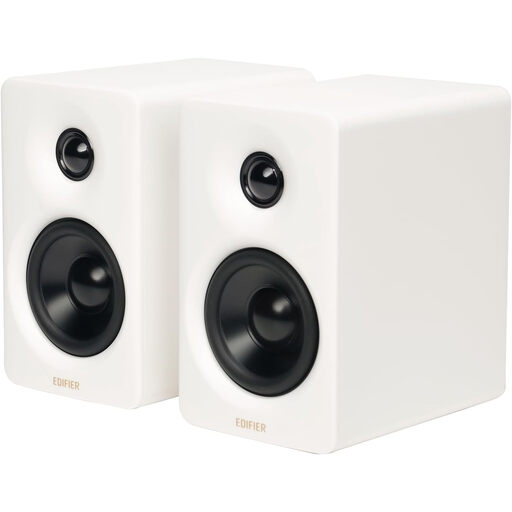
Edifier M60 Compact Desktop Speakers
These compact desktop speakers are an option to check for local phone or wired playback rather than a planned multi-room system.
The title lists Bluetooth 5.3, 66 W RMS, USB-C and AUX inputs. Check whether their intended placement and low-volume coverage suit your lounge, as well as how users switch sources.
View on Joybuy
Common questions
Do I need Wi-Fi for music in a shared lounge?
No: a Bluetooth-first speaker can handle straightforward playback from a phone in one room. Choose a Wi-Fi route if its compatible streaming, stereo-pairing or multi-room features matter to you; Sonos says Era 100 must first be set up on Wi-Fi before switching to Bluetooth.
Can two people connect their phones to one speaker?
Some models allow two connections: Marshall says Acton III can connect to two Bluetooth devices at once. That does not establish simultaneous playback or automatic handovers, so check how the exact speaker selects its active phone.
Can I connect a turntable or another wired source?
Yes, if the speaker has a suitable connection and you have any required accessory. Sonos specifies its Line-In Adapter for an auxiliary source on Era 100; check the source device’s output, the speaker’s input and the cables before buying.


