Small-table talk participants
One to four people discussing local history nearby may want two-way speech without relying on a laptop microphone. Logitech positions its BCC950 audio-and-video device for small rooms or groups of one to four.


Choose a speakerphone around the number of local speakers and how far they will sit from it: a portable table unit may suit a close group, while wider seating calls for a model with a suitable stated coverage area. A speakerphone cannot make dim video clearer, so add a camera if remote attendees need to see the presenter or historical materials, and test the selected audio and video devices in the meeting application before the talk.
One to four people discussing local history nearby may want two-way speech without relying on a laptop microphone. Logitech positions its BCC950 audio-and-video device for small rooms or groups of one to four.
When comments may come from different seats, the organiser needs to compare the seating layout with the speakerphone’s stated coverage. AnkerWork and EMEET describe models intended for group conversation, subject to each model’s conditions.
If people joining remotely must see the presenter, documents or objects, audio alone is not enough. They also need a camera positioned to show what matters; Logitech describes low-light adjustment for its Brio 4K webcam.
Choose it when: A close group mainly needs to hear and speak, with no new camera required.
Bear in mind: Stated microphone reach is a planning limit, not a promise that every seat will sound clear in the room.
Choose it when: More people may contribute from seats spread around a wider table or room.
Bear in mind: AnkerWork’s PowerConf S500 capacity figures are manufacturer claims; confirm the proposed arrangement with a call from the farthest seats.
Choose it when: Remote attendees must see the speaker or materials as well as hear the discussion; consider an integrated device or a speakerphone with a separate camera.
Bear in mind: An integrated camera still needs a dim-room image check, while a separate camera adds a connection and setup step.
| Concern | What to check | Who this matters to |
|---|---|---|
| Group voice pickup | Compare stated room size or pickup distance with the farthest seat; check full-duplex and echo-control features if people will talk back and forth. | If several people want to contribute, I need their voices to reach remote listeners from around the table. Around 42% of consumers would put group voice coverage first. |
| Video in dim light | Decide whether video is needed, then check the camera’s low-light features and whether its position shows the presenter and materials. | When sharing maps or objects, I need remote attendees to see them rather than just hear my explanation. Dim-room video would be the primary concern for around 33% of consumers. |
| Connection and portability | Match the connection to the host computer or mobile device, then check microphone and speaker selection in the meeting application. | If I am bringing equipment to an occasional talk, I want a connection I can set up and check before people arrive. Around 25% of consumers would prioritise straightforward portable setup. |
A speakerphone handles sound, not the camera image. Logitech says the Brio 4K webcam adjusts for low-light conditions, but the view still needs checking where the presenter and materials will be shown.
Decide whether remote attendees need video before choosing the setup, and test the camera from its intended position.
Showing the presenter or historical materials may require a separate camera as well as the speakerphone.
A microphone count does not tell you whether the farthest participant will be heard in your seating layout. Jabra, EMEET and Logitech give model-specific pickup distances, while some products also state room or group sizes.
Use the stated coverage as a starting point, place the device near the speakers and make a test call from the intended seats.
Jabra specifies Bluetooth use with smartphones and tablets for Speak2 75, rather than as a general laptop connection. AnkerWork’s PowerConf S500 guide also notes that the audio device may need to be selected manually.
Confirm the intended host device and connection method, then select and test the microphone and speaker in the actual meeting application.
A wired connection or compatible adapter may be needed for the computer you intend to use.
EMEET limits its OfficeCore M0 Plus daisy-chain claim to compatible models. A Luna Plus Kit is a different product, so its bundle contents or expansion arrangement should not be assumed to apply to M0 Plus.
Check the complete model name and supported pairing combination before planning coverage with two units.
The portable Speak2 75 is specified by Jabra for rooms up to 4.5 m × 4.5 m, with microphone pickup up to 2.5 m.
The PowerConf S500 offers USB-C, Bluetooth and dongle connection routes for a group speakerphone setup.
Logitech offers different approaches to the video side of a talk: the BCC950 combines a camera and speakerphone for one to four people, while Brio 4K is a separate webcam.
EMEET describes its OfficeCore M0 Plus as a portable conference speakerphone with a stated pickup range of up to 9.8 ft.
These choices cover portable group-audio devices and an all-in-one audio-and-video device. Match any stated coverage and connection to the talk’s seating and equipment; for video, check the image in the dim room before relying on it.
 No image available
Consider this for a table discussion where several nearby people need to speak; check that the planned placement works for the farthest seats.
The product name specifies eight microphones, 360° voice pickup, Bluetooth and a 5W speaker. If you plan to use two units, confirm the pairing arrangement for this model.
 No image available
A wired speakerphone may suit a talk run from one computer, provided it can be placed where the intended speakers can be heard.
Check the computer connection and whether the cable reaches the preferred table position. If people will often speak over one another, check the model’s two-way audio features before choosing it.
 No image available
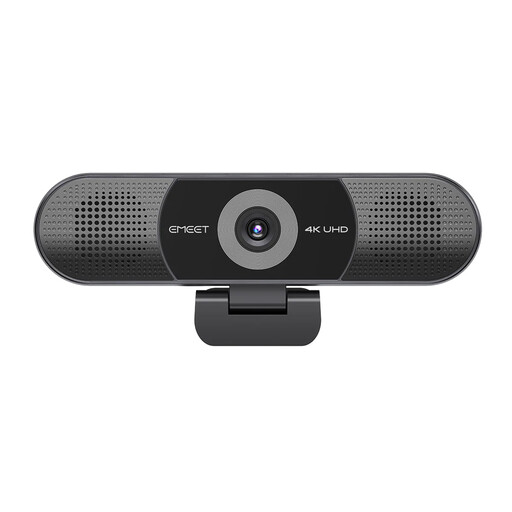
Consider an integrated camera-and-audio device if remote attendees need to see the presentation as well as hear it; test both the view and voices from their intended positions.
The product name specifies dual speakers, fixed focus and an adjustable 98° field of view. A 4K specification alone does not establish how clearly this camera will show a dim room.
No. A speakerphone handles audio, so attendees who need to see the presenter or historical materials also need a camera. Logitech says Brio 4K adjusts for low-light conditions, but check the camera’s view and the available light in the venue.
Connect it and make a test call using the meeting application, with the intended device selected for both microphone and speaker output. AnkerWork’s PowerConf S500 guide notes that manual selection in system or conferencing-software settings may be needed.
Plan around the exact model’s stated pickup range, then test voices from the farthest intended seats rather than treating that range as a guarantee. Jabra specifies up to 2.5 m for Speak2 75, EMEET states up to 9.8 ft for OfficeCore M0 Plus, and Logitech states up to 2.4 m for BCC950.