Small-table quiz hosts
If you and a few nearby players will provide most answers, look for pickup guidance that fits your seating positions. A remote listener can tell you whether quieter voices are reaching the call.


Choose a speakerphone around the furthest person who will answer aloud, rather than room size alone. A portable tabletop model may suit a host and a few nearby players; for voices spread across a room, compare the exact model’s coverage guidance and test a call from the furthest seat. If remote players need to see the host or visual clues, the dim room also needs separate camera-facing lighting.
If you and a few nearby players will provide most answers, look for pickup guidance that fits your seating positions. A remote listener can tell you whether quieter voices are reaching the call.
When answers may come from several seats, compare the distance to the furthest speaker with the exact model’s coverage guidance. Test the arrangement before relying on it for the quiz.
If remote players must see you, a scorecard or physical clues, plan the webcam view alongside the audio. The speakerphone will not illuminate what the camera sees.
Start with seating and voice pickup, then check two-way conversation and connection controls; assess camera lighting separately if the quiz includes video.
| Concern | What to check | Who this matters to |
|---|---|---|
| Hearing every local answer | Compare the exact model’s stated pickup range or room guidance with the furthest seat; test that seat in a call. | If answers will come from across the table or room, I need remote players to hear the quieter speakers too. Around 38% of consumers would put coverage first. |
| Clear two-way exchanges | Check for full-duplex audio and the stated echo or noise controls, then ask a remote listener to assess the actual room. | Quick answers can overlap with the host’s next question, so I want both sides of the exchange to remain intelligible. For around 31% of consumers, two-way clarity is the primary concern. |
| Connection and controls | Check the exact variant’s connection method and mute control; select the device as both microphone and speaker in the quiz app. | When I am running the quiz alone, I need to connect and mute the call without disrupting a round. That is the main priority for around 16% of consumers. |
| Visibility in a dim room | If using video, preview the webcam with separate light directed towards the host or visual material. | If remote players must read a clue or see the presenter, clear audio will not help them make out a dark image. Around 15% of consumers would prioritise video visibility. |
A stated room size does not tell you whether the furthest player will be heard from their actual seat. Shure notes that a room’s materials and layout can affect call sound.
Place the unit near the centre of the people speaking, then ask someone on the remote end to listen while each seat contributes an answer.
These features do not remove the need to consider background sounds, reflective surfaces and where the unit sits.
Keep the speakerphone away from obvious noise sources where possible and assess clarity with a remote listener, not just from inside the room.
Connecting a speakerphone does not necessarily make it the audio device used by the call application. AnkerWork’s PowerConf S500 guide advises selecting the device in computer or conferencing-software settings.
Choose the intended microphone and speaker in the system and quiz app, then check mute and volume during a test call.
A speakerphone handles call audio, not webcam exposure. Faces or visual clues can still be hard to see in a dim room.
Preview the camera in the room as it will be used and add separate, glare-controlled lighting where the host or materials need to be visible.
Jabra’s Speak2 75 provides model-specific guidance for a tabletop setup: Jabra specifies rooms up to 4.5 m × 4.5 m and microphone pickup up to 2.5 m.
The Poly Sync 20+ listing from HP Store UK describes a portable speakerphone for rooms up to 4 m × 4 m, with microphone pickup up to 2 m.
AnkerWork positions one PowerConf S500 for rooms of up to 12 people and says two units can be paired for coverage of up to 20 people.
These choices cover a Bluetooth tabletop speakerphone for group answers and a wired model for a nearby computer-based setup. Compare their exact connection and pickup requirements with your seating plan before choosing.
 No image available
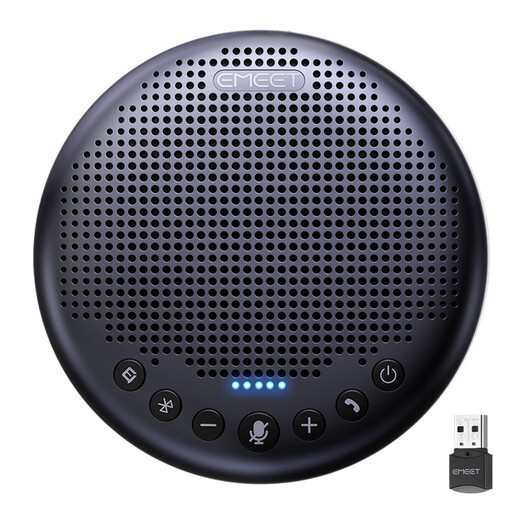
Consider this model when several nearby players may answer aloud, but test whether the furthest seat is heard clearly in your room.
The product title lists eight microphones, Bluetooth, 360° voice pickup, AI noise reduction and a 5 W speaker. Confirm the connection options and what is supplied with the exact listing before setting up the quiz.
 No image available
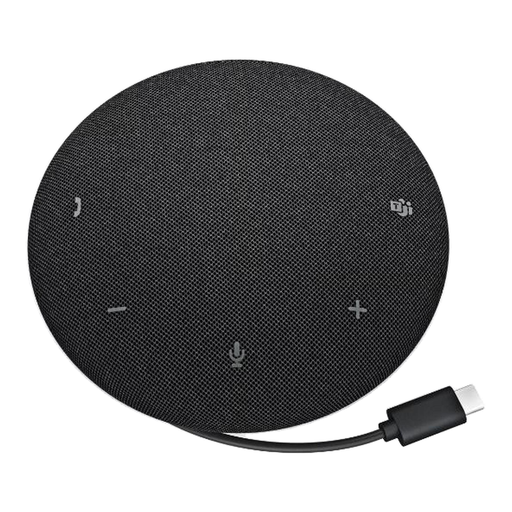
Consider this wired model for a computer-based quiz with players seated near the unit; test the furthest speaking position before the event.
Check that its connection suits your computer and confirm full-duplex audio and echo control if overlapping answers are important to your quiz.
Measure from the planned unit position to the furthest person likely to answer, then compare that distance with the exact model’s guidance. Jabra specifies pickup up to 2.5 m for the Speak2 75, while HP Store UK lists up to 2 m for the Poly Sync 20+; in either case, check every seat with a remote listener because room layout affects the result.
Yes, particularly when local and remote players may speak at the same time during answers or clarifications. Check that the exact model supports it and try a quick two-way exchange in the quiz app before the event.
Select it as both the microphone and speaker in the computer and call application, then make a test call. AnkerWork’s PowerConf S500 guide specifically advises selecting the device in the relevant audio settings; also check mute and volume before players join.
No. It handles audio, while the webcam needs enough light on the host or visual materials. Preview the shot under the quiz’s actual room lighting and add separate camera-facing light if faces or clues are difficult to see.