Solo desk-based presenters
If you usually speak from one desk, focus on a connection that fits your laptop and microphone placement that keeps your voice within the device’s stated pickup range.


Choose a speakerphone with full-duplex audio, echo control and a stated microphone pickup range that fits where you will speak and take questions. A wired USB model suits a fixed desk, while a Bluetooth-capable model may also serve mobile-device calls; check the exact connector, supported devices and variant before buying.
If you usually speak from one desk, focus on a connection that fits your laptop and microphone placement that keeps your voice within the device’s stated pickup range.
If you alternate between computer presentations and phone calls, check which devices can use USB or Bluetooth. Battery operation matters if you also move the speakerphone between workspaces.
If another person may join the discussion, compare the stated pickup range with both speaking positions and look for full-duplex operation so questions can be heard during conversation.
For a spoken research summary, start with voice handling, then check how the speakerphone connects and how far it will sit from everyone who needs to speak.
| Concern | What to check | Who this matters to |
|---|---|---|
| Voice clarity and discussion | Look for stated full-duplex operation and echo reduction; plan a test call in the room where you will present. | If I need remote listeners to follow my summary and ask questions without repeated interruptions, call handling comes first. Roughly 42% of consumers put voice clarity and discussion first. |
| Device and platform fit | Match USB-C or USB-A to your computer, and confirm the intended Bluetooth device and any Teams- or UC-specific variant. | When I switch between a work laptop and phone calls, I need connections that fit both uses. Around 33% of consumers make connection and platform fit their primary concern. |
| Pickup coverage | Compare the model’s stated microphone range with the distance to each speaker; check battery operation if you will move the device. | If I step away from the desk or invite someone in the room to ask a question, their voice still needs to reach the device. About 25% of consumers prioritise coverage and movement. |
Four or eight microphones do not tell you how far away a presenter can stand. Manufacturers state different pickup distances for different models, and room conditions also affect placement.
Measure the furthest expected speaker-to-device distance and compare it with the exact model’s stated range. Treat the figure as a specification, not a guarantee for every room.
Connection methods, supplied adapters and meeting-platform features can vary by model or variant. Jabra describes USB computer use and Bluetooth mobile-device use for the Speak2 55.
Check the product code, your laptop’s port, the intended Bluetooth device and whether you need a particular meeting-platform control.
The wrong connector or variant may mean using a separate compatible adapter or changing the device.
Echo and noise-handling descriptions do not establish the same result in every home office, particularly when other sounds are close to the microphone.
Position the speakerphone near the presenter, reduce nearby noise where possible and make a test call before an important presentation.
A retired speakerphone is electrical equipment and needs an appropriate recycling route rather than the household bin.
Use an electrical-equipment collection or take-back route when replacing it.
The Speak2 55 and Speak2 75 are portable USB-and-Bluetooth speakerphones with published specifications for home-office-sized spaces.
The Sync 20 is a compact speakerphone aimed at personal desks and small meeting spaces, with USB and Bluetooth capabilities depending on the intended connection.
The PowerConf S330 represents a wired USB-C desk setup and is supplied with a USB-A adapter.
These choices cover a Bluetooth conference speaker for presentations that may involve phone calls and a wired speakerphone for a fixed desk. Match either one to your speaking position and connection needs.
 No image available
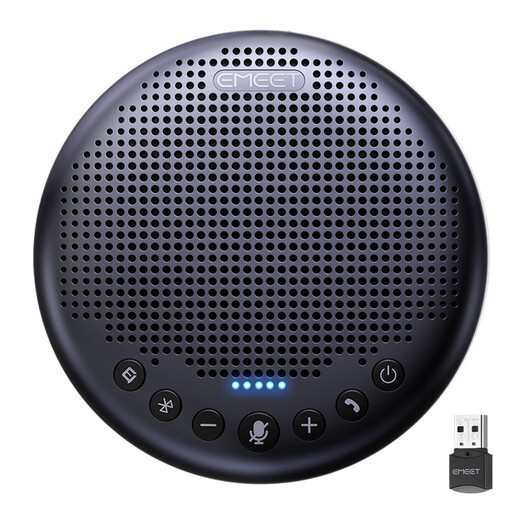
Consider this model if your presentation setup may also involve Bluetooth calls. Its product name states eight microphones, 360° voice pickup and a 5W speaker; check the usable pickup distance for your room and the connection needed by your computer. Noise reduction is a product claim, not a guarantee of how it will sound in every room.
 No image available
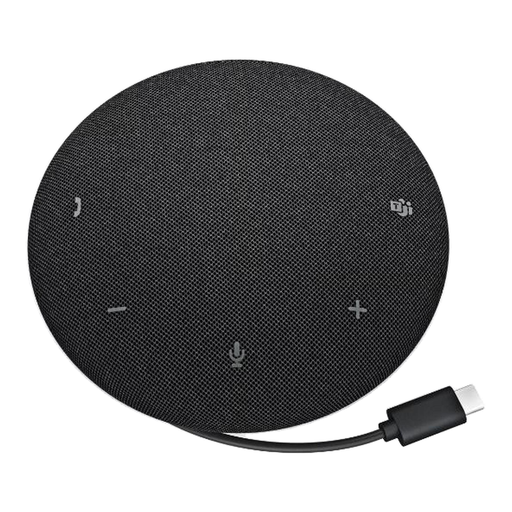
Consider this wired model for presentations from a fixed desk. Check that its connection fits your laptop and that the cable reaches your preferred position; if live questions or room echo are important, confirm its full-duplex and echo-handling capabilities before buying.
Choose a speakerphone if remote participants need to hear your presentation and ask questions. Check for stated microphone pickup, full-duplex audio and echo reduction rather than assuming a playback speaker provides call-focused functions.
Place it within the exact model’s stated microphone pickup range, considering anyone else who may speak in the room. Jabra specifies up to 2.3 m for Speak2 55 and 2.5 m for Speak2 75; HP specifies up to 2 m for the cited Poly Sync 20 version, while AnkerWork states 3 m voice coverage for PowerConf S330. These are manufacturer figures, not guarantees for every room.
Not necessarily, but a Teams label alone does not establish which controls or certifications another setup supports. Jabra lists multiple platforms for Speak2 75 while noting that some certifications depend on the variant; check the precise model against your organisation’s meeting software.
A faulty product may qualify for a remedy separately from a retailer’s change-of-mind returns policy. Coventry City Council Trading Standards advises UK consumers to contact the seller about a faulty item and explains that the available remedy depends on the circumstances; keep your order record and describe the fault when making a claim.
Use an electrical-equipment recycling or take-back route rather than putting the speakerphone in household waste. UK government WEEE guidance describes take-back arrangements when customers buy new electrical equipment; check the available route with the seller or a local collection service.