What matters when choosing
Genelec monitor with GLM
Choose when: The speakers must stay near a wall and you are prepared to measure and adjust their response at your listening position.
Allow for: The 8341A’s GLM calibration workflow needs compatible hardware and a planned source connection; it is not an integrated streaming system.
Neumann nearfield monitor with MA 1
Choose when: You listen at roughly 1–2 m, the distance Neumann recommends for the KH 120 II, and want a monitor with a room-alignment workflow.
Allow for: MA 1 setup requires equipment beyond the speakers, including a measurement microphone, computer and audio interface.
Integrated wireless hi-fi pair
Choose when: Streaming, TV sound and fewer separate components are more important to you than a monitor-based calibration workflow.
Keep in mind: Connections do not address wall-related changes in sound; follow the exact model’s placement guidance and assess it from your seat.
For consumers choosing speakers for recorded brass band music near a wall, these checks help separate the placement question from listening distance and source connections.
| Concern |
What to check |
Who this matters to |
| Bass and low-mid balance near a wall |
Check the exact model’s placement guidance and whether its response controls or calibration can be used at your listening position. |
I cannot move the speakers far from the wall and want bass to stay in proportion to the rest of the band; around 42% of consumers put wall-related tonal balance first. |
| Listening distance and intended level |
Match the specified listening distance to your seat, and compare stated output and frequency-response figures only on comparable measurement terms. |
I listen critically from a particular seat and need a speaker intended for that distance and level; roughly 33% of consumers prioritise distance and dynamic clarity. |
| Streaming and TV connections |
Confirm the inputs and streaming methods your sources need, along with whether amplification is built in. |
If I use a TV as well as streamed music, I would rather connect both through one speaker pair; about 25% of consumers put straightforward source connections first. |
Joybuy product choices
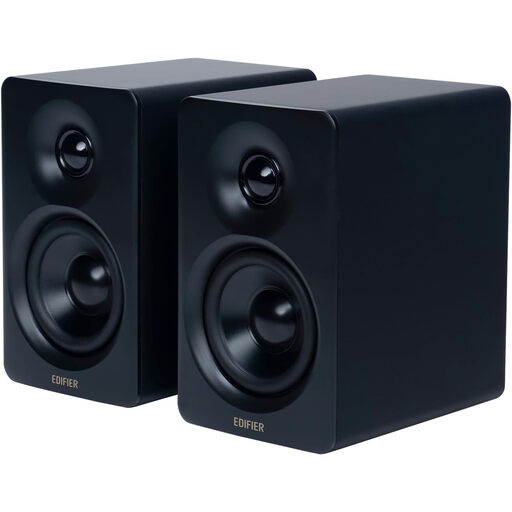
The Edifier M60 offers a compact desktop speaker option for recorded-music playback with Bluetooth or wired inputs. If it must sit near a wall, check its placement guidance and whether the sound works at your intended listening position.
 No image available
Edifier M60 Multimedia Speakers, Bluetooth 5.3, 66 W RMS
For desktop music playback where Bluetooth and wired source options matter; assess the speakers at your intended distance and wall-adjacent position.
The stated configuration includes 3-inch mid-bass drivers, 1-inch tweeters, USB-C and AUX inputs, and LDAC.
Joybuy
Questions about the setup
Must speakers always be moved away from a wall?
No, but a position near a wall needs to be part of your selection and setup. Genelec explains that wall placement changes a monitor’s response compared with a position away from walls; follow the exact model’s placement guidance and assess the result where you listen rather than relying on one distance rule.
Will room calibration solve every wall-placement problem?
No. Genelec describes calibration as a way to measure and adjust room-related response, while its placement guidance still calls for attention to speaker aiming, the listening position and reflections. Set up the speakers carefully before judging the calibrated result.
What equipment do calibrated studio monitors need?
The requirements depend on the system. Genelec’s 8341A uses GLM software with compatible calibration hardware; Neumann’s MA 1 setup requires a measurement microphone, PC or Mac, audio interface and suitable networking equipment. Check the complete source and calibration chain for the model you choose.
Can one active hi-fi pair handle both TV sound and streaming?
The KEF LS50 Wireless II is one such option: KEF lists HDMI eARC for a TV alongside AirPlay 2, Google Cast, Bluetooth and streaming support. Confirm that your TV output and preferred streaming method work with the exact speaker before choosing it.


