Who is this for?

Households sharing radio, music and podcasts

If one speaker will serve a living room, kitchen or family room, consider how each person will find their preferred stations and programmes. Ofcom’s 2025 UK listening findings show that smart speakers play a role in listening at home, particularly for live online radio; that does not mean voice is the right control method for every household.

Homes planning to listen in several rooms

If you want synchronised playback, check that the speakers can join the same system and that Wi-Fi reaches each room. Amazon’s Alexa multi-room guidance, for example, calls for compatible devices on the same Wi-Fi network and in a speaker group.

Households needing more than one way to control audio

Voice, touch, physical buttons and app controls may suit different people at different times. RNIB describes Echo devices as primarily voice controlled, while Google documents voice, touch and app controls for its speakers and displays. Check the controls on the exact model with the people who will use it.

What should you check?

Voice-assistant speaker

Consider it when: people want to request audio hands-free and may add compatible speakers in other rooms.

Trade-off: individual listening preferences take account setup, and spoken station requests do not always select the intended result.

Voice-free multi-room speaker

Consider it when: you want speakers in several rooms without built-in voice control, as offered by the Sonos Era 100 SL.

Trade-off: expect to use other controls and check the app and Wi-Fi setup required by the chosen system.

Radio-first speaker

Consider it when: direct DAB/FM listening, station presets or physical controls matter more than spoken requests.

Trade-off: internet radio and podcasts need Wi-Fi on models such as the Roberts Revival iStream 3L; check any multi-room or voice features separately.

Priority What to check Your needs
Radio and on-demand audio Check access to your actual stations, music and podcast services. If direct broadcast reception matters, check for DAB/FM; for online playback, check the required connection and service. I want everyone to switch between live radio and on-demand listening without depending on a playback method they do not use.
Individual accounts Check how each listener sets up music defaults and libraries. Google documents Voice Match personalisation through Google Accounts; Amazon says individual Alexa experiences require profiles on the same Alexa account. Different people use different playlists or services, so I need an account arrangement that works for the household.
Several rooms Confirm speaker-group compatibility, the setup method and Wi-Fi coverage in each room. Amazon says grouped Alexa devices must be on the same Wi-Fi network and added to the group. If we add another speaker, we want to know whether it can play alongside the first rather than only work on its own.
Everyday controls Check the exact model’s voice, touch, app or physical controls. Look for another way to find a station when a spoken request selects the wrong result. Not everyone wants to use an app or speak to a speaker each time they change what is playing.
Connection options Check the inputs and wireless methods on the model you plan to buy. For example, Sonos lists Bluetooth and Wi-Fi for the Era 100, but analogue line-in requires its separate Line-In Adapter. We may play audio from a phone or another source as well as from a streaming service.

Common buying mistakes

  • Assuming voice will find the right radio station every time

    Ofcom reported in its 2025 UK listening findings that three in five smart-speaker users said their device had played the wrong thing when asked for a particular station. That can interrupt routine shared listening if voice is the only convenient control.

    Check how to find your usual stations through an app, touch control or presets, and consider physical station controls if radio is the main use.

  • Adding speakers before checking the network and grouping

    Another speaker does not automatically provide synchronised playback. Amazon’s Alexa guidance says grouped devices must be connected to the same Wi-Fi network and included in the speaker group.

    Check coverage in each intended room and confirm that every planned device can join the chosen system before expanding beyond one room.

  • Treating Bluetooth, multi-room audio and voice as the same feature

    Bluetooth playback from a phone does not, by itself, establish speaker-group support or a built-in voice assistant. The Roberts Revival Uno BT, for instance, is described by Roberts as a DAB/FM radio with Bluetooth, while its Sonos Era 100 SL example is a multi-room option without built-in voice control.

    List the sources and controls the household will actually use, then check each feature on the exact model.

  • Assuming every voice-enabled device has the same accessible controls

    Controls and accessibility settings differ between speakers, displays and their apps. A feature documented for a display should not be assumed to work on a speaker without a screen.

    Check the exact device’s setup and day-to-day voice, touch and app controls with the intended user where possible.

Relevant brand references

Amazon Echo / Alexa

An option to examine for Alexa voice requests, individual profiles and compatible Echo speaker groups.

  • Amazon documents synchronised music across compatible devices in an Alexa multi-room group.
  • Amazon says individual Alexa experiences require profiles created on the same Alexa account; check the particular Echo model and supported services.

Google Home / Nest

An option to examine for Google-account-based listening preferences and speaker groups.

  • Google says Voice Match can personalise music defaults and access to a listener’s private library after setup.
  • Google says each person can link only one account per streaming service. Check the exact device’s controls and the household’s account arrangement.

Sonos

A multi-room wireless-speaker option with both voice-enabled and voice-free models.

  • Sonos lists Wi-Fi, Bluetooth and touch controls for the Era 100; the Era 100 SL is offered without built-in voice control.
  • Check app setup and preferred services. Analogue line-in on the Era 100 requires a separate Sonos Line-In Adapter.

Roberts Radio

A radio-first option to examine for DAB/FM, presets and physical controls, with features varying by model.

  • Roberts lists DAB+/FM, internet radio, podcasts, Bluetooth and presets on the Stream 219.
  • On the Revival iStream 3L, Roberts says internet radio and podcasts need Wi-Fi, while DAB+, FM and Bluetooth can operate independently. Check local reception and the exact model’s sources.

Joybuy product options

This tabletop speaker is an option to consider for shared listening and a possible multi-room setup. Check its grouping method and your playback sources before choosing it for several rooms.
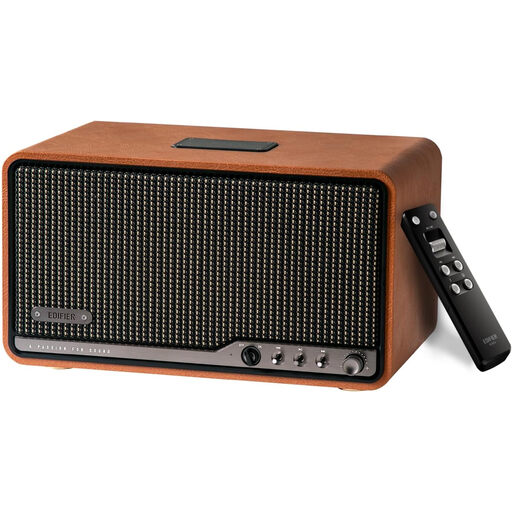
Brown Edifier S300 tabletop speaker

Edifier S300 tabletop speaker, brown

The S300 is listed as a wireless multi-room tabletop speaker for shared-room listening. Before planning playback across rooms, confirm how grouping works with your devices; also check your preferred music and podcast sources and whether you need separate radio or voice controls.

View on Joybuy

Questions about shared listening

Can a smart speaker play live radio, music and podcasts in a shared room?

It can if the particular stations and services you want are supported, so check those before buying. Ofcom reported in its 2025 UK listening findings that three in five smart-speaker users had received the wrong result when requesting a particular radio station; regular radio listeners should also check a non-voice way to select stations.

Can different people use their own music preferences?

Yes, in supported setups, but the account rules differ. Google says Voice Match can personalise music defaults and libraries through Google Accounts, with one linked account per streaming service for each person. Amazon says individual Alexa experiences require profiles on the same Alexa account.

What do I need for music in several rooms?

Check that the planned speakers support the same grouping system and that the home network reaches each room. For Alexa multi-room music, Amazon says devices must be on the same Wi-Fi network and added to the speaker group; support for one ecosystem does not establish compatibility with another.

When does a radio speaker make more sense than a voice-assistant speaker?

Consider a radio-first speaker when direct DAB/FM listening, station presets or physical controls matter more than spoken requests. Roberts says DAB+, FM and Bluetooth work independently of Wi-Fi on its Revival iStream 3L, although that model needs Wi-Fi for internet radio and podcasts. Check reception and features on the model you choose.

Which controls should I check for accessibility?

Check the exact speaker and its setup process with the person who will use it. RNIB describes Echo devices as primarily voice controlled, and Google documents accessibility settings and voice, touch or app controls across relevant devices. Those descriptions do not establish that every model, app step or service will meet an individual’s needs.