Households adding controllers for local races
If you already have a console and racing game, check how many people the game supports locally before buying controllers for the rest of the group. The console’s pairing limit is a separate check.


Choose a controller that works with your console or device, then check that your racing game accepts that controller type for the number of local players you have in mind. If gradual steering, acceleration and braking matter to you, examine the exact model’s stick and trigger design; weigh wireless seating flexibility against charging, or a wired connection against cable routing. Screen glare needs separate attention to the display and room lighting.
If you already have a console and racing game, check how many people the game supports locally before buying controllers for the rest of the group. The console’s pairing limit is a separate check.
If steering, acceleration and braking feel important to you, compare the exact models’ sticks and triggers as well as their platform compatibility. A trigger description alone cannot tell you how a particular game will use it.
Wireless controllers may make it easier to arrange shared seating without cables across the room. They will not correct glare on the television or monitor, so consider screen position and lighting separately.
Start with the host platform and the game’s local multiplayer rules. Once those fit, decide which controls and connection arrangement suit your group.
| Concern | What to check | Who this matters to |
|---|---|---|
| Platform and local players | Match the exact controller to your console or device, then check the game’s supported local mode, player count and controller types. | I need everyone in our race to have a controller the game will actually accept. Around 40% of consumers with this primary need put compatibility and local-player support first. |
| Racing inputs | Check the exact model’s stick and trigger design, particularly whether the triggers provide the type of input you want for acceleration and braking. | When I want to vary throttle and braking rather than use simple on-off inputs, the controls matter more to me than extra connections. Roughly 30% of consumers prioritise this kind of racing input. |
| Cables and power | For wireless play, plan how controllers will be charged; for wired play, check connection and cable placement around seating. | I want the group to sit comfortably without an awkward cable run or an interrupted session while controllers charge. Around 30% of consumers place lounge setup and power management first. |
A console’s pairing capacity does not establish how many people can play a particular racing game in split-screen. Nintendo also notes that its usable controller count varies with controller type and features.
Check the game’s local multiplayer mode and accepted controller types before deciding how many additional controllers your group needs.
The Xbox, Windows and Android, and Switch-oriented controller routes described here have different stated compatibility. A wireless connection method does not make their supported platforms interchangeable.
Check the manufacturer’s compatibility information for the exact variant and the device hosting your game.
8BitDo describes linear Hall Effect triggers on the Ultimate 2C Wireless for Windows and Android, but non-linear digital triggers on the Switch-oriented Ultimate 2C Bluetooth. Those descriptions should not be transferred from one version to the other.
If gradual throttle and brake input matters, check the exact controller’s triggers and how your racing game uses them; try the feel where possible.
GOV.UK advises that electrical items and batteries should go to appropriate recycling collection points rather than household rubbish when they are no longer wanted or working.
Use a suitable battery collection point for removable batteries and an appropriate electrical-waste collection point for the controller.
The DualSense is the platform-native route to consider for PS5 local play.
The Xbox Wireless Controller is a route for Xbox consoles and its stated Windows PC and mobile-device uses.
Pro Controller options are worth checking for compatible Switch and Switch 2 games.
The G7 SE represents a wired controller route for compatible Xbox and Windows PC setups.
The Ultimate 2C range includes separate Windows and Android, and Switch and Switch 2 variants.
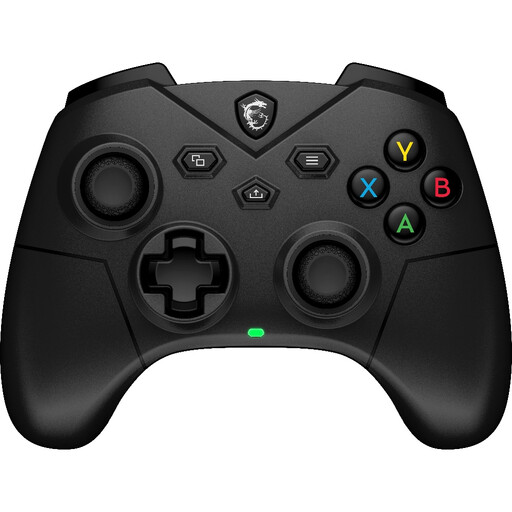
This controller is a choice to consider for a supported Windows PC or Android setup; check your racing game’s local multiplayer and controller requirements before buying.
 No image available
Consider this controller for a Windows PC or Android racing setup if your game accepts it for the local multiplayer mode you intend to use.
Confirm compatibility with your device and game before buying. If gradual throttle and braking matter to you, check whether its trigger action suits those controls; do not assume it works with an Xbox, PlayStation or Nintendo console.
Plan for a compatible controller for each local player, but check your game’s player limit and accepted controller types before buying extras. PlayStation states that up to four controllers can be used simultaneously on PS5. Nintendo says up to eight wireless controllers can be paired to Switch, although the usable count varies; its September 2026 guidance describes up to eight local players for Mario Kart 8 Deluxe on Switch 2 with enough compatible controllers.
They may not all work: PlayStation says DualSense feature availability varies by device, connection and game support. Check the racing game’s controller support and the connection requirements for the particular feature you want before choosing it for PC.
No controller choice addresses glare on the television or monitor. Assess the screen position, incoming light and display settings separately, then choose controllers for compatibility, local player support and the controls you prefer.
Take unwanted electrical items and batteries to appropriate recycling collection points rather than putting them in household rubbish, as GOV.UK advises. Keep removable batteries separate for a suitable battery collection point.