Choose a controller your particular sports game accepts before comparing extra features. Nintendo Switch Sports calls for supported Joy-Con configurations rather than a standard Pro Controller, while conventional PS5 and Xbox games call for a gamepad compatible with the console and game. If you also play on PC or other devices, check the stated connection method and which features remain available there.
Who these controllers suit
Motion-sports Switch players
If your game involves swinging or other movement-led play, check which Joy-Con configuration it accepts for each sport and how many controllers local players need. Nintendo specifies different play styles for Nintendo Switch Sports.
Console-first sports players
If you mainly play button-and-stick sports games on PS5 or Xbox, start with a controller supported by that console and the particular game. Check game support before choosing a controller for its feedback or other optional features.
Multi-device arcade players
If you move between a console, PC or mobile device, compare the controller’s stated device support and connection methods. Compatibility with several devices does not mean every game or controller feature works on each one.
What matters when choosing
Start with the game’s accepted controllers. Then decide whether motion play, use across devices or adjustable controls is your main reason for choosing one model over another.
| Concern |
What to check |
Who this matters to |
| Game and platform compatibility |
Check the exact game’s accepted controllers and the model’s stated support for your console or operating system. |
I need the controller to work with my game and device before any extra feature matters. Roughly 36% of consumers would make compatibility their primary concern. |
| Motion and local play |
Check the controller configuration accepted by each sport, the number needed for local players and any strap requirements. |
For movement-led sports or shared play, I need the controls to suit the sport and the players taking part. Around 29% of consumers would put motion and local play first. |
| Use across devices |
Match each intended device to the controller’s stated support and check whether it connects by USB, Bluetooth or another method. |
I switch between devices and would rather use one familiar gamepad where my games allow it. About 21% of consumers would prioritise use across devices. |
| Control adjustments |
After confirming game support, compare available button mapping, control adjustments and the charging arrangement for the exact model. |
I want to tailor the controls or make charging more convenient once I know the controller works. Roughly 14% of consumers would make those adjustments their main concern. |
Mistakes to avoid
-
Assuming every Switch controller works with a sports game
Nintendo says neither the Nintendo Switch Pro Controller nor the Nintendo Switch 2 Pro Controller works with Nintendo Switch Sports. Controller requirements can also differ by sport.
Check the support information for your exact game and sport before choosing a Joy-Con configuration or a standard gamepad.
-
Equating Bluetooth pairing with full feature support
A connected controller may still have feature limits. Sony says DualSense haptic feedback on PC requires USB and a game that supports it.
Check both the connection method and the game’s feature support if haptics or adaptive triggers influence your choice.
-
Overlooking the setup for active play
Detached Joy-Con play needs more planning than choosing a controller alone. Nintendo instructs players to use wrist straps when Joy-Con controllers are detached for TV-mode play.
Check the intended play mode, available space and straps before starting a movement-led game.
-
Putting an old controller or battery in household rubbish
GOV.UK advises that electrical products and batteries marked with a crossed-out wheelie bin should not go in household rubbish.
Use an appropriate electrical-waste or battery collection point when the controller reaches the end of its life.
Relevant brands to consider
Nintendo
Nintendo’s Joy-Con controllers are relevant to compatible motion-led Switch sports games and local shared play.
- Nintendo describes accelerometer and gyroscope sensing in each Joy-Con.
- Nintendo Switch Sports does not accept standard Switch or Switch 2 Pro Controllers; check the required Joy-Con play style for the sport.
PlayStation
DualSense is a controller route for PS5 sports games, with connections to supported PCs, Macs and mobile devices.
- Sony describes haptic feedback and adaptive triggers for games that support those features.
- Sony says PC haptics require USB; feature availability also differs on Mac and mobile devices.
Xbox
The Xbox Wireless Controller is relevant to Xbox and Windows PC gamepad play.
- Microsoft lists Xbox, Windows PC, Android and iOS support, alongside Bluetooth and button mapping.
- That device list does not establish support for a particular sports game or for Switch games requiring Joy-Con motion input.
8BitDo
The Pro 3 is a multi-platform option for consumers comparing Switch, PC, SteamOS, Apple and Android use.
- 8BitDo lists configurable controls and support for those platforms for the Pro 3.
- 8BitDo says the Pro 3 cannot wake a Switch 2; check the requirements of each device and game.
Joybuy controllers for sports play
These choices include Joy-Con motion controllers, a twin-pad set and gamepads named for Xbox, Switch or PC use. Match any choice to your particular sports game and its supported play mode.
 No image available
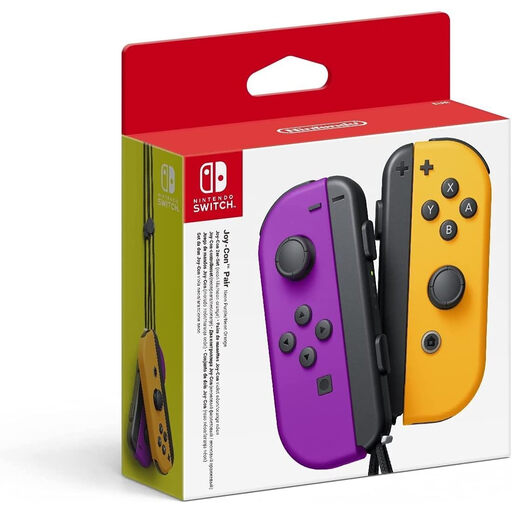
Nintendo Joy-Con Pair – Neon Purple/Neon Orange
Consider this pair for a Switch sport that accepts Joy-Con motion input; Nintendo describes motion sensors in each Joy-Con. Check the sport’s controller configuration and whether wrist straps are included. Nintendo instructs players to use straps for detached TV-mode play.
View on Joybuy
 No image available
Microsoft Elite Wireless Controller Series 2 (Xbox One/Xbox Series X/S/PC)
If you want an Xbox or PC controller for conventional sports play, check that your game accepts this Series 2 model. Confirm the controls and accessories supplied with this variant before choosing it for a particular setup.
View on Joybuy
 No image available
Xbox Wireless Controller – Carbon Black
For conventional sports play on Xbox or Windows PC, Microsoft lists Bluetooth and button mapping for the Xbox Wireless Controller. Confirm that your game accepts it and that its connection method suits your device.
View on Joybuy
 No image available
Lexip SteelPlay Twin Pads Controllers
If you are considering twin pads for local sports play, check whether your game accepts this model and allows the separate-controller play style you intend to use. A twin-pad format alone does not establish game compatibility.
View on Joybuy
 No image available
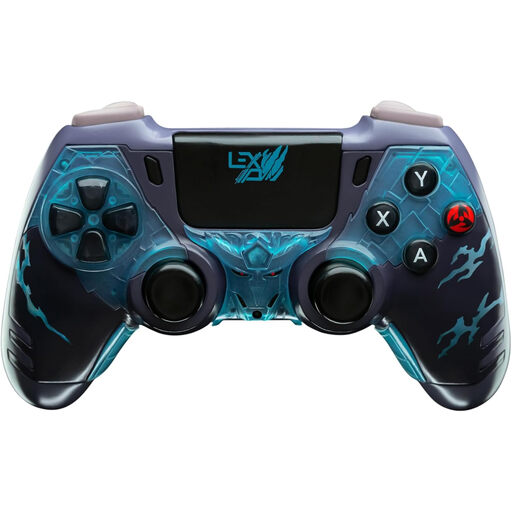
LEXIP Kakashi Kamui Controller (PC, Switch)
For a PC or Switch sports game that accepts a conventional controller, check this model against the game’s support information. Confirm the connection method and whether a required cable comes with this variant before buying.
View on Joybuy
Common questions
Can I use a Switch Pro Controller for Nintendo Switch Sports?
No. Nintendo says Nintendo Switch Pro Controllers and Nintendo Switch 2 Pro Controllers are not compatible with Nintendo Switch Sports. Check the Joy-Con or Joy-Con 2 configuration accepted by the sport you plan to play.
Do DualSense haptics work wirelessly on PC?
Sony says DualSense haptic feedback on PC requires a USB connection and support from the game. Check the game’s features separately; connecting the controller does not make every DualSense feature available.
What do I need for detached Joy-Con play on a TV?
Use Joy-Con wrist straps. Nintendo’s TV-mode guidance instructs players to use them whenever the Joy-Con controllers are detached; also check that your game accepts the chosen play mode.
Can I return an online controller purchase if I change my mind?
For most UK online purchases, GOV.UK says you can tell the seller you want to cancel within 14 days of receiving the item and then have another 14 days to return it. Check the applicable process and exceptions; remedies for faulty or misdescribed goods are separate from a change-of-mind cancellation.
How should I dispose of an old controller or its battery?
Use an appropriate electrical-waste or battery collection point rather than household rubbish. GOV.UK says electrical products and batteries marked with a crossed-out wheelie bin should be collected separately; follow local guidance for a removable battery.


