Shortcut-heavy sprite animators
If you frequently add or navigate frames and change tools, key access and custom assignments matter. Aseprite documents editable shortcuts for commands and tools, as well as arrow-key frame navigation.


Start with a wired keyboard whose connection fits an available computer port and whose shortcuts suit your animation software; limited wall sockets alone do not require a wireless model. A tenkeyless layout retains more conventional key access than a 60% board while leaving room for a mouse. Consider a slimmer low-profile model for your preferred desk feel, or adjustable-actuation switches if you also value those controls for gaming.
If you frequently add or navigate frames and change tools, key access and custom assignments matter. Aseprite documents editable shortcuts for commands and tools, as well as arrow-key frame navigation.
If another mains-powered accessory would complicate your setup, check the keyboard’s computer connection instead of judging it by wall sockets alone. Microsoft Support and Apple Support advise checking hub power when troubleshooting connected input devices.
If the same desk serves sprite work and gaming, a tenkeyless layout may give your mouse more room without moving straight to a 60% keyboard. Keychron, Logitech G and Razer each describe a tenkeyless model among the options discussed here.
Choose the keyboard’s connection and shortcut approach before deciding how much desk space or gaming-specific control you want to prioritise.
Choose when: repeated sprite commands make accessible, customisable keys your main priority; Keychron lists QMK remapping and macros for its C3 Pro 8K.
Keep in mind: keyboard programming still has to work with the commands recognised by your animation app.
Choose when: a slimmer keyboard and shorter-travel feel matter alongside configurable controls; Logitech G describes its G515 TKL as a wired, 22 mm-high model.
Keep in mind: its configurable functions use Logitech software, and switch comfort is a personal preference.
Choose when: you also want adjustable actuation for response-sensitive games; Razer specifies this for the Huntsman V3 Pro Tenkeyless 8KHz.
Keep in mind: adjustable actuation and Rapid Trigger do not, by themselves, establish an advantage for frame-by-frame animation.
| Concern | What to check | Who this matters to |
|---|---|---|
| Shortcut customisation | Check remapping or macro options and whether the configuration tool works with your operating system and animation app. | I repeatedly change frames and tools, so I want the commands I use most within easy reach. Around 42% of consumers put shortcut customisation first. |
| Connection and power | Match the cable connector to a free computer port; if using a hub, check its power arrangement. | With few wall sockets, I need a reliable way to connect the keyboard without complicating my existing setup. Connection and power come first for around 33% of consumers. |
| Desk space and key feel | Compare layout and access to navigation keys, then consider whether a low-profile switch feel suits you. | I use a mouse beside the keyboard and do not want important frame-navigation keys to become awkward to reach. Around 25% of consumers primarily care about desk space and key feel. |
A wired keyboard still needs a compatible computer connection. Microsoft Support and Apple Support both address hub power when troubleshooting connected devices.
Identify the keyboard connector and an available computer port before buying. If you need a hub, check whether its power arrangement is suitable for your devices.
Razer describes adjustable actuation and Rapid Trigger on its Huntsman V3 Pro Tenkeyless 8KHz, but those features alone do not show that frame editing will be easier.
Check layout, shortcut options and connection fit first; weigh adjustable actuation against how much you will use the keyboard for gaming.
Keyboard remapping does not replace the shortcuts recognised by animation software. Aseprite provides its own editable assignments for menu commands and tools.
List your frequently used frame and tool commands, then check how you would assign them in both the app and the keyboard’s configuration tool.
Keychron’s C3 Pro 8K is relevant if a wired tenkeyless layout and configurable sprite-work shortcuts are priorities.
The wired G515 TKL is relevant if you want a slimmer keyboard while retaining a tenkeyless layout.
The Huntsman V3 Pro Tenkeyless 8KHz is relevant chiefly to a setup shared between sprite animation and response-sensitive gaming.
These wired, compact keyboards offer different approaches to desk space and controls. Check the layout, connection and shortcut options of each model against your own sprite-animation workflow; the 60% and 75% models are not substitutes for every key arrangement offered by a tenkeyless board.
 No image available
Consider this compact layout if you want to assign repeated animation commands: the listed web driver supports key remapping and macros.
The product name specifies magnetic switches, a metal knob and side-engraved black keycaps. Check the cable connector, configuration-tool compatibility and stated US key layout against your setup.
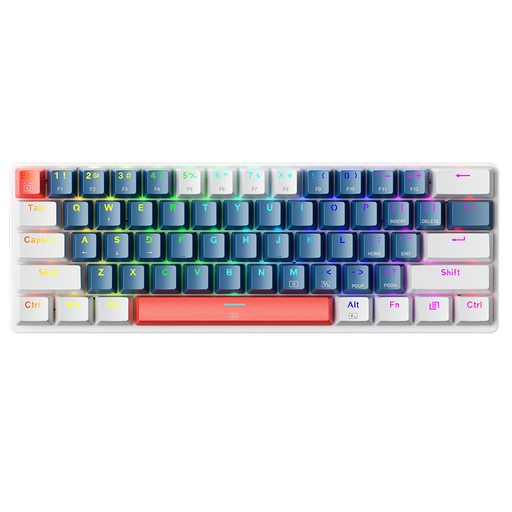 No image available
Consider this smaller layout if desk space matters and you are comfortable accessing some functions through key layers. Its listed software supports macros and key assignments.
The listed connection is USB-C. Check how you would reach your frame-navigation keys and whether the configuration software works with your operating system.
 No image available
This compact option retains arrow keys, which may matter if you use them to navigate animation frames. Its listing also mentions software support for macros.
The listed cable is detachable Type-C. Check the scope of shortcut customisation and software compatibility before relying on it for your app.
 No image available
Consider this compact wired model if you also want its listed adjustable actuation and Rapid Trigger controls for gaming; those features do not establish an animation-workflow advantage.
The listing specifies a detachable USB-C cable and macro recording. Navigation uses modifier-key combinations on its 60% layout; check that approach, the stated US layout and the available remapping options against your app.
 No image available
Consider this wired 75% option if a compact layout is your main priority rather than relying on confirmed keyboard-level shortcut programming.
The listing specifies USB-C and a volume knob. Check the physical key arrangement before buying, and confirm remapping or macro support if your animation workflow needs it.
Yes, if your animation app supports the assignments you need: Aseprite lets you edit shortcuts for menu commands and tools. A programmable keyboard can add remapping or macros, but check its configuration options and map them around the app’s actual commands.
No. A wired keyboard can connect to a compatible computer port without its own routine charging arrangement. Confirm the exact connector and an available port; if a hub is involved, Microsoft Support advises checking its power, while Apple Support recommends a direct connection or a self-powered hub when troubleshooting insufficient power.
Choose a tenkeyless, or TKL, layout if you want a smaller keyboard without immediately relying on the key-layer approach of many 60% models. A 60% layout can still suit you if its access to your frame-navigation and tool shortcuts feels workable; check the exact key arrangement before deciding.