For a two-screen sprite-animation desk, start with monitors whose colour modes suit the assets you create, then decide whether smoother motion or a simpler connection matters more. A matched pair is a sensible route when close screen-to-screen appearance is important, but identical model specifications alone do not guarantee a visual match. Before relying on one cable or a particular refresh rate, confirm what your computer can deliver to two extended displays.
Who this setup suits
Palette-critical sprite artists
If you create pixel art, UI sprites or other game assets, compare the exact monitors’ stated sRGB or Rec.709 modes and calibration information before expecting consistent colour across a canvas and preview. BenQ, ASUS and Dell publish these specifications for particular creative-monitor models; panel type alone does not establish a match.
Timeline-heavy animators
If one screen holds your canvas while the other holds a timeline or engine preview, refresh rate may matter when you scrub or review fast loops. Dell lists the UltraSharp U2724D at QHD and 120Hz, but your computer must also support the intended two-display arrangement.
Laptop-based dual-screen creators
If you want two external screens and fewer desk cables, check the laptop’s supported display count and video output before choosing a connection route. Dell’s daisy-chain guidance distinguishes video-capable USB-C with DisplayPort Alt Mode or Thunderbolt from a USB-C connection used only for other functions.
What to prioritise
Decide what the second screen will do beside your drawing canvas, then check colour modes, computer outputs and desk fit against that plan.
| Concern |
What to check |
Who this matters to |
| Colour consistency |
Compare both models’ stated sRGB or Rec.709 modes and factory-calibration information. Matching specifications do not, by themselves, establish a visual match. |
I need the palette on my drawing canvas to look close to the preview beside it before I export. Around 29% of consumers put colour consistency first. |
| Two-screen connection |
Check the computer’s supported external-display count, then confirm the ports, dock and cables for either two direct outputs or a compatible display chain. |
If my laptop cannot extend the desktop across both screens, the planned canvas-and-timeline layout will not work. For around 36% of consumers, a reliable two-screen connection is the primary concern. |
| Motion preview |
Compare the monitors’ stated refresh rates with what the computer can output to both screens at the intended resolution. |
When I scrub a timeline or inspect a fast sprite loop, I want motion that is easier to follow. Smoother review takes priority for around 21% of consumers. |
| Desk fit |
Measure the space for two stands or compatible mounts, and check the exact models’ adjustment options. |
I need room to position a drawing canvas and reference screen without crowding the desk. Around 14% of consumers make two-screen placement their main concern. |
Buying pitfalls
-
Assuming every USB-C port can run two screens
A USB-C connector alone does not establish video output or a working display chain. Dell’s daisy-chain guidance says HDMI is not a daisy-chain route and USB-C needs DisplayPort Alt Mode or Thunderbolt support for this use.
Check the computer maker’s external-display specification and the intended monitor connections. If a display chain is unsuitable, check whether two direct video outputs or a documented dock arrangement will work.
That change of plan may also mean using a compatible dock, video-capable cable or separate display connections.
-
Choosing a pair because both panels are IPS
Panel type does not specify a monitor’s colour mode, calibration claim, resolution or refresh rate. Those differences matter when one screen holds the sprite and the other holds its preview.
Compare the exact models’ sRGB or Rec.709 specifications and calibration information; check refresh rate separately if motion review is important.
-
Expecting the stated refresh rate on both screens automatically
A monitor’s refresh-rate specification does not establish what a computer, dock and cable path can deliver to two extended displays.
Confirm the computer’s output limits at your intended resolution and refresh rate before planning a high-refresh pair or a dedicated preview screen.
-
Treating a retailer policy as the whole returns picture
For UK purchases, GOV.UK distinguishes a limited right to cancel certain distance orders from remedies where goods are faulty or not as described. A retailer’s additional policy is a separate matter.
Keep the order details and supplied components while you test both screens, and check the applicable cancellation terms alongside your rights if there is a fault or the monitors differ from their description.
Relevant monitor lines
ASUS ProArt
A creative-monitor line to consider when specified colour modes and a compatible laptop connection are priorities.
- ASUS specifies the PA278CV with 100% sRGB and Rec.709 coverage, Delta E below 2, 75Hz, USB-C with 65W power delivery and DisplayPort daisy-chaining.
- Those are PA278CV specifications, not promises for every ProArt model or every computer. Check the host’s support for two extended displays before planning a chain.
BenQ PD
A creative-design line with a documented QHD option for sRGB and Rec.709 work.
- BenQ specifies the PD2705Q with 100% sRGB and Rec.709 coverage, average Delta E at or below 3, USB-C with 65W power delivery and DisplayPort MST output.
- The PD2705Q has a stated 60Hz refresh rate. Check the computer and connection path before relying on its MST output for a second screen.
Dell UltraSharp
A professional-monitor line with a QHD model that combines stated colour specifications and a 120Hz refresh rate.
- Dell lists the U2724D at QHD and 120Hz, with 100% sRGB and BT.709 coverage and average Delta E below 2.
- Check the intended connection method separately: those U2724D specifications do not establish a monitor-to-monitor MST output path for this model.
Joybuy monitors for this setup
These monitors offer different starting points for a two-screen sprite-animation desk: a specified creative-display route, QHD options with higher stated refresh rates, and different connection details to check against your computer. Decide whether to use a matched pair or a separate preview screen before choosing two units.
 No image available
ASUS ProArt PA278CV QHD monitor
Consider this model when specified colour modes matter for both the sprite canvas and its preview. ASUS lists 100% sRGB and Rec.709 coverage, Delta E below 2, 75Hz and USB-C with 65W power delivery for the PA278CV.
ASUS also specifies DisplayPort daisy-chaining, which requires a compatible computer and connection path. Check the appearance of both screens together if close colour matching is important.
View on Joybuy
 No image available
ASUS ProArt PA278CFRV QHD 100Hz monitor
Consider this QHD model if colour-led sprite work and a stated 100Hz refresh rate both matter to your desk layout.
Before planning a laptop connection through USB-C, confirm the exact unit’s video-output and power-delivery specifications. Check the computer’s two-display capability separately.
View on Joybuy
 No image available
MAG 274QP QD-OLED X24 QHD 240Hz monitor
The stated 240Hz refresh rate makes this a model to assess when motion preview is a priority alongside a QHD drawing workspace.
If you work in sRGB or Rec.709, check the exact colour-mode specifications. Confirm what refresh rate your computer can deliver to both screens.
View on Joybuy
 No image available
MSI MAG 271QP QD-OLED X28 QHD 280Hz monitor
This QHD model’s stated 280Hz refresh rate is relevant if your second screen is chiefly for reviewing motion.
Check its sRGB or Rec.709 mode for standard-space sprite work, as well as the computer’s support for two extended displays at your intended settings.
View on Joybuy
 No image available
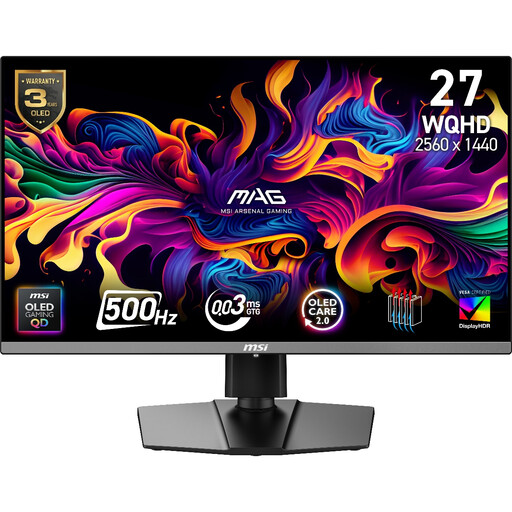
MAG 272QP QD-OLED X50 WQHD 500Hz monitor
Consider the stated WQHD resolution and 500Hz refresh rate against the motion-review work you actually do; the monitor’s rating does not establish the rate available in a two-screen setup.
Check its standard-space colour mode if palette work is central, and confirm that your computer and connection path support both displays as intended.
View on Joybuy
Common questions
Can one cable run two external monitors from my computer?
It can when the computer and the complete display chain support the required connection. VESA describes DisplayPort Multi-Stream Transport as a way to drive multiple screens from one DisplayPort source; Dell advises that HDMI is not a daisy-chain route and that USB-C needs DisplayPort Alt Mode or Thunderbolt support. Check the exact computer, dock, cable and monitor ports before choosing this layout.
Should both sprite-animation screens be the same model?
The same model is a sensible starting point when close visual matching matters, but it does not guarantee that two individual screens will look identical. If you mix models, compare their relevant sRGB or Rec.709 modes and assess the pair together; separate gamut and colour-accuracy claims do not prove a screen-to-screen match.
How do I arrange two screens for animation in Windows?
Use an extended desktop so the canvas and timeline can occupy separate screens. Microsoft Support says you can identify detected displays and drag their rectangles in Windows display settings to match their physical positions.
What if an online monitor purchase is faulty or unsuitable?
For UK purchases, a fault and a change of mind follow different routes. GOV.UK says distance-order customers have a limited cancellation right even when an item is not faulty, while faulty or misdescribed goods have separate remedies. Check the terms that apply to your order and distinguish those rights from any additional retailer policy.


