Players with limited desk space
A compact Full HD display is worth considering if your desk is small and you want to prioritise high-refresh play without moving to QHD. AOC UK, LG UK and ASUS UK each specify a 23.8-inch, 180Hz IPS-type model.


For a tight student-room desk, start with a roughly 24-inch Full HD monitor rated at 180Hz, provided your PC and connection can use that mode. Choose a 27-inch QHD display if you have the space and your PC runs Squad satisfactorily at 2560 × 1440; consider a 320–400Hz esports model only if very high refresh matters more to you than QHD detail.
A compact Full HD display is worth considering if your desk is small and you want to prioritise high-refresh play without moving to QHD. AOC UK, LG UK and ASUS UK each specify a 23.8-inch, 180Hz IPS-type model.
A 27-inch QHD screen offers more detail for coursework and games if it fits your desk and your PC can run Squad satisfactorily at that resolution. Dell UK lists the AW2725DM as a QHD, 180Hz option.
If very high refresh is your priority, compare the connection and graphics output needed to use it before choosing a specialist display. Dell UK lists a 320Hz Full HD model, while ZOWIE UK lists a 400Hz Fast TN model.
Start with the space available and the signal your PC can deliver, then decide whether compact Full HD play, QHD detail or a specialist refresh rate is your primary need.
| Concern | Buying check | Who this matters to |
|---|---|---|
| Compact Full HD play | Measure the screen and stand against your desk; confirm 1920 × 1080 and the refresh rate available through your intended input. | If desk space is tight, I want a compact screen and a resolution my PC can run comfortably in Squad. Around 43% of consumers put that combination first. |
| QHD for study and gaming | Check that a 27-inch display fits and that your PC can run games satisfactorily at 2560 × 1440. Dell UK specifies QHD 180Hz through DisplayPort but up to QHD 144Hz through HDMI on the AW2725DM. | When the same screen serves coursework and Squad, I may value QHD detail enough to accept a larger display and greater PC workload; roughly 29% of consumers prioritise that need. |
| Competitive motion clarity | Confirm the model's refresh limit by input, compatible graphics output and any variable refresh rate requirements. | If competitive FPS play matters most, I would weigh very high refresh against QHD detail. About 28% of consumers place that priority first. |
A monitor's rated maximum does not mean your PC, game, port and cable will deliver that mode. ZOWIE UK also notes that variable refresh rate requires a compatible graphics signal.
Check your laptop or graphics card output and the monitor's resolution and refresh limits for the exact input you plan to use.
QHD gives you more image detail than Full HD, but rendering at the higher resolution can reduce game frame rates on the same PC.
Choose QHD if the extra detail matters to you and your PC runs Squad satisfactorily at 2560 × 1440; otherwise, consider compact Full HD.
A screen's diagonal size does not tell you how much desk depth its stand needs or whether its position can be adjusted.
Measure the available width and depth, then check the dimensions with the stand attached and the adjustments or mounting option you need.
A manufacturer's voluntary warranty is separate from rights relating to faulty or misdescribed goods. UK consumer guidance from Coventry City Council Trading Standards says goods must be as described, fit for purpose and of satisfactory quality.
Keep your order confirmation and evidence of a fault, contact the seller where appropriate, and read any warranty's terms separately.
AOC UK's 24G4X is a compact Full HD option.
LG UK's 24GS65F-B is another compact Full HD route.
ASUS UK lists the VG249Q3A as a 23.8-inch Full HD Fast IPS model.
Dell UK lists both the 27-inch QHD AW2725DM and the compact Full HD AW2525HM.
ZOWIE UK's XL2566X+ is a specialist Full HD esports option.
These monitors cover a compact Full HD option and several 27-inch QHD options for a student-room Squad setup. Check desk fit and the refresh mode available from your PC before choosing among them.
 No image available
Consider this compact Full HD option if desk space matters; its listed VA panel differs from the IPS examples discussed above.
The product name specifies a 1500R curve, Adaptive Sync, HDMI inputs, DisplayPort, tilt adjustment and VESA compatibility. Confirm which input and cable can deliver your intended refresh mode.
 No image available
Consider this QHD option if you have room for 27 inches and your PC runs Squad satisfactorily at the higher resolution.
The product name specifies Rapid IPS and Adaptive Sync. The listing describes WQHD 180Hz through DisplayPort and WQHD 144Hz through HDMI, so check your chosen connection.
 No image available
This larger QHD option suits consumers who prioritise screen detail and have checked their PC's game performance at that resolution.
Its product name states an OLED panel and 240Hz refresh rate. Confirm the refresh mode available through your intended input and graphics output.
 No image available
Consider this 27-inch QHD option if sharper detail is a priority and the screen fits your desk.
The product name specifies 2560 × 1440, Fast IPS and a 220Hz maximum. Check the refresh rate through your intended input, as well as the stand's dimensions and adjustments.
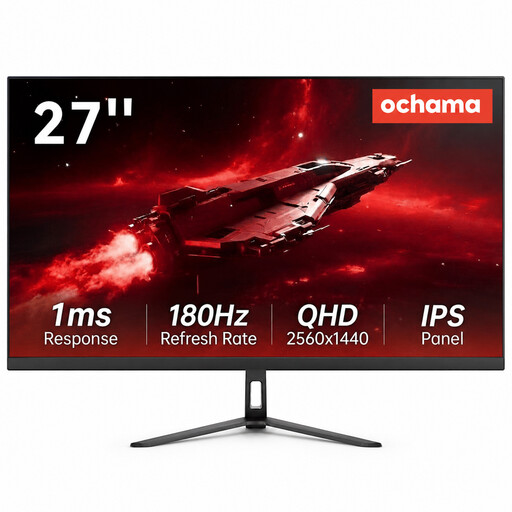 No image available
This QHD option is worth considering if you want a larger screen for both study and Squad and can accommodate it on your desk.
The product name specifies IPS and 180Hz. Check the connections, input-specific refresh limit and stand dimensions, and confirm what the keyboard offer includes.
That depends on the monitor and source device: Dell UK specifies QHD at up to 180Hz through DisplayPort on the AW2725DM, but up to 144Hz through HDMI. Check the exact monitor input, your PC's output and the cable before relying on the headline rate.
No. ZOWIE UK says variable refresh rate requires a graphics card capable of outputting a compatible signal. Check both the monitor's supported standard and your source device.
Inspect the screen and stand, then test the resolution and refresh rate using the cable and port you intend to keep using. Record any fault and contact the seller; UK guidance from Coventry City Council Trading Standards says goods must be as described, fit for purpose and of satisfactory quality.
For covered online and distance sales, GOV.UK says customers can cancel up to 14 days after delivery. Check the applicable exceptions and the seller's return procedure; remedies for faulty or misdescribed goods are a separate matter.
Arrange an electrical-waste recycling route rather than putting the monitor in ordinary household rubbish. GOV.UK describes take-back responsibilities for relevant retailers and distributors; ask the seller or your local authority which option is available to you.