Presenters who move while explaining
You stand, gesture, change position or demonstrate physical research material, so keeping yourself in frame matters more than maintaining one fixed composition.


If you move around your standing desk while presenting a research summary, consider an AI-tracking webcam designed to keep a presenter framed; if you stay in one planned position, a fixed USB webcam may be simpler to set up. A room-oriented PTZ camera makes more sense when several people or dedicated room connections are involved. Whichever route you choose, check the mounting position, computer and video-call compatibility, and how the picture looks in your lighting.
You stand, gesture, change position or demonstrate physical research material, so keeping yourself in frame matters more than maintaining one fixed composition.
You can stay within a planned frame but want to check focus and adjust the image when lighting changes around your desk.
You need to capture several people or connect a camera to room equipment, rather than attach it only to one presenter’s laptop.
For a standing-desk research summary, decide whether movement, picture control, shared-room coverage or straightforward laptop setup is your primary need.
Choose when: You present alone but move between your desk and material you are demonstrating. OBSBOT describes tracking with auto-zoom for its Tiny 2.
Allow for: Tracking behaviour depends on the camera’s placement and the area in which you move.
Choose when: You can remain within a planned shot and want a personal computer setup with image controls.
Allow for: A fixed camera cannot physically follow you; a wider shot gives you more room to move but makes you smaller in frame.
Choose when: A shared presentation room needs to capture several participants or use dedicated AV connections.
Allow for: AVer’s CAM550 requires installation planning, including a position that does not obstruct its secondary lens.
| Concern | What to check | Who this matters to |
|---|---|---|
| Framing while moving | Look for presenter tracking and auto-zoom rather than assuming 4K includes them; check the camera’s placement against your presentation area. | When I step aside to point at material, I want to remain in shot without planning every movement around a fixed frame. Around 40% of consumers would put moving-presenter framing first. |
| Picture and lighting | Check the exact resolution and frame-rate modes, focus behaviour and available exposure and white-balance controls. | If I present near a window or hold up research material, I need an image I can adjust for the actual light and viewing distance. Picture and lighting control would come first for around 30% of consumers. |
| Shared-room coverage | Check the mounting position, camera-to-presenter distance, required USB, HDMI or IP connections, and power arrangement. | When several people take part, I need the camera to fit the room’s layout and existing AV equipment, not just my laptop. Around 20% of consumers would prioritise shared-room coverage. |
| Simple laptop setup | Confirm the connector, supported computer and video-call software, and whether the available mount gives a suitable standing-height view. | For an occasional solo presentation, I would rather connect a camera to my laptop and keep to a planned position than set up room equipment. Straightforward setup would be the primary need for around 10% of consumers. |
Resolution describes the video output, not whether the camera can track movement. A fixed camera can still leave a moving presenter cropped or small in the shot.
Decide how far you will move, then check for tracking if you need it. If you will stay put, plan the field of view and mounting height instead.
Room systems can need a different position and power arrangement from a monitor-mounted webcam. AVer warns that placing its CAM550 on a table can obstruct the secondary lens.
Identify the mounting surface, cable route, power connection and required video outputs before choosing a room camera.
Mounting, cabling and AV integration may add setup work.
Backlighting or an unsuitable focus setting can make a presenter or physical material difficult to see, even when the camera offers a high-resolution mode.
Make a short test call from your standing position and adjust framing, exposure, white balance or focus where the camera’s software allows it.
Its personal USB webcam range includes fixed cameras for laptop- or monitor-based calls.
Its Tiny 2 is a compact PTZ webcam aimed at an individual presenter who may move during a call.
Its CAM550 is a room-oriented conferencing camera for shared presentation spaces.
These fixed USB webcams are options to consider if you can present within a planned frame. Electronic framing controls and an adjustable field of view should not be treated as evidence that a camera will automatically follow you around the desk.
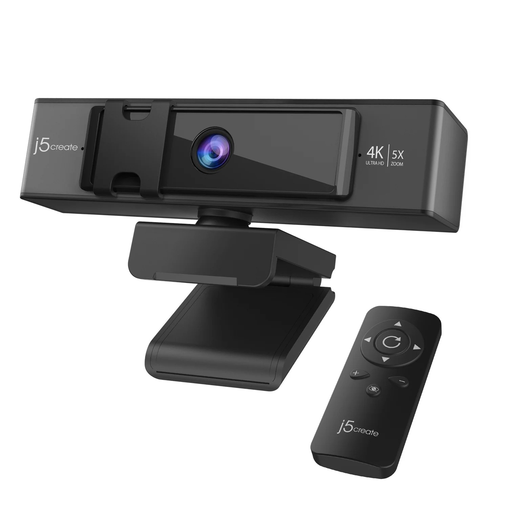 Image unavailable
Consider this for a presentation from a planned camera position where remote framing adjustment would be useful.
The product name specifies 5x digital zoom with remote control. Digital zoom does not establish automatic presenter tracking; check the mount and standing-height view if you expect to move.
 Image unavailable
Consider this for a conference call where you can remain within a planned position and want built-in audio.
The product name specifies a Sony sensor, four-microphone array, dual speakers, fixed focus and an adjustable 98° field of view. Check whether the fixed-focus distance suits both your standing position and any material you intend to show, as well as the connector and mounting method.
No: tracking is most relevant when you move outside a repeatable fixed shot. If you can stay within a planned frame, a fixed webcam may suit you; check whether a raised mount is needed to frame you comfortably while standing.
Not on resolution alone. Check focus and exposure at your standing position, along with the white-balance and lighting adjustments available for the exact camera and its software, before relying on the picture for a presentation.
Plan the mount, power and required video connections before choosing a room PTZ camera. For AVer’s CAM550, AVer advises against table placement that obstructs its secondary lens, suggests a 1.5 m installation height and specifies USB, HDMI and IP outputs.
Ask your organisation’s data-protection lead about the recording purpose, notices, access and storage arrangements for that use. The Information Commissioner’s Office provides guidance on handling identifiable people’s information in video-surveillance settings; the requirements for a presentation recording should be assessed in its own context.