Choose the keyboard around the constraint that matters most while you prepare training materials: a split layout offers a different hand position, a conventional full-size board keeps familiar keys, and a compact board leaves more desk space if its key arrangement suits your work. Check device compatibility before choosing a Mac-specific option, and adjust the standing desk to your typing position rather than expecting a keyboard to correct the workstation.
Who is choosing?
Comfort-focused planners
If you spend long stretches drafting agendas, notes and schedules, consider your hand and forearm position as well as desk height. The Health and Safety Executive and the Chartered Institute of Ergonomics and Human Factors both give guidance on positioning a keyboard for desk work.
Multi-device coordinators
If preparing a session takes you between computers or a tablet, check the keyboard’s supported devices and how you will switch between them. Logitech and Keychron describe different connection and switching options for their respective models.
Space-conscious organisers
If your standing-desk surface must also hold a mouse, notes and training materials, compare keyboard footprints without overlooking the keys you use for schedules and documents.
What matters when buying?
Start with the keys and devices your planning work requires, then check how each layout fits your desk and typing position. A compact keyboard and a split keyboard solve different problems; neither replaces a suitable desk-height adjustment.
Split ergonomic layout
Consider it: If you want separated key zones and palm support for extended typing, Logitech’s ERGO K860 offers a curved split keyframe and adjustable palm-lift positions.
Trade-off: Allow for its unfamiliar shape and check that it leaves enough room for your mouse; its design is not a guarantee against discomfort.
Conventional full-size layout
Consider it: If familiar keys, number entry and device switching matter, Logitech says MX Keys S can switch across up to three supported devices.
Trade-off: A full-size board needs more desk width and does not provide the separated key zones of a split layout.
Compact programmable layout
Consider it: If desk space and configurable shortcuts take priority, Keychron’s K3 Max UK-ISO model combines a 75% layout with QMK/VIA remapping.
Trade-off: Check access to the navigation, function and number keys your software requires, as well as your preferred switch feel.
Mac-specific compact layout
Consider it: If you work on a compatible Apple-silicon Mac and want Touch ID, Apple offers a British-English Magic Keyboard for that setup.
Trade-off: The Touch ID model requires a Mac with Apple silicon running macOS 15.1 or later; check other workstations before choosing it for shared use.
| Concern |
What to check |
Who this matters to |
| Hand and forearm position |
Check keyboard height at your standing setting and whether its shape and angle suit your hand position. |
When I draft materials for long periods, I want my arms to remain relaxed without relying on the keyboard shape alone. Around 33% of consumers put typing position first. |
| Devices and shortcuts |
Confirm supported devices, connection methods and any software needed for your shortcuts. |
If I move between planning documents and work devices, I need a setup that lets me use my usual commands. For around 25% of consumers, workflow and device switching are the primary concern. |
| Desk space and key layout |
Measure space with the mouse beside the keyboard; check access to navigation and number keys. |
I need room for notes beside the keyboard, but schedules may still call for dedicated keys. Desk footprint and key access come first for around 25% of consumers. |
| Mac compatibility |
For Apple Magic Keyboard with Touch ID, confirm an Apple-silicon Mac running macOS 15.1 or later. |
If my planning work stays on a compatible Mac, its layout and Touch ID may matter more to me than use across other systems. Around 17% of consumers prioritise that Mac-specific requirement. |
What should you avoid?
-
Choosing an ergonomic shape before adjusting the desk
A split layout or wrist rest cannot correct a typing position that makes you raise your shoulders or bend your wrists.
Set the desk for relaxed upper arms and approximately horizontal forearms, then compare keyboard height, footprint and angle. The Health and Safety Executive advises placing the keyboard just below elbow height.
-
Choosing a compact layout without checking your planning keys
A 75% layout changes access to some keys that may matter for schedules, attendance records or spreadsheets.
List the keys and shortcuts you use in your calendar, spreadsheet and presentation software before deciding whether a compact arrangement works for you.
-
Assuming a Mac-specific feature works on every computer
Apple specifies an Apple-silicon Mac running macOS 15.1 or later for its Magic Keyboard with Touch ID, so that feature should not drive a purchase for a shared Windows workstation.
Check each computer you intend to use and decide whether Mac-specific features matter more than cross-platform flexibility.
-
Using prolonged standing as a fix for discomfort
Changing posture does not remove the need to adjust and review the whole workstation.
Alternate sitting and standing, take movement breaks and seek an individual workstation assessment if discomfort develops. The Chartered Institute of Ergonomics and Human Factors recommends varying posture when using a sit-stand desk.
Brands to consider
Logitech
Relevant here for two different approaches: the split ERGO K860 and the conventional, low-profile MX Keys S.
- Logitech specifies a curved split keyframe, integrated wrist rest and palm-lift settings for ERGO K860; MX Keys S offers switching across up to three supported devices.
- Check whether the K860’s shape and footprint suit you. Neither model’s features establish that it will prevent discomfort.
Keychron
Relevant for the K3 Max UK-ISO if a compact layout and configurable keys take priority over integrated palm support.
- Keychron specifies a 75% low-profile layout, wired, Bluetooth and 2.4 GHz connections, and QMK/VIA remapping for this model.
- Check its dedicated-key access and the feel and noise of the switch variant you select.
Apple
Relevant for a Mac-focused workspace rather than as a general answer to mixed-device training work.
- Apple offers a compact British-English Magic Keyboard with Touch ID.
- The Touch ID model requires a Mac with Apple silicon running macOS 15.1 or later; its compact version has no numeric keypad.
Joybuy product choices
These keyboards offer conventional or compact layouts for planning work. Compare their stated layouts and connections with the keys you use, and check each one at your standing-desk typing height; they are not substitutes for the split ergonomic or Mac-specific options discussed above.
 No image available
ASUS ROG Strix Scope II 96 Wireless Keyboard, UK layout
Consider its UK layout if familiar typing and number-entry keys matter for schedules. The name identifies a 96% wireless keyboard; check its height, angle and wrist-rest position at your standing desk, as well as the supplied switch configuration if that affects your choice.
View on Joybuy
 No image available
HyperX Alloy Rise 75 Wireless Keyboard, UK
Consider this UK keyboard if a smaller layout appeals but navigation keys still matter to your planning work. Its name identifies the wireless Alloy Rise 75 variant; check the key arrangement, typing height and whether its profile functions cover any shortcuts you need.
View on Joybuy
 No image available
AULA F99, US QWERTY, Light Blue, Reaper Switch
Consider this layout if you want number-entry keys while keeping the keyboard footprint in mind. The named variant offers wired, Bluetooth and 2.4 GHz modes; check whether US QWERTY suits your typing, whether any macro software works with your devices, and how its height and angle feel at the desk.
View on Joybuy
 No image available
AULA F75 75% Keyboard, US QWERTY
Consider a 75% layout if desk space takes priority over dedicated number-entry keys. This named variant has wired, Bluetooth and 2.4 GHz modes, RGB backlighting and PBT keycaps; check its exact key access, US layout and typing height before relying on it for planning tasks.
View on Joybuy
 No image available
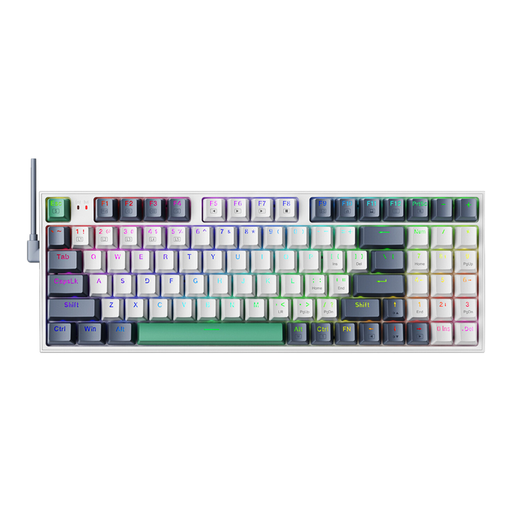
MACHENIKE K500-B94 90% Wired Keyboard, US QWERTY, Red Switch, White
Consider this wired option if you use one desk computer and want to examine a 90% layout. The named variant has red switches and RGB lighting; confirm that its US QWERTY arrangement includes the keys your planning work needs and that its height suits your standing position.
View on Joybuy
Common questions
Where should the keyboard sit when I work standing up?
Set the desk so you can type with relaxed upper arms and approximately horizontal forearms. The Health and Safety Executive advises placing the keyboard just below elbow height; keep it central to your work and leave room for your mouse and forearms.
Will a split keyboard fix an uncomfortable standing-desk setup?
No keyboard by itself corrects the whole workstation. Check desk and screen position, available arm space and your typing posture; if discomfort develops, seek an individual workstation assessment rather than relying on a particular keyboard shape.
When must a UK employer assess a computer workstation?
The Health and Safety Executive says employers must assess the workstation when a worker uses display screen equipment daily as part of normal work for continuous periods of an hour or more. The assessment concerns the workstation as a whole, not a requirement to purchase a particular keyboard.
Will Apple Magic Keyboard with Touch ID work with any Mac?
No: Apple specifies a Mac with Apple silicon running macOS 15.1 or later for this Touch ID model. Check your Mac and operating-system version before choosing it for training-session work.


