For organising study notes at a standing desk, consider a shaped keyboard with palm support if that design appeals to you, a compact keyboard if desk space is tight, or a low-profile mechanical model if key feel matters most. None replaces a suitable workstation setup: the Health and Safety Executive advises placing the keyboard just below elbow height and keeping it and the screen central. Check the exact key layout, connections and device compatibility before choosing.
Who these choices suit
Standing-desk students focused on hand position
If you spend long periods typing and reorganising notes, you may want to consider keyboard shape and palm support alongside desk height. The Health and Safety Executive advises keeping the keyboard just below elbow height; a shaped keyboard does not replace that adjustment.
Study-note organisers with limited desk space
If paper notes, a mouse, a laptop stand or a tablet share your desk, the keyboard’s footprint matters. A compact layout may free space, but inspect its dedicated keys before giving up a larger board.
Students working across several devices
If you capture notes on one device and organise them on another, check that the keyboard supports each device and offers a switching method you can use. Connection options vary between models.
What matters when choosing
Shaped ergonomic keyboard
Consider it when: You want a shaped typing position and palm support during longer note-organising sessions.
Trade-off: The wider shape can take desk space, and you still need to set the keyboard at a suitable height.
Compact keyboard
Consider it when: You need space beside the keyboard for a mouse, paper notes or another device.
Trade-off: A smaller layout may change how you reach the number pad or navigation keys.
Low-profile mechanical keyboard
Consider it when: You prefer mechanical key feedback but want a slimmer keyboard design.
Trade-off: Switch feel, sound and available keys depend on the exact variant.
| Concern |
What to check |
Who this matters to |
| Hand position |
Check whether the desk lets you place the keyboard just below elbow height. If considering a shaped board, assess its dimensions and palm support. |
If I spend long sessions reorganising notes while standing, I want a hand position that suits me without relying on the keyboard to fix my desk setup. Around 33% of consumers put this need first. |
| Desk space |
Compare keyboard dimensions and inspect the exact number-pad and navigation-key arrangement. |
With notes and a mouse beside the keyboard, I need enough room to work, but I may still use dedicated keys. This is the primary concern for around 27% of consumers. |
| Key feel and shortcuts |
Check the switch variant and whether the required keys or remapping controls are available on that model. |
When I format and sort a large set of notes, I care about the keys I press repeatedly and how they feel. Around 20% of consumers prioritise this. |
| Device compatibility |
Confirm the supported operating systems, connection modes and switching method for every intended device. |
If my notes move between a laptop and a tablet, I need a keyboard that works with both without disrupting the task. Around 20% of consumers make compatibility their main concern. |
Buying pitfalls
-
Expecting an ergonomic keyboard to fix desk height
A shaped keyboard or palm rest cannot correct a keyboard positioned too high, too low or off-centre. The Health and Safety Executive advises placing the keyboard just below elbow height and keeping it and the screen central.
Adjust the standing desk and position the screen first, then decide whether you prefer a shaped keyboard.
-
Choosing a small board without checking its keys
Compact keyboards can make room for notes and a mouse, but their number-pad and navigation-key arrangements differ. Missing a key you use frequently can make structured note work less convenient.
Inspect the exact layout. If you enter numbers often, compare it with a 96% or full-size option.
-
Assuming wireless means easy switching
Wireless keyboards do not all offer the same connections, device switching or operating-system support.
Match the exact model’s stated connection methods and compatibility to each laptop, tablet or phone you intend to use.
-
Overlooking the regional key layout
Model families can have different regional variants. Key shapes and symbol positions matter if you are accustomed to a UK layout.
Check for an explicit UK English or UK ISO designation, then compare the product images and part number with the variant you intend to order.
Brands to consider
Logitech
Logitech’s range includes shaped, compact and low-profile mechanical keyboards relevant to different standing-desk preferences.
- Logitech describes Wave Keys as having a wave-shaped design, palm rest and device-switching controls; it positions MX Keys Mini as a compact option and offers three switch choices for MX Mechanical Mini.
- These designs suit different preferences. The brand’s product descriptions do not establish which will feel more comfortable for an individual user.
Keychron
Keychron offers keyboard sizes and low-profile mechanical models for shoppers comparing layout and switch options.
- Keychron lists compact through full-size layouts. Its K1 Max ISO product page describes 2.4 GHz, Bluetooth and wired connections, plus VIA remapping.
- Features vary by model and variant, so confirm the UK ISO layout, switches and connection modes of the board you choose.
HP
HP has compact, multi-device keyboard options for desks where surface space matters.
- HP describes its 350 as a compact Bluetooth 5.2 keyboard with standard-size keycaps.
- A compact design alone does not establish a comfort advantage at a standing desk; check its layout against the keys you use.
Joybuy keyboard choices
These keyboards cover shaped and full-size wireless designs alongside smaller mechanical layouts for organising notes at a standing desk. Compare the key arrangement and space each would take before considering connection and device requirements.
 No image available
HP 960 Ergonomic Split Layout Wireless Keyboard with padded wrist rest
Consider its split layout and padded wrist rest if you prefer a shaped keyboard for longer note-organising sessions.
Check that the keyboard fits your desk and that its exact layout and connections suit your devices. Set it just below elbow height rather than relying on its shape alone.
Joybuy
 No image available
Targus EcoSmart full-size wireless keyboard (UK)
Consider a full-size layout if keeping a larger key arrangement matters more to your note workflow than freeing desk space.
This is identified as a UK wireless variant. Check its exact key arrangement and the room it leaves for your mouse and paper notes.
Joybuy
 No image available
HyperX Alloy Rise 75 Wireless Keyboard UK
Consider this wireless model if you want to compare a smaller keyboard with full-size options while keeping mechanical key feel in the decision.
Check the actual key arrangement despite the UK designation, and confirm that its connections suit your study devices.
Joybuy
 No image available
AULA F75 75% wireless mechanical keyboard, QWERTY US
The 75% layout is worth considering when notes and a mouse need space beside the keyboard, provided its key arrangement fits your work.
The product name specifies wired USB, Bluetooth and 2.4 GHz modes, plus PBT keycaps. Its QWERTY US layout may differ from the UK arrangement you expect; confirm device compatibility and any switching controls you need.
Joybuy
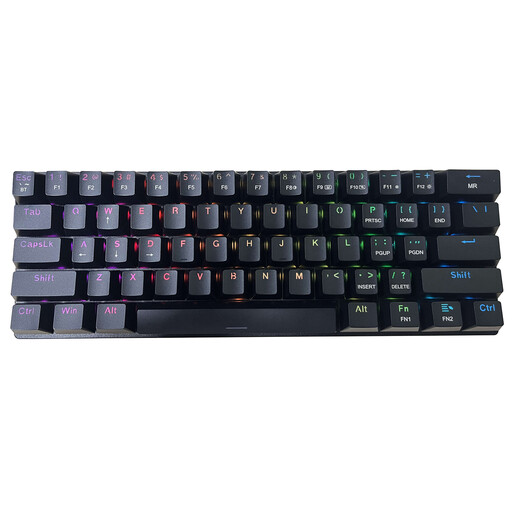 No image available
ET 60% tri-mode mechanical keyboard, QWERTY US
Its small layout may suit a desk crowded with study materials if you can work without dedicated key groups.
The product name specifies 61 keys, clicky blue switches and wired, Bluetooth and 2.4 GHz modes. Check how you would access your usual shortcuts, whether the US layout suits your typing, and compatibility with your devices.
Joybuy
Frequently asked questions
How high should my keyboard be at a standing desk?
Place the keyboard just below elbow height and keep it and the screen central, as the Health and Safety Executive advises. Adjust the desk before deciding whether a different keyboard shape would suit you.
Will a compact keyboard make organising notes easier?
It may give you more room for paper notes, a mouse or a tablet, but only if its key arrangement works for you. Check access to the number pad and navigation keys if you use them regularly.
Which connection should I choose for notes spread across devices?
Choose a connection supported by every device you intend to use, then check whether the exact keyboard offers the switching method you want. Bluetooth, USB-receiver and wired options vary between models; a wireless label alone does not establish multi-device switching.
Do UK display-screen-equipment rules require a particular keyboard for studying at home?
No particular keyboard model is prescribed for personal study. The Health and Safety Executive describes an employer workstation-assessment duty for workers who use display screen equipment daily as part of normal work, continuously for an hour or more; that work-related condition is not a consumer keyboard requirement. Its posture guidance can still help you arrange your study desk.


