For prolonged contact-form work at a standing desk, plan where the screen, keyboard and mouse will sit before choosing a laptop for its built-in display. Then choose an operating system that runs your form tools and extensions, and check how the laptop will connect to your desk setup; whichever system you use, test the finished form in the browsers your audience uses.
Who needs this setup?
The right laptop setup depends on whether you spend most of your time at one standing desk, rely on particular form-building tools, or carry the same machine between workstations.
Standing-desk form builders
If you spend long periods arranging fields, labels, validation messages and previews, screen position matters as well as screen size. The Health and Safety Executive advises using a separate keyboard and mouse for prolonged laptop work so the screen can be raised.
Browser and toolchain-dependent web workers
Your form builder, content management system, extensions or local development tools may determine which operating system you can use. The GOV.UK Service Manual also notes that browsers can handle HTML, CSS and JavaScript differently, so a working preview in one browser is not the end of testing.
Hybrid workers using more than one desk
A laptop that is convenient to carry may still need a monitor or riser at the desk where you do concentrated layout work. The cited Apple MacBook Air, Dell Pro 14 Plus and Lenovo ThinkPad X1 Carbon configurations offer compact built-in displays and 16GB memory; compare the exact configuration and desk connections rather than relying on a laptop family name.
What matters when choosing?
Start with the equipment needed for sustained standing work, then establish which software must run on the laptop. Built-in screen size matters more if you regularly lay out forms away from an external monitor.
| Concern |
What to check when buying |
Who this matters to |
| Standing-desk setup |
Check the planned monitor or riser connection and whether charging will work with your chosen dock. Allow room for a separate keyboard and mouse, as advised by the Health and Safety Executive for prolonged laptop use. |
If I will spend long sessions laying out fields while standing, I want to raise the screen without raising the typing surface. Around 40% of consumers put this workstation need first. |
| Software and browser compatibility |
Confirm that your form builder, required applications and extensions run on the chosen operating system. Plan to test the completed form in browsers relevant to its users, as the GOV.UK Service Manual advises. |
When my work depends on a particular tool or extension, a suitable screen cannot make up for software I cannot use. This is the primary concern for around 30% of consumers. |
| Moving between workstations |
Compare the exact configuration’s carry weight and power supply, then check how it will connect to the display at each desk. Do not assume configurations within one laptop family include the same accessories. |
I carry one laptop between locations but want to connect it to a standing-desk display for longer sessions. Roughly 20% of consumers prioritise that portable-workstation arrangement. |
| Built-in workspace |
Compare the display size, resolution and surface treatment of the exact variant. A larger built-in screen does not replace an independently positioned screen and input devices for prolonged standing work. |
If I often edit a form without an external monitor, I need room to see the preview alongside my controls. For around 10% of consumers, that built-in workspace is the leading need. |
Buying pitfalls
-
Assuming a standing desk fixes laptop screen position
Raising the whole laptop also raises its keyboard. For prolonged laptop use, the Health and Safety Executive advises a separate keyboard and mouse so the screen can be elevated independently.
Plan the screen support, input devices and cable arrangement together before deciding whether a larger built-in display would help.
A riser or external display, together with a separate keyboard and mouse, adds equipment to the workstation.
-
Choosing an operating system before checking the tools
A laptop may suit browser-based work while a required form builder, extension or local application does not suit its operating system. The GOV.UK Service Manual also notes that browser behaviour can differ.
List the tools you must run before choosing Windows, macOS or ChromeOS, and test the finished form in browsers used by its intended audience.
-
Assuming every configuration includes the same equipment
Memory, displays and supplied accessories can vary within a laptop family. Dell’s cited UK Pro 14 Plus configurations, for example, state that an AC adapter is not included.
Check the exact configuration’s display, memory, ports, power supply and support terms before ordering.
For those Dell configurations, you will need to account for a compatible power supply.
-
Testing the form only on the laptop’s own screen
A spacious authoring view does not show how the contact form will behave in every browser or on other devices. The GOV.UK Service Manual notes that browsers can handle web technologies differently.
Test the steps needed to complete and submit the form on the browsers and devices relevant to its audience, not just in your default browser.
Brands to consider
These examples describe particular laptop lines and configurations, not every model made by each brand. Match their operating systems and connections to your form workflow and desk equipment.
Apple
Apple’s cited UK MacBook Air specifications are relevant if your form tools work on macOS and you want a compact laptop for an external-display setup.
- The cited MacBook Air specifications include 13.6-inch and 15-inch display options, 16GB unified memory and support for up to two external displays.
- With two Thunderbolt 4/USB-C ports alongside MagSafe and a headphone jack, check whether your monitor and other peripherals require a dock or adapters.
Dell
Dell’s UK Pro 14 Plus line includes cited Windows configurations with a 14-inch 1920 × 1200 display, 16GB memory and a 512GB SSD.
- The cited configuration gives you a compact Windows option to assess against your form software and standing-desk connections.
- Dell lists multiple configurations and states that the shown ones do not include an AC adapter; check the selected display, memory and charger arrangement.
Lenovo
Lenovo’s cited UK ThinkPad X1 Carbon Gen 13 Aura Edition configuration is a 14-inch Windows option for people who carry their laptop between workstations.
- Lenovo specifies a 1920 × 1200 anti-glare IPS display, 16GB memory, a 512GB SSD, a weight below 1kg and three years of Premier Support for the cited configuration.
- Low carry weight does not remove the need to position the screen separately from the keyboard and mouse during prolonged standing work.
Joybuy laptop choices
These laptops cover Windows, Chromebook and MacBook Air options for contact-form work. Choose by the software you need to run, then check how the exact model will connect to your standing-desk screen and input devices.
 No image available
ASUS Vivobook 14 X1407QA-LY003W, Snapdragon X, 16GB/512GB, Quiet Blue
Consider this model if your required form applications and extensions support its Snapdragon X configuration; check that compatibility before buying.
The named variant has 16GB RAM and a 512GB SSD. For prolonged standing work, plan an elevated screen and separate keyboard and mouse.
Joybuy
 No image available
HP OmniBook Ultra Flip 14-fh0006na 2-in-1, 16GB/1TB
This Windows 11 Home model is worth considering if it supports the form tools and extensions you need; confirm those requirements for your workflow.
Its named configuration includes 16GB RAM and a 1TB SSD. An elevated screen and separate input devices remain important for prolonged standing work.
Joybuy
 No image available
Acer Chromebook Plus 514 CB514-5H, Core 5 120U, 8GB/512GB
Consider this Chromebook for a compatible browser-based form workflow, but check your required applications and extensions before choosing it in place of a Windows or Mac laptop.
The named variant has a 14-inch 1920 × 1200 display, 8GB RAM and a 512GB SSD. For sustained desk work, plan how to position the screen and separate input devices.
Joybuy
 No image available
Acer Chromebook Plus 514 CB514-5H, Core i3-1315U, 8GB/256GB
This is another Chromebook option for form work that fits its operating system; confirm support for every application and extension your process requires.
Unlike the Core 5 variant above, this named configuration has an Intel Core i3-1315U and a 256GB SSD. Its display is 14 inches at 1920 × 1200, with 8GB RAM.
Joybuy
 No image available
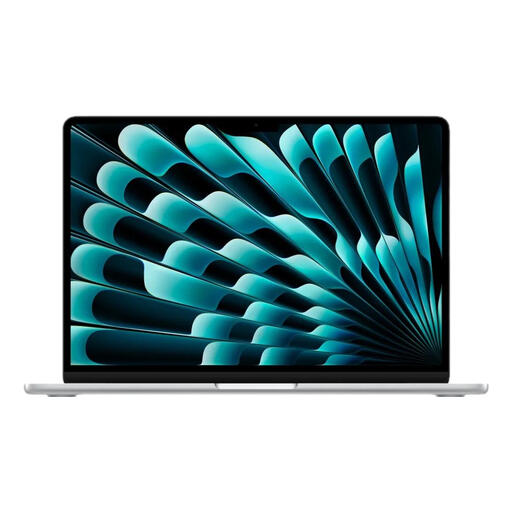
Apple 13-inch MacBook Air (2026), M5 10-core CPU/10-core GPU, 16GB/1TB, Silver
Consider this MacBook Air if your form builder and browser extensions work on macOS. Check the monitor, cable or dock and charging arrangement for the exact setup you intend to use.
The named M5 variant has 16GB memory and a 1TB SSD. Apple’s cited UK MacBook Air specifications describe external-display support, but a separate keyboard and mouse are still relevant for prolonged standing work.
Joybuy
Frequently asked questions
Do I need a separate keyboard and mouse at a standing desk?
For prolonged laptop use, the Health and Safety Executive advises using a separate keyboard and mouse so you can raise the screen without raising the typing surface. Check the position of the complete workstation, not just the desk height.
Should I choose Windows or macOS for contact-form work?
Choose the operating system that runs your required form builder, local applications and browser extensions. Either can be used to create a form when the tools fit, but the GOV.UK Service Manual advises accounting for differences in how browsers handle web technologies when you test it.
Can a MacBook Air connect to an external display for this setup?
Apple’s cited UK MacBook Air specifications support external displays through Thunderbolt 4/USB-C connections, with support for up to two external displays on the cited models. Check the exact MacBook Air, monitor, cable or dock and charging arrangement before buying.
What should I do with an old laptop when buying a replacement?
Ask the retailer how to use its electrical-waste take-back service. GOV.UK states that UK retailers must offer to take back waste equipment of the same type as an item a customer buys; check the retailer’s arrangements for handing over your old laptop.


