What to check before choosing
For renovation planning at a standing desk, start with the control method that suits your grip and available space, then check fit, navigation controls and connection requirements.
Vertical mouse
Consider it: If you prefer an upright, handshake-style grip during lengthy sessions with plans and documents.
Trade-off: Size and handedness vary by model, so the shape still needs to fit your hand and button reach.
Conventional productivity mouse
Consider it: If a familiar grip suits you and scrolling or configurable shortcuts are more important to your work than an upright grip.
Trade-off: It does not provide a vertical grip, and some custom controls depend on compatible software.
Thumb-operated trackball
Consider it: If plans and samples leave little room to move a mouse across the desk.
Trade-off: Moving the cursor with your thumb is a different technique from moving a conventional mouse.
| Concern | What to check | Who this matters to |
|---|
| Grip and workstation position |
Check the mouse shape and whether it can sit in line with your elbow, as advised by the Health and Safety Executive. |
During long sessions over drawings and budgets, I want a grip that suits me without reaching across the desk. Around 36% of consumers put grip and positioning first. |
| Navigation and shortcuts |
Check adjustable tracking, button placement and whether the controls you want need compatible software. |
When editing plans and switching documents, I want cursor control and shortcuts that suit those tasks. For around 29% of consumers, navigation is the primary concern. |
| Connections and desk space |
Check the connection your computer can use and whether there is room to move the mouse; consider a stationary trackball for a crowded surface. |
With samples and paperwork beside my keyboard, I need a pointing device that fits the space and my computer setup. Desk flexibility comes first for around 21% of consumers. |
| Hand size and handedness |
Check the stated fit, handed version and button reach for the exact model. |
If a shell is too large or its buttons are on the wrong side for me, its other features will not settle the choice. Around 14% of consumers prioritise physical fit and handedness. |
Mouse options on Joybuy
These options cover vertical-grip and conventional mice for working through renovation plans and documents. Choose between them by grip, controls and desk setup; the conventional models are not substitutes for an upright grip.
 Image unavailable
HP 920 Ergonomic Wireless Mouse, black, with detachable wrist rest
Consider this vertical-grip option if you want an upright hand position while navigating plans; check that its shell and button reach suit you.
The product description specifies six buttons, adjustable tracking up to 4,000 DPI and Bluetooth 5.3 or 2.4 GHz connectivity. The detachable wrist rest is part of this named variant.
View on Joybuy
 Image unavailable
V7 MW500BT Bluetooth Vertical Mouse
This is another vertical-grip option for moving between plans and documents; check the shape, handedness and button reach before choosing it.
The product description specifies six buttons, 800, 1,200 and 1,600 DPI settings, and Bluetooth or 2.4 GHz connection.
View on Joybuy
 Image unavailable
RAPOO MT760L-LG Mouse
Consider this model if configurable controls and switching between devices matter to your planning work. Confirm the exact model and grip shape on the product page before choosing it.
The product description specifies adjustable DPI, programmable buttons and side scrolling. Its cross-computer function requires driver installation and computers on the same Wi-Fi or Ethernet network; the optional wireless charging module is sold separately.
View on Joybuy
 Image unavailable
Logitech MX Master 3S, black
Choose this conventional-grip option if scrolling and configurable controls matter more to you than an upright grip.
The product description specifies a 200–8,000 DPI range, seven programmable buttons, MagSpeed scrolling and Bluetooth or Logi Bolt connectivity. Customisation uses Logi Options+; check that the functions you want suit your computer.
View on Joybuy
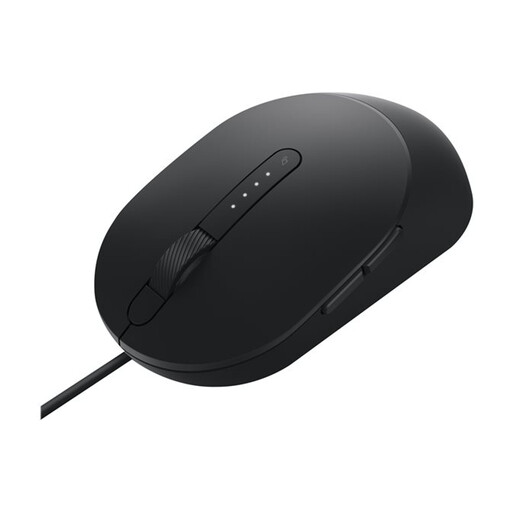 Image unavailable
Dell MS3220 Laser Mouse
This wired, conventional mouse may suit a fixed desk setup if you want a symmetrical shape and shortcut controls rather than a vertical grip.
The product description specifies USB connection, 3,200 DPI, five buttons and tilt scrolling. Check compatibility with your computer and whether the cable arrangement works at your desk.
View on Joybuy
Questions about choosing and setup
Do I need a vertical mouse at a standing desk?
No: a vertical mouse is an option if you prefer its upright grip and find a model that fits your hand. A conventional mouse or thumb trackball may better suit your controls or available space, and the Health and Safety Executive’s mouse-position advice still applies whichever shape you choose.
Where should I put the mouse while standing?
Keep the mouse in line with your elbow, as the Health and Safety Executive advises, so you do not have to reach across the desk to use it. Review the keyboard and screen positions at the same time rather than adjusting the mouse in isolation.
Will a higher DPI figure help me work on detailed plans?
A higher maximum DPI figure does not, by itself, establish better control for your plans. Adjustable tracking lets you choose a cursor-speed setting; assess that alongside grip, button placement and the software you use.
What ergonomic mouse options are there for left-handed use?
Logitech offers a left-handed Lift option for small to medium hands, and Kensington makes a dedicated Pro Fit Left-Handed Ergo Wireless Mouse. Check the particular version’s fit and controls rather than assuming a right-handed vertical model can be used comfortably with either hand.


