Who is this for?

Standing spreadsheet reviewers

If you spend extended sessions comparing transactions, statements and bills, check how a mouse shape fits your hand and where it lets you place your arm. An upright grip may be worth trying if a flat mouse feels awkward.

Paper-heavy desk users

If receipts and statements share your desk with the computer, a thumb-operated trackball lets you move the pointer without moving the device across the surface.

Shortcut-focused household organisers

If you regularly move through long account lists or wide spreadsheets, scrolling controls and configurable buttons may matter more to you than an upright grip.

What matters when choosing?

Vertical mouse

Consider it when: You want an upright grip for lengthy account-review sessions and can find a shape suited to your hand and handedness.

Trade-off: The grip may feel unfamiliar, and a vertical shape alone does not establish that it will be comfortable for you.

Thumb trackball

Consider it when: Bills and receipts leave little space to move a mouse beside the keyboard.

Trade-off: Your thumb controls the pointer, so check whether that movement and the button positions suit you.

Conventional productivity mouse

Consider it when: Long lists, wide spreadsheets and repeated actions make scrolling and shortcuts your priority.

Trade-off: It does not offer a vertical grip, and configurable features may depend on compatible software.

ConcernWhat to checkWho this matters to
Grip and hand fit Compare the stated hand-size and handedness guidance; check whether the mouse can sit in line with your elbow. If a flat mouse feels awkward during lengthy reviews, I want a grip that fits my hand without reaching across the desk. Around 40% of consumers put grip and hand fit first.
Limited desk space Check whether pointer control requires moving the device, and whether its thumb ball and buttons are within comfortable reach. With bills and receipts spread out, I need to keep control of the pointer without clearing space for mouse travel. Roughly 30% of consumers prioritise that space-saving need.
Account navigation Check scrolling controls and whether any shortcuts you want work with your computer and software. When I work through long transaction lists or wide sheets, I want controls that suit those repeated movements. About 30% of consumers make navigation their primary concern.

Buying pitfalls

  • Choosing a vertical shape without checking fit

    Vertical mice differ in size and handedness. Logitech describes Lift as suited to small to medium hands and offers a left-handed version; Kensington positions its Pro Fit Ergo Vertical Wireless Mouse for average to larger hands.

    Start with the maker’s fit guidance, check the exact variant you intend to buy and, if trying the shape is important to you, review the retailer’s applicable returns policy.

  • Expecting a mouse to fix the whole workstation

    The Health and Safety Executive advises placing the mouse in line with the elbow and considering the keyboard, screen and furniture as part of the workstation arrangement.

    Set the standing-desk height and keyboard position before judging a new mouse, and keep the mouse close enough to use without reaching.

  • Assuming all wireless connections and shortcuts work alike

    Connection choices differ by model: Kensington describes a nano receiver for its Pro Fit Ergo Vertical Wireless Mouse, while Trust lists receiver and Bluetooth connections for Bayo+. Configurable Logitech controls can also depend on compatible software.

    Check the exact mouse’s connection modes, your available ports and operating-system compatibility before relying on a particular shortcut setup.

Brands to consider

Logitech

Its relevant range includes upright mice, stationary thumb trackballs and conventional mice with additional navigation controls.

  • Logitech offers a left-handed Lift variant and describes its trackballs as devices that stay in place during pointer movement.
  • Fit varies between models; configurable features should be checked against the required software and operating system.

Kensington

Its Pro Fit Ergo Vertical Wireless Mouse is a right-handed, receiver-based option that Kensington positions for average to larger hands.

  • Kensington specifies a 46.7-degree vertical shape and a nano receiver for this model.
  • Check another model if left-handed use or Bluetooth is essential; neither is listed for this one.

Trust

Its Bayo vertical-mouse models provide options for buyers comparing an upright shape with wireless connection needs.

  • Trust specifies a 57-degree shape for Bayo II and connections to up to three devices for Bayo+ using one receiver and two Bluetooth connections.
  • Confirm the exact model and its connection modes rather than assuming that features carry across the Bayo range.

Joybuy product options

These options include vertical mice for an upright-grip preference and a conventional mouse for account-review navigation. Compare their fit and controls against the space available at your standing desk.
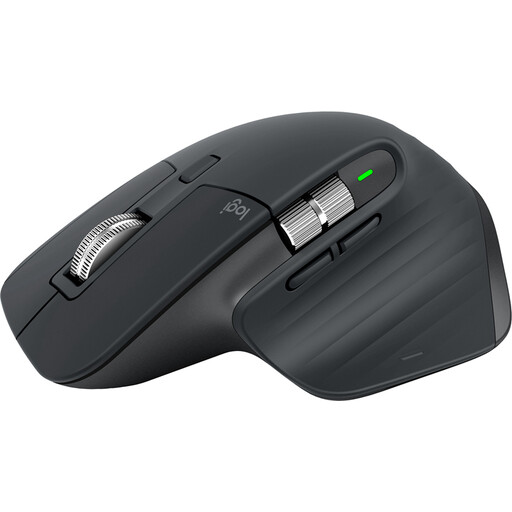
Logitech MX Master 3S mouse in black

Logitech MX Master 3S Mouse, Black

Consider this conventional mouse if navigating account lists and setting up repeated actions matter more to you than an upright grip. If you plan to use programmable controls, check software compatibility; also confirm whether a receiver is in the box and whether the shape fits your hand.

View on Joybuy
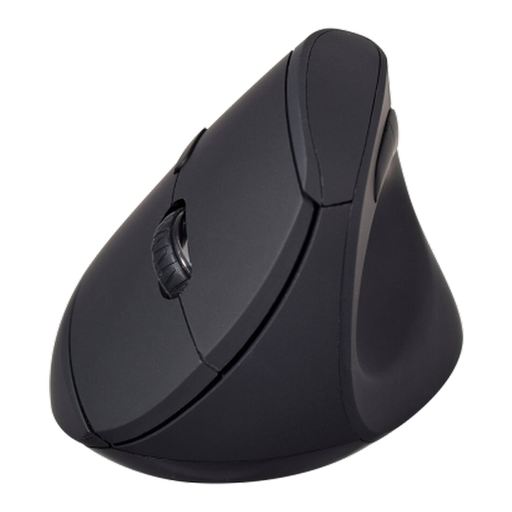
V7 MW500BT Bluetooth vertical mouse

V7 MW500BT Bluetooth Vertical Mouse, 2.4GHz Dual-Mode, 6 Buttons, 1600 DPI

Consider this model if you prefer an upright grip while reviewing accounts. Its stated options include Bluetooth and 2.4GHz connectivity, six buttons and a 1600 DPI setting; check hand-size and handedness fit before buying.

View on Joybuy
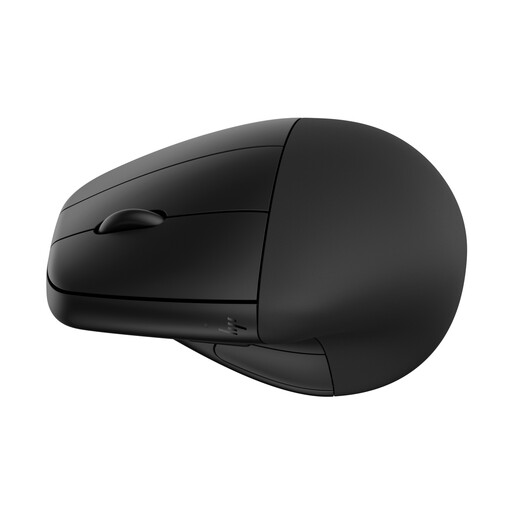
HP 920 wireless mouse in black with detachable wrist rest

HP 920 Ergonomic Wireless Mouse, Black, with Detachable Wrist Rest

Consider this vertical option if you want to assess a mouse with a detachable wrist rest for your desk arrangement. Check that the mouse and rest fit your hand and working position; the rest alone cannot establish personal comfort.

View on Joybuy

Common questions

Is a vertical mouse the automatic choice for account reviews at a standing desk?

No: a vertical mouse is worth considering when its upright grip fits your hand, but a thumb trackball may suit a desk crowded with paperwork, while a conventional productivity mouse may suit frequent spreadsheet navigation. Check the shape and controls against the work you actually do.

Where should I put the mouse on a standing desk?

Keep it close and in line with your elbow, as the Health and Safety Executive advises. Arrange the desk and keyboard so you can use it without reaching across paperwork or twisting to see the screen.

Should I choose Bluetooth or a USB receiver?

Choose according to the connections supported by both your computer and the exact mouse, particularly if keeping a USB port free matters to you. Kensington lists a nano receiver for its Pro Fit Ergo Vertical Wireless Mouse, whereas Trust lists a receiver and two Bluetooth connections for Bayo+.

Do workplace display-screen rules apply when I review my own household accounts?

Private household-account use is not itself an employer display-screen-equipment assessment. The Health and Safety Executive describes those duties in relation to employers whose workers regularly use display-screen equipment as a significant part of their normal work; if you also use this desk for your job, ask your employer about its workstation assessment process.