Joybuy Insights

How to Build an Effective Standing Desk Setup: Top Recommendations

The way we work has changed. For many in the UK, the home office is no longer a temporary solution but a permanent fixture. If your current workspace consists of a dining table and a stack of books for your laptop, you might be feeling the strain. An uncomfortable setup can lead to back pain, clutter and a dip in productivity.

Creating a functional and comfortable workspace is key to staying focused and healthy. This guide will walk you through the essential components of a modern standing desk setup, helping you choose the right elements to build an environment that supports both work and well-being. We will look at the core components and accessories that form a complete ergonomic home office setup.

Building Your Workspace: A Practical Guide

Before choosing individual products, it helps to understand what makes a setup truly effective. Here are a few key considerations for building a workspace that lasts.

1. The Foundation: Choosing Your Electric Standing Desk

The centrepiece of your setup is the desk itself. An electric standing desk offers the flexibility to switch between sitting and standing, which can help reduce sedentary time. When comparing models, look for:

  • Motor & Stability: A quiet, smooth motor is essential for an undisrupted work environment. Check the desk's load capacity to ensure it can safely support your monitors, computer and other equipment. A sturdy steel frame is often a good indicator of stability.
  • Height Range & Memory Presets: Ensure the desk's height range is suitable for you, both when sitting and standing. A good rule of thumb is that your elbows should be at a 90-degree angle when typing. Memory presets are a convenient feature, allowing you to save your preferred heights and switch between them with a single button press.
  • Tabletop Size & Finish: Consider the space you have available and the equipment you need to accommodate. A depth of at least 60cm is generally recommended for a comfortable distance from your monitor. The finish should complement your room's aesthetic, creating a space you enjoy being in.

2. Optimising for Sound and Space

A cluttered desk can lead to a cluttered mind. A well-chosen wfh tech kit should enhance your productivity, not get in the way. Consider how audio and other peripherals fit into your setup. A high-quality wireless desk speaker can eliminate the need for cumbersome wired systems and headphones, providing clear audio for calls and a rich sound for music while you work. Look for models with multiple connectivity options like Bluetooth, Wi-Fi and AUX for maximum versatility.

3. Accessorising for Your Workflow

The right accessories can transform a good desk into a great one. For those who use their phone for video calls, content creation or as a second screen, a dedicated holder is invaluable. A versatile tabletop stand can hold your phone securely at the perfect angle, freeing up your hands and desk space. This is a crucial part of any content creator setup and equally useful for professionals who frequently join video meetings.

Our Top Recommendations for Your Standing Desk Setup

Here are a few items that provide a strong foundation for a productive and ergonomic workspace.

ochama Electric Standing Desk, Walnut Colour, 120*60cm

ochama Electric Standing Desk, Walnut Colour

  • Why It Stands Out: This desk serves as an excellent core for any ergonomic home office setup. Its electric lift mechanism operates quietly, allowing you to adjust the height without disturbing your focus. The frame is built to handle a 70KG load capacity, providing a stable surface for multiple monitors and other gear. It also features 2-level memory height settings for convenience.
  • Pros:
    • Quiet and smooth electric motor.
    • Sturdy steel frame with a generous load capacity.
    • Elegant walnut finish that fits well in modern home offices.
    • Features UK Standard & CE dual certification.
  • Who is it for? Professionals, students or gamers seeking a reliable and stylish height-adjustable desk to serve as the cornerstone of their workspace.

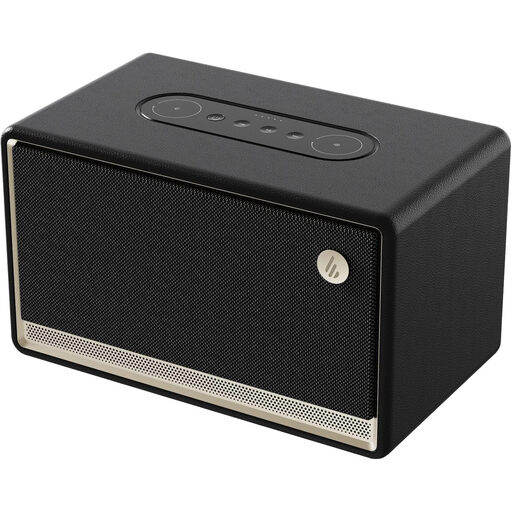
Edifier ES300 Tabletop Wireless Speaker

Edifier ES300 Tabletop Wireless Speaker

  • Why It Stands Out: This speaker delivers impressive audio quality without taking up valuable desk space. It is certified for Hi-Res Audio, ensuring crystal-clear sound for music, podcasts and calls. Its connectivity is highly versatile, featuring Bluetooth 5.3, Wi-Fi, USB and AUX inputs. The multi-point connection allows you to pair two devices at once, seamlessly switching between your computer and phone.
  • Pros:
    • High-fidelity audio with powerful bass and clear treble.
    • Extensive connectivity options for any device.
    • 12-hour battery life for portable use.
    • Supports multi-room audio via Airplay 2.
  • Who is it for? Anyone looking to upgrade their desk audio, from music lovers and gamers to remote workers who need clear sound for virtual meetings. It's a great addition to a clean setup or as part of a gaming desk accessories collection.

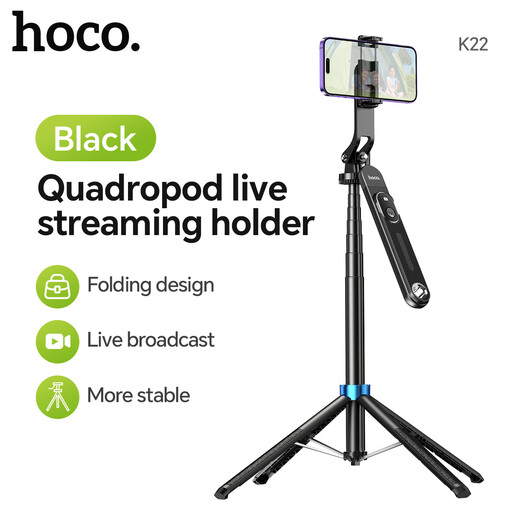
HOCO K22 Handy Tabletop Holder

HOCO K22 Handy Tabletop Holder - Black

  • Why It Stands Out: More than just a phone stand, the HOCO K22 is a versatile tool for any modern desk. It’s incredibly portable, folding down to just 29cm, but extends to a remarkable 1.75 metres. The included Bluetooth 5.2 remote lets you start and stop recordings or take photos from a distance, making it ideal for content creation or hands-free video calls.
  • Pros:
    • Lightweight, portable and highly adjustable design.
    • Includes a detachable Bluetooth remote shutter.
    • Securely holds a wide range of smartphones (4.5" to 7.0").
    • Stable tripod base for use on any flat surface.
  • Who is it for? Content creators, streamers and professionals who rely on their smartphone for video. It’s an essential part of a flexible content creator setup.

Looking for More Options?

The products highlighted here are designed to work together as a cohesive electric standing desk bundle, but every workspace has unique needs. If you are exploring different styles or components, you can find a wider selection of accessories to complete your setup.

Discover more options in our Black Tabletop collection to find the perfect additions for your desk.

Frequently Asked Questions

Is a standing desk worth it for a home office?

For many people, a standing desk is a worthwhile addition. The ability to alternate between sitting and standing can help reduce the discomfort associated with long hours of sedentary work. It encourages more movement throughout the day, which can contribute to better posture and focus.

How do I organise my standing desk setup?

Effective organisation is key. Start with cable management solutions like ties or sleeves to keep wires tidy. Use monitor arms to free up desk surface area and position screens at an ergonomic height. Finally, use dedicated accessories like a wireless speaker or a phone holder to keep your essential tools within reach but out of the way.

What is a good height for a standing desk?

The ideal height for a standing desk allows you to work comfortably without straining your neck, shoulders or wrists. A common guideline is the "elbow rule": adjust the desk height so that when your arms are resting on the surface, your elbows are bent at approximately a 90-degree angle and your wrists are straight.