What to check before buying
For a stock-chart desk beside a window, decide which need would drive your choice if glare control, smoother movement and device connections compete. Check the room layout before comparing display specifications.
| Concern |
What to check |
Who this matters to |
| Glare and chart readability |
Check the exact model’s matte or anti-glare surface and typical brightness; make sure you can angle the screen away from the window. |
When daylight reflects across chart lines, I need to keep prices legible without relying on brightness alone; around 42% of consumers put glare control first. |
| Smoother on-screen movement |
Compare the supported refresh rate and check that your computer can output the desired resolution and refresh rate together. |
If I scroll through charts and watchlists frequently, I want the movement to look smoother; roughly 33% of consumers prioritise display motion. |
| Laptop connections and switching |
Check USB-C display support and charging wattage against your laptop; verify any keyboard-and-mouse switching function you need. |
When I move between a laptop and another computer, I want fewer cable and peripheral changes; about 25% of consumers put device switching first. |
Joybuy monitors for this desk
These monitors offer 4K or WQHD chart workspaces, with different display and connection priorities. For a window-side desk, check each model’s screen surface and typical brightness alongside the room layout; OLED models also warrant care if charts remain static for long periods.
 No image available
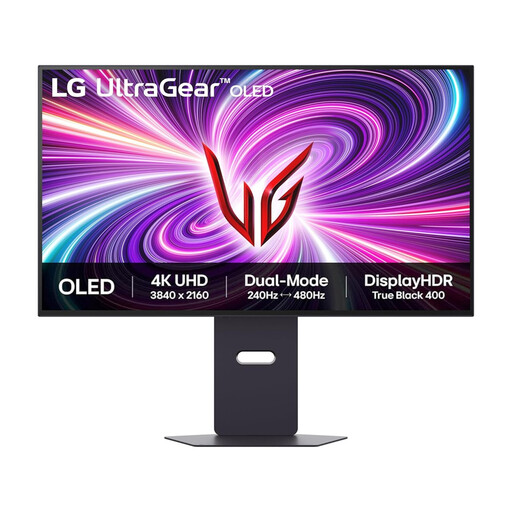
LG UltraGear 32GS95UV-B 32-inch dual-mode 4K OLED monitor
Consider this if display-motion options matter alongside a 4K chart workspace. The product name lists 4K at 240Hz and FHD at 480Hz as separate modes; check which mode your computer can drive. For charts left on screen for long periods, consider the listing’s warning about OLED image retention, and assess brightness and reflections in your room.
Joybuy
 No image available
ASUS ProArt Display PA32UCG-K 32-inch 4K IPS Mini LED monitor
Consider this 120Hz model if smoother movement is a priority at a chart-reading desk. Its product name also identifies Thunderbolt 3 connectivity; confirm compatibility with your computer. Check the exact typical-brightness specification and how the screen handles reflections in your intended position.
Joybuy
 No image available
ASUS ProArt PA278CV IPS WQHD monitor
Consider this IPS WQHD model if a 4K workspace is not essential to your chart layout. Before using it with a laptop beside a window, check its exact connection and charging specifications, screen surface and typical brightness against your setup.
Joybuy
 No image available
ASUS ProArt PA27DCE-K OLED 4K UHD monitor
This OLED 4K UHD model is an option to assess for a high-resolution chart workspace. Consider the listing’s warning about image retention with prolonged static images. For window-side use, compare typical brightness rather than treating a peak-brightness figure as equivalent.
Joybuy
 No image available
Lenovo L32p-30 31.5-inch 4K IPS USB-C monitor
Consider this 31.5-inch 4K IPS model if you want a larger chart workspace with USB-C connectivity. Check its screen coating and typical brightness for your window position, and confirm USB-C display and charging compatibility with your laptop.
Joybuy
Frequently asked questions
Should I choose the brightest monitor for a desk beside a window?
No: brightness is one specification to compare, not a substitute for controlling reflections. The Health and Safety Executive advises arranging the screen to avoid glare and bright reflections, often by not facing it directly towards a window or bright light.
Do I need 120Hz to follow live stock movements?
You do not need 120Hz to make market data arrive sooner. A higher refresh rate can make visible scrolling and interface movement smoother, so choose it if that display preference matters after you have addressed glare and checked your computer’s supported output.
When must a UK employer assess a desk used for stock charts?
According to the Health and Safety Executive, a UK employer must carry out a workstation assessment when a worker uses display screen equipment daily as a significant part of normal work, continuously for an hour or more. The assessment concerns the workstation, including equipment, furniture and working conditions, rather than the monitor alone.
What should I check when replacing an old monitor?
Check the retailer’s take-back terms and your local authority’s current collection options for the old monitor. The Office for Product Safety and Standards and the Department for Environment, Food & Rural Affairs identify the Waste Electrical and Electronic Equipment Regulations 2013, as amended, as the legislation underpinning the UK electrical-equipment waste framework.


