Confirm how your photo service lets you export the library before choosing a drive: Amazon Customer Service describes a selection-based browser download and says whole albums cannot be downloaded in one action. Choose storage that fits the completed photo-and-video export, with a portable hard drive worth considering when capacity is the priority and a portable SSD when you expect frequent transfers or travel. Keep the disconnected drive as one part of a backup arrangement, not your only retained copy.
Who needs an offline copy?
People with large home photo libraries
If your cloud collection includes years of photos and videos, you need enough space for the exported files and a way to check that the copy opens. The download route matters too: Amazon Customer Service says its browser workflow requires selecting pictures within an album rather than downloading the entire album in one action.
People who transfer or carry files regularly
If you update the offline copy often or move it between devices, check the ports and cables you will actually use. Samsung says the stated maximum speeds for its T7 Shield SSD require a compatible host, cable and UASP support; carrying any drive does not remove the need for a separate retained copy.
Households using several devices
If the library must open on Mac and Windows computers, or directly on an iPhone, decide on the file system and connection before copying. Apple lists exFAT for Windows-compatible volumes over 32 GB and sets additional format and partition requirements for external storage connected to iPhone.
What matters when choosing storage?
Start with a small export you can inspect, then assess the space needed for the full library. The drive must also connect to your intended devices, and the finished copy must remain separate from the files it protects.
| Concern |
What to check |
Who this matters to |
| Space for the full export |
Check the exported photo-and-video size against the chosen drive's capacity, leaving room for future additions. Confirm the capacity of the exact model, not just its product range. |
If I want the whole collection together, I need to know that videos and exported folders will fit as well as photos. Around 40% of consumers put complete-library capacity first. |
| Transfers and device access |
Check both ends of the connection, including ports and cables; for direct iPhone access, check Apple's format, partition and power requirements. |
When I update the copy regularly or carry it between devices, a connection I can use matters more than a headline speed. Around 30% of consumers prioritise transfer and portability needs. |
| A recoverable separate copy |
Plan where the drive will be kept, check that sample files can be restored and disconnect removable storage between updates. |
If something happens to my computer, I need a copy I can still open rather than another drive exposed to the same incident. Backup separation is the primary concern for around 30% of consumers. |
Mistakes to avoid
-
Assuming the whole cloud library downloads in one step
A suitable drive does not solve an awkward export process. Amazon Customer Service says its browser instructions involve selecting pictures and do not download an entire album as one action.
Check your service's current download and account-data options. Try a small export and inspect its photos, videos, dates and folder structure before planning the full copy.
-
Choosing capacity from the photo count
A count of pictures does not tell you how much space the completed export will occupy, particularly when the collection also contains videos or downloaded archives.
Measure the storage used or inspect a representative export, then allow space for the files you intend to keep and future additions.
-
Leaving the offline drive connected all the time
The National Cyber Security Centre reports ransomware incidents that affected connected USB and network backup drives as well as original files.
Check that copied files can be opened, then safely eject and disconnect the removable drive when you are not updating it. Keep another retained copy separately.
-
Choosing by the drive's advertised speed alone
Samsung says its T7 Shield's stated maximum transfer speeds require USB 3.2 Gen 2 support from the host and cable, with UASP enabled. Apple also notes that an external hard drive connected to an iPhone may need external power.
Check your device's port and power requirements alongside the drive's connector and supplied cable; use an adapter or powered hub if the device documentation calls for one.
Relevant brands to consider
Seagate
The Seagate Basic portable hard-drive range is relevant when you are looking for a dedicated, capacity-led copy kept at home.
- Seagate lists Basic models in 1 TB, 2 TB, 4 TB and 5 TB capacities with USB 3.0 connectivity.
- Check the exact model and your computer's port before purchase; keeping one hard drive does not by itself provide a separate backup arrangement.
Samsung
The Samsung T7 Shield portable SSD range is relevant to people who expect to move or update their library frequently.
- Samsung lists 1 TB, 2 TB and 4 TB T7 Shield variants.
- Samsung's stated maximum T7 Shield speeds require a compatible USB 3.2 Gen 2 host and cable, with UASP enabled; these conditions should not be assumed for every Samsung T7 model or computer.
Western Digital
The WD Elements Portable hard-drive range is another capacity-led option for a photo-and-video copy.
- Western Digital lists Elements Portable capacities from 1 TB to 6 TB and USB 3.2 Gen 1/USB 3.0 connectivity.
- Check the selected model's capacity, connector and file-system format against the devices that need to read the copy.
Joybuy storage choices
These portable SSDs and hard drives are possible destinations for a cloud photo export. Match the finished export's size to the specific capacity before choosing; none replaces the need to retain and check another copy.
 No image available
Samsung Portable SSD T7 4 TB Grey
Consider this portable SSD if you expect to update or carry a library that fits within its capacity, with room to grow.
The product name specifies 4 TB and USB 3.2 Gen 2. Check your host connection and cable before relying on transfer-speed claims.
View on Joybuy
 No image available
Samsung Portable SSD T7 2 TB Grey
Consider this portable SSD if your completed export fits within 2 TB with enough space for additions and you plan to move files regularly.
The product name specifies USB 3.2 Gen 2. Check the computer's port and the cable you will use.
View on Joybuy
 No image available
Lexar ES4 Portable SSD with Magnetic Set 2 TB
Consider this portable SSD for a 2 TB photo-library copy if its connection and intended devices suit your workflow.
Its product name specifies USB 3.2 Gen 2, stated speeds of up to 1,050 MB/s read and 1,000 MB/s write, and iPhone 15/16 compatibility. Check the required format before copying files; the magnetic attachment is described for iPhone 15/16 series.
View on Joybuy
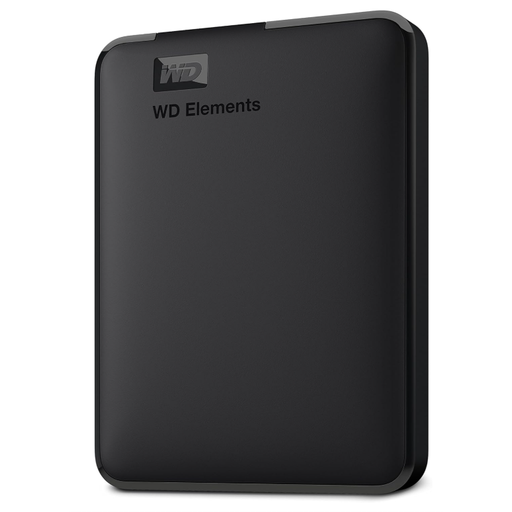 No image available
Western Digital Elements Portable 6 TB hard drive
Consider this portable hard drive if a substantial completed export calls for 6 TB of stated capacity.
The product name specifies USB 3.0. Check the file-system format needed by your computers before copying; using it with macOS may require reformatting.
View on Joybuy
 No image available
Western Digital Elements Portable 4 TB Black hard drive
Consider this portable hard drive when the completed export and expected additions fit within its stated 4 TB capacity.
The product name specifies USB 3.0. Check the connection and file-system format for every intended computer; Mac use may require reformatting.
View on Joybuy
Frequently asked questions
Can I download an entire Amazon Photos album at once?
Not through the browser workflow described by Amazon Customer Service: its instructions say to open an album and select the pictures to download, rather than downloading the entire album in one action. Check your account's current download options and test what arrives before committing to a full-library transfer.
Can I use one external drive with both Mac and Windows?
Yes, if you choose a file system both computers can use for your intended tasks. Apple identifies exFAT as a Windows-compatible format for volumes over 32 GB; check the drive's current format and copy off any existing files before reformatting it.
Can an iPhone open photos on an external drive?
An iPhone can access compatible external storage through the Files app and supported apps, according to Apple. The device needs a compatible connection, one data partition and a format Apple lists as supported; an external hard drive may also need external power.
Is one external drive enough for irreplaceable photos?
Do not make one external drive your only retained copy. The National Cyber Security Centre describes a backup as a copy kept in a separate safe location and warns that connected backup drives have been affected in ransomware incidents. Keep copies separated and test that you can restore files from them.


