Start with the strategy games you want to play: a Steam library points towards a SteamOS or Windows handheld, while Nintendo Switch 2 makes sense when those games are available on Nintendo hardware. Check each game's compatibility and controls before choosing; trackpads, touch controls and mouse-style controllers are useful only where the game supports an input method you find comfortable.
Who these handhelds suit
PC strategy-library owners
If your planned games are on Steam or another PC store, establish which handheld can access them before comparing hardware. Valve provides game-by-game Steam Deck compatibility ratings; Windows access offers another route, but each game's requirements still need checking.
Players navigating detailed maps and menus
If small units and dense menus make thumbstick control awkward, consider the input options in the games you play. Valve's Steam Deck has trackpads, Nintendo's Joy-Con 2 controllers can act as a mouse in compatible games, and Lenovo describes a mouse mode for the Legion Go Gen 2's detachable right controller.
Console-first strategy players
If you prefer a console catalogue, confirm each planned game and its controls on Nintendo Switch 2. If you already have a PS5, PlayStation Portal is a different proposition: PlayStation describes it as a Remote Play device that requires the console rather than running games independently.
What matters when choosing
Identify the games and platform you need first, then judge whether their maps, text and controls will work for you on a handheld screen.
| Concern |
What to check |
Who this matters to |
| Access to planned games |
List your games; check Steam Deck ratings for Steam titles and store, operating-system and input requirements for others. |
I want to keep playing games from my PC library, so access to those titles comes before hardware features; around 40% of consumers put game-library access first. |
| Readable maps and precise input |
Assess screen size and text in each game, and confirm support for its touchscreen, trackpad or mouse-style controls. |
When a game relies on small units and crowded menus, I need to navigate them comfortably; readable interfaces and precise input come first for around 30% of consumers. |
| Console catalogue |
Confirm the exact game runs on Switch 2 and supports the controls you intend to use. |
I prefer a console setup, provided the strategy games I want are available on it; around 20% of consumers prioritise that catalogue-and-console choice. |
| Playing away from the TV |
For PlayStation Portal, confirm PS5 ownership, game suitability and the connection where you plan to play. |
I already have a PS5 game and want to continue it away from the television rather than install games on a new device; that Remote Play need comes first for around 10% of consumers. |
Buying mistakes to avoid
-
Assuming every Steam strategy game works equally well on Steam Deck
Valve assesses Steam Deck compatibility by game; some titles need configuration or are not compatible with SteamOS.
Check each priority title's rating, launcher requirements, text and available control options before choosing a Steam Deck.
-
Treating Windows access as proof of comfortable handheld play
Access to a PC game does not establish that its text, menus and controls will suit a handheld display and controller.
Confirm whether your games require Windows, then assess their interfaces and the exact handheld configuration you are considering.
-
Using a standard microSD card for Switch 2 game storage
Nintendo says non-Express microSD cards cannot be used for Switch 2 game-storage expansion; they can be used to copy screenshots and videos.
If you need more game storage, choose a compatible microSD Express card.
-
Expecting PlayStation Portal to work as an independent handheld
PlayStation Portal Remote Play requires a PS5 and depends on the connection where you play.
Confirm that your game is suitable for Remote Play and assess your connection before choosing it as a way to play away from the TV.
Relevant handheld brands
Valve
Steam Deck is a SteamOS handheld to consider when your planned strategy games are in your Steam library.
- Built-in trackpads provide an alternative to thumbsticks for navigation.
- Valve's compatibility ratings are game-specific; check the titles you intend to play.
Nintendo
Switch 2 is a console-oriented choice when your intended strategy games are available on Nintendo hardware.
- Nintendo lists a 7.9-inch touchscreen and Joy-Con 2 mouse use in compatible games.
- Mouse control is game-dependent, and game-storage expansion requires microSD Express.
ASUS ROG
The ROG Xbox Ally X20 is a Windows 11 handheld to assess if your strategy games span PC stores or require Windows.
- ASUS describes access to a PC game library through Windows 11.
- Windows access alone does not establish comfortable controls or readable text in each game.
Lenovo Legion
The Legion Go Gen 2 is a Windows handheld for players assessing screen area and pointer-style control.
- Lenovo lists an 8.8-inch display and a detachable right controller that can operate as a mouse using its controller base.
- Check the exact configuration and whether your games suit its control arrangement.
PlayStation
PlayStation Portal is relevant to existing PS5 owners who want to stream compatible games away from the TV.
- Remote Play lets a PS5 owner consider a handheld screen without choosing a separate local game library.
- PlayStation says Portal Remote Play requires a PS5 and at least 5 Mbps broadband, recommending at least 15 Mbps for a better experience; connection quality can vary.
Joybuy handheld options for strategy games
Consider the Lenovo Legion Go S if you are assessing handheld play for a PC game library, or Nintendo Switch 2 if your planned games are in its console catalogue. For either device, check your exact games and preferred controls before choosing.
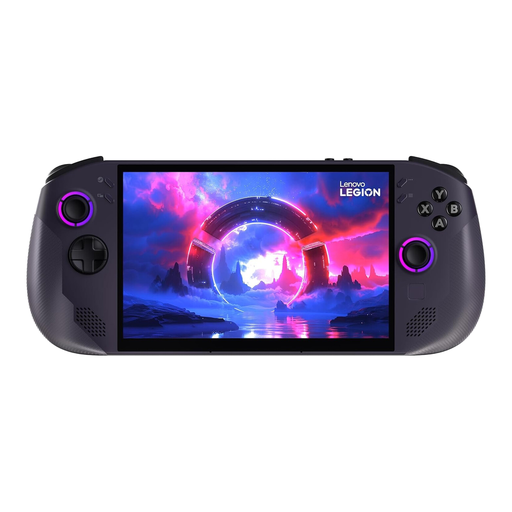 Image unavailable
Lenovo Legion Go S, AMD Ryzen Z2 Go, 1TB
For strategy games in your PC library, check whether your chosen titles and their map and menu controls suit this handheld.
The listed variant has an AMD Ryzen Z2 Go processor and 1TB storage.
View on Joybuy
 Image unavailable
Nintendo Switch 2 Console, UK Version
For console-based strategy play, confirm that each planned game is available on Switch 2 and supports the controls you want.
Nintendo lists a 7.9-inch touchscreen; Joy-Con 2 mouse control works only in compatible games. Game-storage expansion requires a compatible microSD Express card.
View on Joybuy
Questions about strategy gaming on handhelds
How do I check my Steam strategy games for Steam Deck?
Check the Steam Deck compatibility rating for every game you plan to play. Valve's ratings describe the expected experience for individual titles; also consider whether their text, launchers and controls will suit you on a handheld.
Can Joy-Con 2 work as a mouse in every Switch 2 strategy game?
No. Nintendo says Joy-Con 2 mouse use applies to compatible games, so confirm support for each title before relying on it for maps or menus.
Which memory card expands Switch 2 game storage?
Use a compatible microSD Express card. Nintendo says a non-Express microSD card can copy screenshots and videos but cannot expand Switch 2 game storage.
Can PlayStation Portal replace a standalone strategy-game handheld?
Not if you need games to run locally on the handheld. PlayStation says Portal Remote Play requires a PS5 and at least 5 Mbps broadband, with at least 15 Mbps recommended for a better experience; it is a way to stream compatible PS5 games rather than install a separate PC game library.


