Choose a mouse for historical strategy games by the commands you want within reach, not by button count alone. A conventional multi-button layout suits a short list of shortcuts; consider a 12-button thumb grid only if you will learn and use it. In a student room, weigh the convenience of wireless against battery upkeep, or make room for a wired cable.
Who is this for?
Players with many repeated commands
If you regularly use control groups, maps and menus, you may want more actions within thumb reach. Corsair and Razer offer 12-button thumb-grid layouts, but their usefulness depends on the commands you actually assign.
Players focused on button reach
During long campaigns, the position of frequently used controls may matter more to you than the total button count. Consider your hand, grip and risk of accidental presses when comparing layouts; an ergonomic label cannot establish personal fit.
Student-room gamers with compact desks
If the same desk serves study and gaming, decide whether a cable or battery upkeep is easier to accommodate. Wireless options can remove the mouse cable from the desk, while some models offer both 2.4 GHz and Bluetooth connections.
What matters when choosing?
List your intended mouse shortcuts before comparing layouts, then check whether their placement and connection method suit your desk.
| Concern |
What to check |
Who this matters to |
| Command layout |
Count the controls you intend to assign and compare a conventional side-button layout with a 12-button thumb grid. |
If I use many repeated map, menu or control-group commands, I want enough reachable buttons to make learning a larger layout worthwhile. Around 31% of consumers put command capacity first. |
| Reach and fit |
Check handedness, side-button position and whether controls can be moved or disabled; assess the seller’s return terms before ordering. |
For a long campaign, I need to reach my shortcuts without changing my grip or pressing neighbouring buttons by mistake. Comfort and control placement come first for around 25% of consumers. |
| Desk setup |
Compare wired use with the wireless modes offered, then check battery or charging arrangements and any conditions attached to stated runtimes. |
If I move between study and gaming on a small desk, I would rather manage a battery than an extra cable. Wireless desk convenience is the main concern for around 19% of consumers. |
| Useful simplicity |
Write down the shortcuts you will bind and confirm that the exact model has the controls and accessories your setup requires. |
When I only need a few extra commands, I do not want to learn a thumb grid that I will rarely use. Around 25% of consumers put a straightforward setup first. |
Buying pitfalls
-
Choosing a thumb grid for its button count alone
A 12-button side panel offers room for assignments, but a dense layout takes practice and may add accidental presses if you use only a few shortcuts.
Write down your planned bindings. If the list is short, compare conventional multi-button layouts before committing to a grid.
-
Reading maximum battery life as your expected runtime
Manufacturer-stated maximums can depend on the connection mode and settings. Corsair specifies RGB-off conditions for its cited Scimitar Elite Wireless SE figures.
Compare figures for the mode and lighting settings you plan to use, and check how the exact mouse is powered or charged.
-
Assuming an ergonomic shape will fit your hand
Hand size, grip and button reach differ between players; a contoured shape or adjustable control does not guarantee comfort.
Check control placement and the seller’s return terms before ordering. Logitech G’s G502 X has a repositionable DPI-shift button, while Corsair’s Scimitar Elite Wireless SE has an adjustable side panel.
-
Putting an old mouse in general waste
GOV.UK describes the UK waste electrical and electronic equipment framework as a way to reduce electrical equipment sent to landfill or incineration.
When replacing a mouse, check the available retailer, manufacturer or local-authority collection route.
Brands to consider
Logitech G
The wired G502 X is a reference point for players who want several control options without a 12-button thumb grid.
- Logitech G lists a tilt wheel with two additional programmable controls, a DPI-shift button that can be repositioned or removed, and an 89 g weight for this model.
- Its cable needs space on the desk, and adjustable controls do not establish whether the shape fits your hand.
Razer
The Basilisk V3 X HyperSpeed offers a nine-control wireless layout; the Naga V2 HyperSpeed takes the distinct route of a 12-button thumb grid.
- Razer lists 2.4 GHz and Bluetooth connectivity for both models, and 21 programmable controls for the Naga V2 HyperSpeed.
- Razer’s battery-life figures are stated maximums, not a personal runtime guarantee. The Naga’s denser layout also requires more bindings to learn.
SteelSeries
The wired Rival 5 offers a conventional side-panel alternative to a 12-button grid.
- SteelSeries lists nine programmable buttons, including a five-button side-panel layout, and an 85 g weight for Rival 5.
- Those specifications do not determine whether its button positions suit your grip or your planned strategy-game shortcuts.
Corsair
The Scimitar Elite Wireless SE is a high-control-count option for players planning a substantial set of thumb-button assignments.
- Corsair lists 16 programmable buttons, a repositionable 12-button Key Slider panel, 2.4 GHz wireless, Bluetooth and USB use while charging.
- Its stated battery maximums use RGB-off conditions, and the adjustable grid still needs to suit your thumb reach.
Joybuy product choices
These models cover wireless mice with different stated button counts and a wired alternative for players who prefer not to manage a mouse battery. Compare their exact control layouts with the shortcuts you plan to use.
 No image available
Rapoo VT7 MAX Wireless Gaming Mouse, White
Consider this wireless model if your planned bindings call for more than a small set of mouse shortcuts.
The listing names 10 programmable buttons, macro support and a 53 g weight. Its up-to-750-hour battery figure depends on updating the driver to enable low-power mode; check the button arrangement and power requirements for your setup.
Joybuy
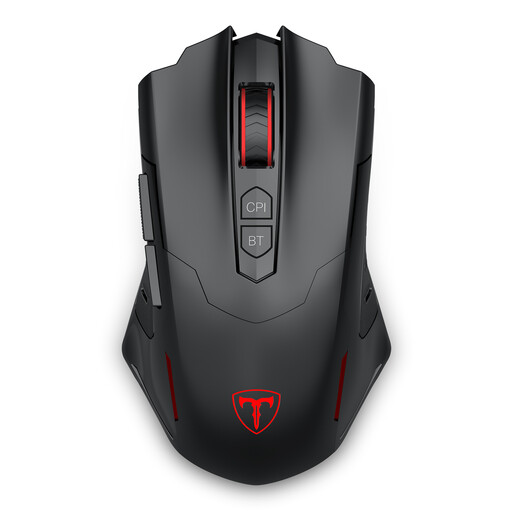 No image available
ET PC400 Wireless Gaming Mouse
This model suits a shorter shortcut list when you also want a choice of wireless connection methods.
Its name states seven programmable buttons, 2.4 GHz and Bluetooth connections, and 8000 DPI. Check the button positions against your grip and the battery arrangements before choosing it; stated runtime varies with the backlight setting.
Joybuy
 No image available
ONIKUMA CW905 Wired Gaming Mouse
Consider this wired option if you want programmable controls without managing a wireless mouse battery.
The product name identifies programmable buttons and RGB lighting. Check which controls can take your intended bindings and whether the cable and button positions suit your desk and grip.
Joybuy
Frequently asked questions
How many mouse buttons do I need for historical strategy games?
Start with the commands you will actually assign, rather than a target button count. A conventional multi-button layout can cover a short list; consider a 12-button thumb grid if you have enough repeated actions to justify learning it and can reach its controls comfortably.
Is wired or wireless more practical in a student room?
Wireless is worth considering if removing a cable helps you use a compact desk or switch setups, provided you are comfortable managing its battery. A wired mouse avoids that upkeep but still needs a workable cable route.
How should I set up the buttons for strategy games?
Begin with a few repeated commands you can recall without looking, then adjust the bindings as you play. Check the mouse software and the game’s own settings or rules before assigning macros.
What should I do if a mouse bought in the UK is faulty?
Contact the retailer and keep your order details when reporting the fault. GOV.UK states that consumer law protects purchases of goods; the applicable remedy and timing depend on the circumstances, rather than simply on a retailer’s change-of-mind return policy.


