Choose a key-based controller if you mainly need labelled controls for scenes, microphone mute and overlay triggers. Choose a controller with dials if you expect to adjust audio levels while playing. Check computer and software compatibility before buying, and set up the fundraiser and donation overlays separately: a controller does not create them.
Who a controller may suit
First-time charity stream hosts
If you need to change scenes, mute your microphone and show donation overlays while gaming, dedicated controls may make those actions easier to find. JustGiving describes livestream fundraising for new and experienced streamers and offers overlay options.
Live audio adjusters
If you expect to change microphone, game or music levels during the session, dials may matter more to you than additional visible keys. Elgato’s Stream Deck + has four push-capable dials alongside its keys.
Creators with an existing workflow
If you already use several streaming or creative applications, profiles and macros may help organise your configured actions. Razer describes application profiles and plugins for Stream Controller X; check that the tools you intend to use are supported.
What matters when choosing
List the actions you will use while live, then decide whether one-press triggers, gradual adjustments or software fit should drive the control layout.
| Concern |
What to check |
Who this matters to |
| One-press shortcuts |
Count the scenes, mute controls and overlay triggers you want visible, and check how your broadcast software assigns them. |
When I am gaming and hosting, I want the actions I use most to be easy to find without searching through windows. Around 42% of consumers put shortcut access first. |
| Live audio adjustment |
Decide which levels you need to change during play, then check whether your software and audio setup can expose them to the controls. |
If microphone or game sound needs changing mid-stream, I want a control suited to gradual adjustment. For around 33% of consumers, live level control is the primary need. |
| Workflow compatibility |
Check the exact model’s operating-system requirements, connection and configuration software against your planned setup. |
With several tools already in my workflow, I need the configured actions to work together before the event begins. Workflow fit comes first for around 25% of consumers. |
Purchasing pitfalls
-
Choosing by key count alone
Elgato’s Stream Deck MK.2 has 15 LCD keys, while Stream Deck + has eight keys and four rotary dials. More visible shortcuts do not answer a need for frequent, gradual level changes.
Write down your one-press actions and the settings you expect to turn up or down while live, then choose the layout around that list.
-
Assuming the included cable fits your computer
For the Stream Deck MK.2 or Stream Deck +, the controller connection, cable ends and available computer ports all matter.
Check the exact package contents and your computer’s ports before ordering.
If the cable cannot connect directly to your computer, a compatible adapter or hub may be needed.
-
Treating the controller as the fundraising setup
JustGiving describes a fundraising page, streaming account and broadcast software as parts of its livestream workflow. A controller can trigger actions you have configured, but it does not create the donation page or connect its overlays for you.
Set up the donation link and broadcast workflow first, then privately test scenes, overlays and alerts before going live.
-
Overlooking support when considering Loupedeck Live S
Loupedeck’s Live S product page carries an end-of-sales and future-development notice, making current software access and seller support important to a new purchase.
Ask the seller about the exact model’s availability, warranty and support route before committing.
Brands to consider
These brands illustrate different control layouts; compare the exact model and its support arrangements rather than treating a brand name as a guarantee of fit.
Elgato
Elgato’s Stream Deck range includes the shortcut-led MK.2 and the key-and-dial Stream Deck +.
- Elgato specifies 15 customisable LCD keys for Stream Deck MK.2, and eight LCD keys, four push-capable dials and a touch panel for Stream Deck +.
- Choose between the layouts according to your live actions, and check the exact model’s operating-system requirements and included cable.
Razer
Razer lists Stream Controller X for programmable shortcuts and a separate Audio Mixer for direct mixing controls.
- Razer describes 15 Switchblade buttons, multi-link macros and software-powered profiles for Stream Controller X.
- Confirm seller availability and support for Stream Controller X in your market; the Audio Mixer is a different type of device, not another keypad layout.
Loupedeck
Loupedeck Live S combines touch controls, dials and layout buttons.
- Loupedeck specifies 15 touch-sensitive buttons, two press-capable dials and four layout buttons for Live S.
- Its manufacturer page carries an end-of-sales and future-development notice; check current software availability, warranty and support before buying.
Joybuy controller choices
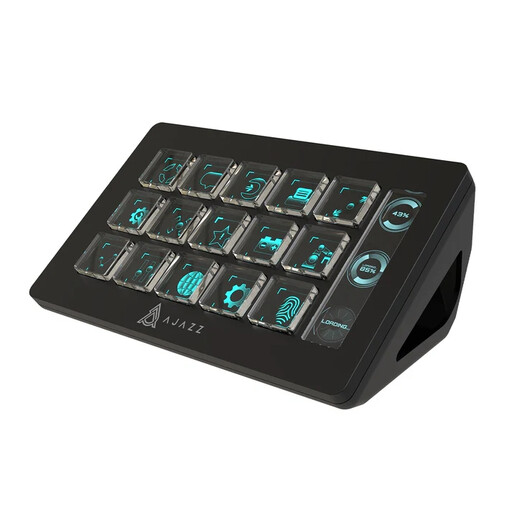
This key-based option suits a setup centred on assignable stream shortcuts; check its compatibility with your own computer and broadcast workflow before buying.
 No image available
AJAZZ AKP153 Studio Controller, 15 macro buttons, black
Consider this controller if you want assignable buttons for stream actions rather than making live dial adjustments your main reason to buy.
Its product name specifies 15 macro buttons and describes use with OBS, YouTube and Twitch on PC or Mac. Check the operating-system version, required software, connection and the actions you plan to configure for your particular setup.
Joybuy
Common questions
Do I need a controller for a JustGiving charity game stream?
No. JustGiving describes a workflow using a fundraising page, streaming account and broadcast software; a hardware controller is optional. Consider one if dedicated physical controls would help you manage configured actions while playing.
Should I choose more keys or physical dials?
Choose more keys when you need visible one-press controls for scenes, mute and overlays; choose dials when you expect to adjust levels gradually during the stream. Elgato specifies 15 LCD keys for Stream Deck MK.2, compared with eight LCD keys and four push-capable dials for Stream Deck +.
What should I test before going live?
Test every configured action privately in your intended broadcast setup, including scene changes, microphone mute, audio adjustments, overlays, donation alerts and ending the stream. JustGiving describes broadcast-software overlays as part of its livestreaming workflow; adding a controller does not configure those connections automatically.


