Choose an LCD-key controller with enough separate keys for your essential broadcast actions if desk space is tight. Consider dials if you regularly make gradual audio adjustments during a run, accepting a larger footprint; keep timer shortcuts apart from broadcast commands and test the mappings before presenting.
Who needs which controls?
Speedrunners managing live controls
If you handle scenes, microphone state, recording and timer shortcuts during a run, give each critical action a distinct position. LiveSplit documents global timer hotkeys, while Elgato documents separate OBS Studio actions for scenes, audio, recording and streaming.
Presenters working at a small desk
If a keyboard and mouse already occupy the usable surface, check the controller’s body dimensions and how many actions must stay visible. Elgato lists the Stream Deck Neo at 107 × 78 × 26 mm with eight configurable keys.
Presenters adjusting audio live
If you change audio levels gradually during a broadcast, a dial-equipped layout may be more relevant than extra shortcut keys. Elgato lists four push encoders and a touch strip on the Stream Deck +; check that its larger body fits your setup.
What matters when choosing?
For a speedrun at a small desk, decide which commands need their own keys, then check the available surface and whether you adjust levels during the presentation.
| Concern |
What to check |
Who this matters to |
| Separate timer and broadcast controls |
Check how many labelled actions remain visible and whether timer shortcuts can be assigned distinct positions. LiveSplit documents global hotkeys, and Elgato lists OBS Studio scene and audio actions. |
When switching scenes mid-run, I need timer commands kept apart so I am less likely to hit reset by mistake; roughly 42% of consumers put command separation first. |
| Desk footprint |
Measure usable width and depth, allowing for the cable and any stand. Elgato lists the Neo at 107 × 78 × 26 mm and the MK.2 at 118 × 84 × 25 mm without its stand. |
At a crowded workstation, I want the controller within reach without displacing my keyboard or mouse; around 33% of consumers prioritise desk fit. |
| Gradual live adjustment |
Decide whether you need rotary controls or only on/off actions. Elgato lists four push encoders alongside eight LCD keys on the Stream Deck +. |
If I change microphone or game levels while presenting, I need gradual adjustments rather than another on/off shortcut; about 25% of consumers put live adjustment first. |
Setup mistakes to avoid
-
Choosing by button count alone
More visible keys can reduce page changes, but they do not replace dials if you regularly adjust levels. Elgato’s eight-key Neo, 15-key MK.2 and dial-equipped Stream Deck + offer different control layouts.
Write down the actions that must stay visible during a run. Choose a smaller keypad only if changing layouts is acceptable, and choose dials only if gradual adjustments are part of your routine.
-
Putting timer reset beside broadcast commands
LiveSplit documents global hotkeys, so a timer command can register even when the timer window is not focused.
Give timer and OBS actions separate positions and recognisable labels. Check for conflicting shortcuts, then rehearse the full start, split and reset sequence before presenting.
-
Assuming a creative-console profile covers streaming
Logitech describes the MX Creative Console’s creative and communication controls, but a general app profile does not establish the exact OBS or LiveSplit actions you need.
Check your operating system, required software and the mapping for every critical action before choosing a general-purpose console for a speedrun broadcast.
Relevant brands to consider
Elgato
Elgato’s Stream Deck range includes compact keypads, a 15-key model and a dial-equipped controller.
- Elgato lists eight keys and Touch Points on the Neo, 15 LCD keys on the MK.2, and eight LCD keys with four push encoders on the Stream Deck +. Its OBS Studio integration documents scene, audio, recording and stream actions.
- Check the operating-system, Stream Deck app and OBS Studio version requirements for the model and actions you intend to use.
Logitech
The MX Creative Console combines a keypad and wireless dialpad for creative-application workflows and configurable shortcuts.
- Logitech describes customisable LCD keypad controls, tactile dialpad controls and application profiles.
- Confirm the specific OBS and timer-shortcut actions you need rather than assuming its creative-application profiles provide them.
Razer
Razer presents the Stream Controller X as a shortcut controller for content creation.
- Razer lists 15 Switchblade buttons and Windows and macOS compatibility through Loupedeck Software for the Stream Controller X.
- Confirm the current support for your required applications and the seller’s terms before purchasing a particular listing.
Joybuy product choices
These controllers are options for programmable actions in a small-desk speedrun setup. Compare the controls you need with the space available, and confirm the exact broadcast and timer mappings before use.
 No image available
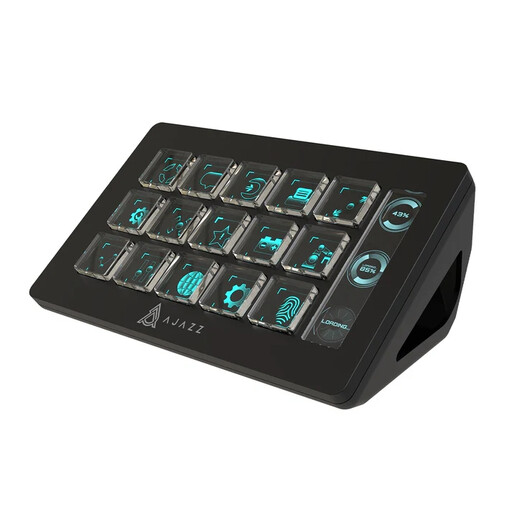
AJAZZ AKP153 Studio Controller, 15 Macro Buttons (Black)
For presenters who want several one-touch commands, this model’s title lists 15 macro buttons and OBS use. Check the software setup and usable desk space, then keep any LiveSplit timer shortcut separate from broadcast commands.
View on Joybuy
 No image available
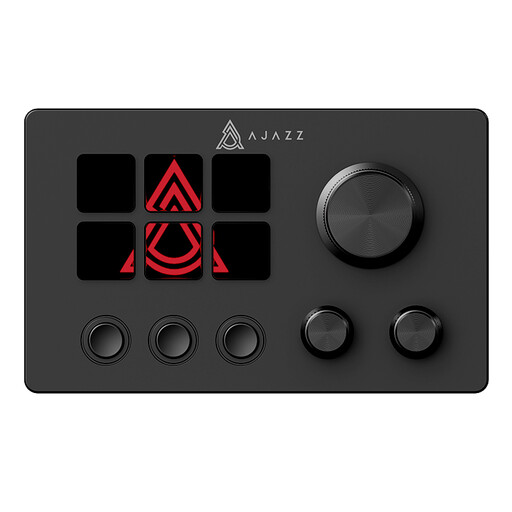
AJAZZ AKP03E Desktop Assistant LCD Multimedia Controller
For a presenter considering customisable controls for live streaming, this model’s title identifies an LCD display and programmable buttons. Confirm the exact controls, desk footprint and required OBS and timer-shortcut mappings before choosing it.
View on Joybuy
Common questions
Can a stream controller replace my speedrun timer keys?
It can trigger mapped shortcuts, but it is not automatically a safer timer input. LiveSplit documents global hotkeys, so give timer actions distinct positions, avoid shortcut conflicts and test the full start, split and reset sequence before presenting.
Which OBS actions should I put on the controller first?
Start with the scene changes and microphone controls you need during the run, then add recording or stream controls if you can give them distinct positions. Elgato documents these actions in its OBS Studio integration; check that your controller and software versions support the mappings you plan to use.
What should I do with an old stream controller?
Look for a suitable electrical-equipment collection or retailer take-back route rather than treating it as ordinary household rubbish. GOV.UK explains that waste electrical and electronic equipment rules aim to reduce disposal to landfill or incineration.


