What matters when choosing?
Count the actions you need during the run before deciding whether key space, live audio adjustment or desk space should take priority.
15-key controller
Choose when: Several scene changes and presentation cues need their own visible buttons.
Trade-off: A key-focused layout does not give you the dedicated audio dials found on some other controllers.
Keys and audio dials
Choose when: You expect to adjust microphone, game or media levels during the presentation.
Trade-off: Elgato Stream Deck + has four encoders but eight LCD keys, compared with the 15 LCD keys on Stream Deck MK.2.
Compact eight-key controller
Choose when: Your essential controls fit on a short main-page list and desk space is limited.
Trade-off: Adding more cues may mean switching pages or profiles mid-run.
| Concern |
What to check |
Who this matters to |
| Visible cues |
List the scene, timer or split, microphone and media actions you need without changing pages; compare that list with the available buttons. |
If I need to trigger several parts of my run without hunting through pages, keeping cues visible comes first. Around 42% of consumers put visible cue access first. |
| Live audio |
Check whether the software can assign the audio sources you use to physical dials. |
When I adjust game and microphone levels as I present, direct control matters more to me than extra shortcut keys. Roughly 33% of consumers make live audio adjustment their primary need. |
| Desk space |
Measure the available area, allow room for the cable and identify a usable connection on your computer. |
With little clear desk space, I would rather keep a small set of controls within reach than fit a larger surface beside my laptop. About 25% of consumers prioritise a compact, straightforward setup. |
Joybuy product choices
This 15-button option is relevant if you want several speedrun-presentation actions close at hand. Confirm that its software can perform your particular OBS and timer or split actions before choosing it.
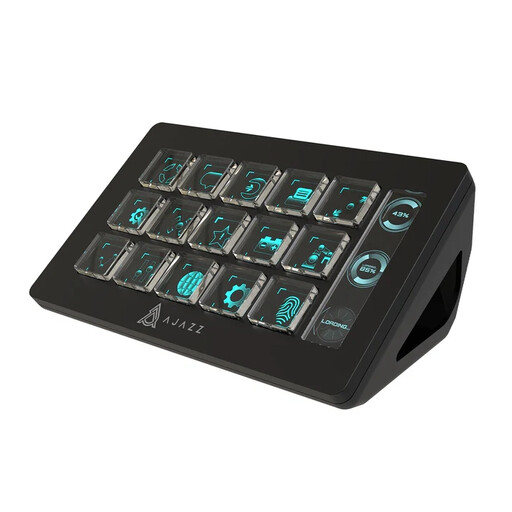 Image unavailable
AJAZZ AKP153 Studio Controller, 15 macro buttons (Black)
Consider this controller if your presentation needs several shortcut buttons within reach.
It has 15 macro buttons and is described for PC/Mac use. Check the supported operating-system and software versions, and confirm whether your required OBS scenes and timer or split shortcuts can be assigned.
View on Joybuy
Common questions
Do I need 15 keys to present a speedrun?
No: eight keys can be enough if your essential actions fit on one page. If scenes, cues, microphone mute and timer or split shortcuts all need to stay visible, a 15-key layout gives you more buttons to assign without changing pages. Elgato specifies 15 LCD keys for Stream Deck MK.2 and eight for Stream Deck Neo.
When are physical dials worth choosing?
Choose dials when you expect to adjust audio levels during the presentation and the controller software can reach the sources you use. Elgato specifies four push encoders on Stream Deck +, while Loupedeck specifies two analogue dials on Live S. If your levels stay fixed, visible shortcut buttons may matter more.
Will a stream controller work with my OBS setup?
Check the controller’s specific OBS integration and the actions you intend to assign before buying. OBS Project describes hardware communication through plugins, but plugin availability can depend on your platform, processor architecture and OBS version; support for one action does not establish support for your timer or split workflow.
What computer requirements should I check for an Elgato Stream Deck?
Check the current Stream Deck software requirements as well as the hardware connection. Elgato lists Windows 11 64-bit with an Intel or AMD processor, or macOS Ventura 13.0 or later, and cautions that Windows on ARM may not work as expected.
What should I check if I use an extension lead in my student room?
Check that the lead is sound, not overloaded and permitted under your accommodation’s rules. London Fire Brigade warns against overloading extension leads or adding extra adaptors and extensions; route the controller cable so it does not create a trip hazard.


