Guide recorders who need visible actions
If you narrate a strategy walkthrough, labelled controls can put recording, microphone mute, scene changes and frequently used shortcuts within reach instead of requiring you to remember key combinations.


Choose a controller with labelled keys if your main job is triggering recording, microphone and scene actions without searching for shortcuts. Consider dials when you need hands-on adjustment during narration, or a larger key grid when many commands must remain visible; in every case, check support for your computer and the recording software you use.
If you narrate a strategy walkthrough, labelled controls can put recording, microphone mute, scene changes and frequently used shortcuts within reach instead of requiring you to remember key combinations.
If you change microphone, game or music levels while speaking, physical rotary controls may matter more to you than a larger grid devoted to fixed actions.
If cutting footage and adjusting parameters take up much of your workflow, check for controls and application profiles suited to your editing software as well as your recording setup.
Start with the actions you need during a take, then decide whether audio adjustment or post-production controls deserve more space on your desk.
| Concern | What to check | Who this matters to |
|---|---|---|
| One-touch recording control | Count the recording, mute and scene actions you want visible during a take; check operating-system support. | I want to trigger the actions I use while explaining a move without hunting through shortcuts; around 42% of consumers would put immediate access to those controls first. |
| Audio adjustment | Decide whether you need gradual level changes or only mute and preset actions; check assignments in your audio software. | When narration and game sound need attention mid-take, I would rather adjust a control than interrupt the explanation; roughly 33% of consumers would prioritise hands-on audio adjustment. |
| Editing controls | Check the named editing applications and the specific profile or shortcut actions you need. | If most of my work follows recording, I want controls that serve the editing application I actually use; around 25% of consumers would make post-production control their primary concern. |
A programmable controller triggers assigned actions; it is not a substitute for the recording part of your setup.
Separate your requirements for recording software, any capture equipment and shortcut control before choosing a device.
Your setup may still require recording software, capture equipment or audio equipment.
Elgato lists 32 LCD keys for Stream Deck XL, while Stream Deck + has eight LCD keys, four push encoders and a touch strip. More visible keys and dedicated adjustment controls answer different needs.
Count the fixed actions you use during a take separately from adjustments you make while speaking.
Logitech names creative applications for MX Creative Console, while Loupedeck lists OBS Studio among integrations for Live S. One device’s named integration does not establish the same workflow on another.
Check your exact recording and editing applications, operating system and required actions before ordering.
Loupedeck’s Live S product page carries an end-of-sales and future-development notice, which matters when considering remaining stock.
Confirm availability, current support, the seller’s returns policy and the warranty route before purchasing.
The Stream Deck range offers distinct layouts for fixed actions, hands-on adjustment and command-heavy setups.
MX Creative Console is an editing-oriented keypad and dialpad option for creators working in supported applications.
Live S combines touch controls and analogue dials for streaming and creative-application workflows.
These AJAZZ desktop controllers offer assignable shortcuts relevant to a guide-recording setup. Check the actions available in your own recording software before choosing either one.
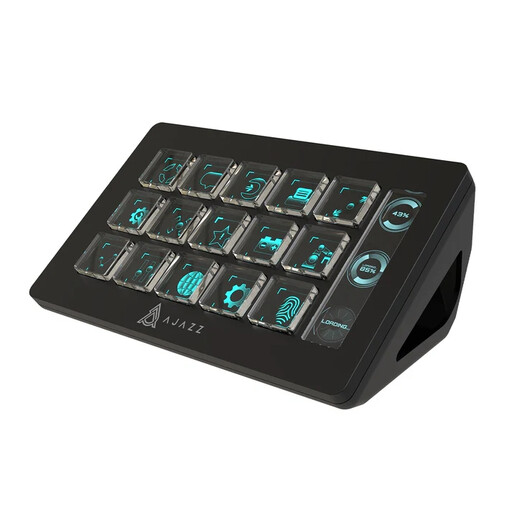 No image available
Consider this model if you want labelled, one-touch actions while recording a strategy guide.
Its product listing specifies 15 macro buttons and names OBS among the applications for triggering actions. Check that the particular recording, mute and scene actions you need work in your setup.
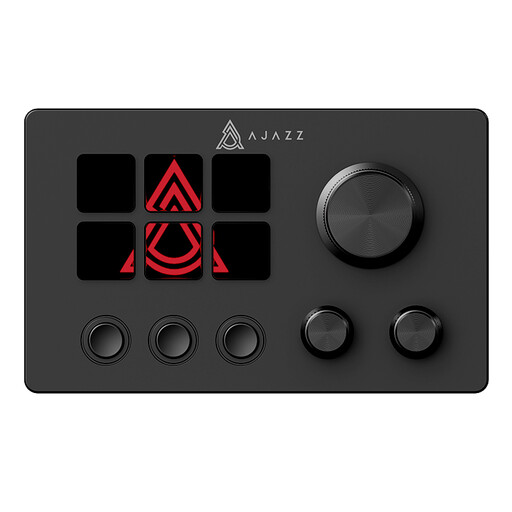 No image available
Consider this model for assignable desktop shortcuts if its controls suit the actions you use while making a guide.
The product name identifies an LCD display and customisable buttons. Confirm the exact control layout, operating-system support and compatibility with your recording application before buying.
A stream controller serves as a programmable control surface, not the recording component of your setup. Plan for compatible recording software and any capture equipment your particular setup requires.
Choose by the actions you need visible during a take: Elgato’s 15-key Stream Deck MK.2 suits a shorter set of fixed commands, while its 32-key XL provides room for more commands at once. If gradual adjustment matters more than extra keys, Stream Deck + has eight LCD keys alongside four push encoders and a touch strip.
Test the recording, microphone and scene actions you intend to use while narrating, then check that the controller software supports your computer. Elgato lists Windows 10 64-bit or newer and macOS 10.15 or newer for Stream Deck MK.2 and XL; check the requirements for any other model separately.
For eligible purchases made without seeing the product in person, Citizens Advice says a 14-day cooling-off period generally applies, with exceptions. Check the seller’s return instructions and distinguish a change-of-mind return from a remedy for a faulty or misdescribed product.