Small-desk strategy-guide recorder
You need shortcuts within reach without moving your keyboard, mouse or notes out of the way.


Choose a six-key controller if desk space matters most and you need only a few recording shortcuts. A 15-key layout gives separate actions more room, while a dial-equipped controller makes sense when you regularly adjust mapped settings during a take and can accommodate its larger body. Check operating-system support, recording-software actions, your available USB connection and the supplied cable for the exact model.
You need shortcuts within reach without moving your keyboard, mouse or notes out of the way.
You use separate recording scenes or repeat actions such as taking screenshots and opening reference windows, so visible, dedicated keys matter.
You want to change mapped audio or other continuous settings during a recording, rather than use only keyboard shortcuts.
List the actions you need during a take, then check how many must stay visible and how much clear desk space the controller can occupy.
| Concern | What to check | Who this matters to |
|---|---|---|
| Desk space | Compare the controller’s stated dimensions with the clear area beside your keyboard; decide whether six visible keys cover your essential actions. | If my notes and mouse already fill the desk, I need shortcuts without crowding them out. Around 42% of consumers put desk space first. |
| Dedicated actions | Count the actions you need without changing folders or profiles; compare that count with a six- or 15-key layout. | When I switch scenes and capture screenshots during a take, I want those actions ready on separate keys. Around 33% of consumers prioritise dedicated actions. |
| Live adjustment | Check whether your recording software lets you map the settings you intend to change to rotary controls. | If I adjust microphone, game or music levels while recording, I need a control I can turn. Around 25% of consumers put live adjustment first. |
A compact controller may require folder or profile changes when too many recording actions need their own controls.
Write down the actions used during one take. If more must remain visible than the compact layout allows, consider a 15-key controller.
Rotary controls offer a different way to interact, but a dial-equipped Stream Deck + occupies more desk space than the compact key-only option.
Identify the settings you would actually turn during recording before making room for dials.
Loupedeck ended sales of its own product line in March 2025. It also ended support for its legacy software version 5.8 and marketplace on 30 March 2026.
For a Loupedeck-based controller, check the current software version and the availability of the recording-app integration you intend to use.
A USB connector alone does not establish operating-system support or confirm that your intended recording actions can be assigned.
Check the exact model’s system requirements, supplied cable, your computer port and the actions available in your recording application.
Its Stream Deck range offers different control layouts for recording workflows.
Its Live S combines touch-sensitive buttons and analogue dials with application profiles.
Stream Controller X is a 15-button option that uses Loupedeck software.
These AJAZZ controllers are options to assess for programmable recording shortcuts. Check their layouts and desk fit against your own action list before choosing.
 No image available
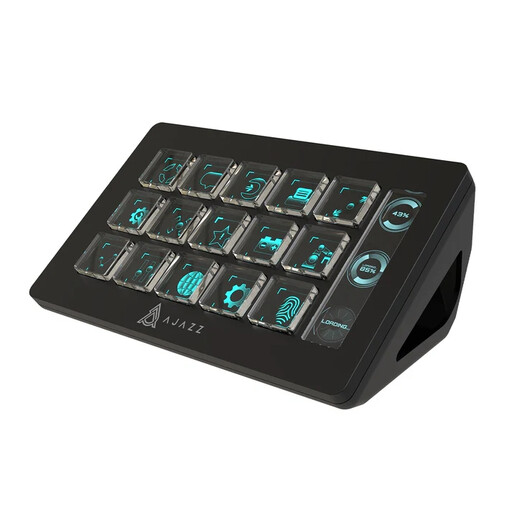
Consider this layout if you want separate buttons for several recording actions. The product name specifies 15 macro buttons and mentions OBS; check that your particular actions work with your operating system and recording setup, and measure the space available beside your keyboard.
 No image available
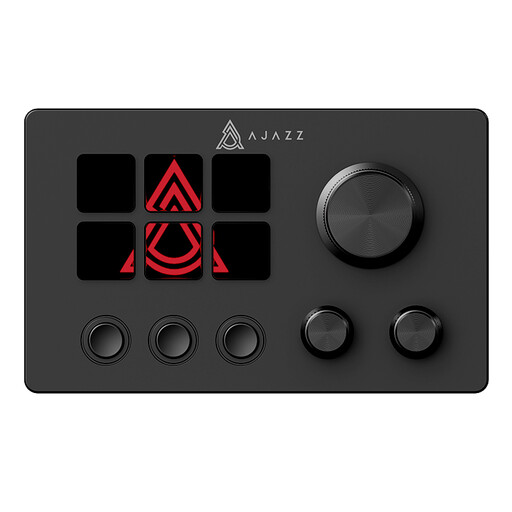
Consider this model if you want customisable controls for recording tasks. Confirm the exact control layout before choosing how many actions to assign, and check its dimensions, operating-system requirements and compatibility with your recording software.
Choose by the number of actions that must stay visible during a take. Six keys can cover a focused set; 15 give more room for separate recording, scene, screenshot and reference controls. If your list exceeds the physical keys, check how the model handles folders or profiles.
Dials are worth considering when you regularly change compatible, mapped settings while recording. Elgato lists four push rotary encoders on Stream Deck +; check that your software supports the adjustments you want and that the controller fits your desk.
Check the exact model’s requirements before buying. Elgato lists Windows 10 (64-bit) or newer and macOS 10.15 or newer for Stream Deck Mini and MK.2; Razer lists Windows 10 or later and macOS 10.14 or later for Stream Controller X, which uses Loupedeck software. Operating-system support alone does not confirm that your intended recording actions are available.
Check the exact product identity, seller details and accompanying documentation. GOV.UK provides conformity guidance for manufactured products placed on the Great Britain market, but the applicable requirements depend on the product; do not assume every USB controller falls under the same rules.