Choose a standalone network streamer if you already have an amplifier, receiver or powered speakers with suitable inputs. If you have passive speakers but no amplifier, choose a streaming amplifier or plan for separate amplification; neither route guarantees that the complete system will suit a large living room. Check how the player reaches your blues collection and how you will control it before choosing a model.
Who each setup suits
Existing hi-fi owners adding streaming
If your amplifier, receiver or powered speakers already serve the room, look for a streamer with matching outputs. Check whether it can access the USB drive, network storage or music service that holds your blues collection.
Passive-speaker owners building a simpler system
If you have passive speakers but no suitable amplifier, a streaming amplifier combines those two roles. Match its stated output conditions to your speakers rather than treating room size or a wattage figure alone as the answer.
Listeners who want easier library browsing
If you regularly choose music from a substantial collection, consider how the player browses your storage and whether its app, screen or controls suit the way you listen.
What matters when choosing
Standalone streamer
Choose it when: Your existing amplifier, receiver or powered speakers already provide the amplification you need.
Trade-off: It cannot drive passive speakers by itself.
Streaming amplifier
Choose it when: You want to connect passive speakers without adding a separate amplifier.
Trade-off: Its amplifier still needs to be matched to your particular speakers and listening setup.
| Concern | What to check | Who this matters to |
|---|
| Speaker power and compatibility |
Identify whether your speakers are passive or powered. For passive speakers, check the proposed amplifier against their impedance and amplification requirements. |
I have passive speakers and need to know what will power them before choosing a player. Around 33% of consumers would put speaker-and-amplifier compatibility first. |
| Library and service access |
Check whether the exact model plays from your USB drive or network-attached storage and supports the services you use. |
My blues collection is stored in a particular place, so convenient access to that music matters more to me than extra connections. For around 27% of consumers, library and service access would be the primary need. |
| Connections and control |
Match the player’s outputs to your existing equipment; check its app and any volume-control function you intend to use. |
I want the player to fit my current hi-fi and be straightforward to operate each day. Connection and control needs would come first for around 20% of consumers. |
| Room and system integration |
Decide whether you need multi-room playback. If considering room correction, check the precise model’s upgrade and setup requirements. |
I may want music in other rooms or a room-correction option as the system develops. Around 20% of consumers would prioritise that kind of integration. |
Buying mistakes to avoid
-
Expecting a standalone streamer to power passive speakers
Models such as Bluesound NODE and WiiM Pro Plus are source components, not speaker-driving amplifiers. Passive speakers need amplification elsewhere in the system.
Check your speaker type and the inputs on any amplifier you already own before selecting a streamer.
Without suitable amplification, you would also need an amplifier or a different speaker arrangement.
-
Using wattage as a large-room guarantee
WiiM specifies the Amp Pro at 60 watts per channel into 8 ohms and 120 watts per channel into 4 ohms. Those ratings alone do not establish how a particular speaker-and-room combination will perform.
Check the loudspeaker manufacturer’s amplification guidance and consider speaker placement and your intended listening level.
-
Assuming every player accesses the same music sources
Cambridge Audio lists USB and network-attached storage playback for the MXN10, but source and service support varies by model. A collection’s location therefore matters as much as the word “streamer” on the box.
List your storage location and essential services, then check support for each on the exact model you intend to buy.
-
Treating room correction as an included feature
Bluesound describes NODE as ready for Dirac Live Room Correction, with correction available as an upgrade. Readiness does not mean the upgrade is part of the base purchase.
Check the precise model’s licence, measurement and setup requirements if room correction is part of your plan.
Brands to consider
WiiM
Offers both standalone streamers for existing hi-fi systems and streaming amplifiers for passive speakers.
- WiiM lists RCA, optical and coaxial outputs for the Pro Plus, giving owners of existing equipment several connection options.
- WiiM rates the Amp Pro at 60 watts per channel into 8 ohms and 120 watts per channel into 4 ohms; match those conditions to your speakers rather than assuming either figure settles large-room suitability.
Cambridge Audio
Its MXN10 and CXN100 are streamer options for systems that already provide amplification.
- Cambridge Audio lists USB and network-attached storage playback for the MXN10; the CXN100 offers a pre-amp mode and colour screen.
- Neither model is a speaker-driving amplifier for passive loudspeakers.
Bluesound
Offers a standalone NODE streamer and an amplified POWERNODE route, both associated with BluOS multi-room use.
- Bluesound lists HDMI eARC on NODE and describes POWERNODE as a 100-watt-per-channel streaming amplifier.
- Bluesound describes NODE’s Dirac Live Room Correction as an available upgrade, so confirm what that feature requires before relying on it.
Naim
The NSC 222 is a streaming pre-amplifier for a separately amplified hi-fi system.
- Naim describes streaming-service support and a pre-amplifier role for the NSC 222.
- Naim specifies pairing it with a power amplifier and loudspeakers; it does not drive passive speakers on its own.
Eversolo
The DMP-A6 Gen 2 is a streamer and DAC route for listeners interested in local-file formats and display-led control.
- Eversolo lists DSD, MQA, FLAC, APE and WAV support for the DMP-A6 Gen 2.
- Check how your particular library is stored and connected before choosing it on the basis of format support alone.
Joybuy product choices
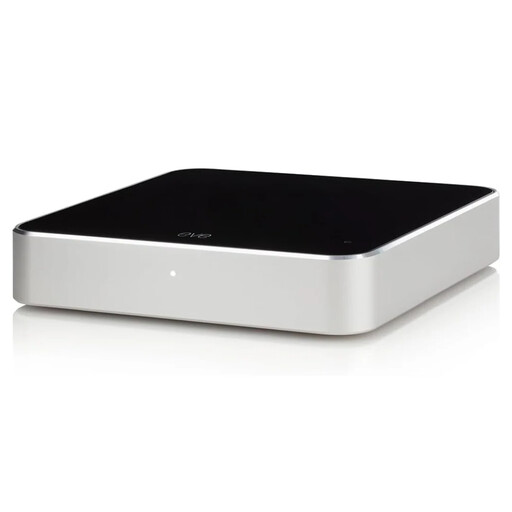
The Eve Play is a standalone option to consider if you already have an amplifier, receiver or powered speakers. Check that its playback method works with the device holding your blues collection.
 No image available
Eve Play Ethernet LAN Wi-Fi, Black and Silver
Consider this for an existing amplified audio system if its described AirPlay route from an iPhone or iPad suits how you access your music.
Ethernet LAN and Wi-Fi are identified in this variant’s name. Before buying for a locally stored collection, confirm how the music will reach the player; it is not a substitute for an amplifier driving passive speakers.
Joybuy
Common questions
Will a network audio player power speakers in a large living room?
A standalone streamer will not power passive speakers: it needs an amplifier, while powered speakers provide their own amplification. A streaming amplifier includes that role, but you still need to match it to your speakers and consider their placement in the room.
Can I play a blues collection from a USB drive or network storage?
Yes, if the exact player supports your storage method. Cambridge Audio lists both USB and network-attached storage playback for the MXN10; check another model’s source and file support before assuming it will browse the same collection.
Is room correction necessary for a large living room?
Not necessarily: speaker placement and amplifier-speaker matching remain important whether or not a player offers correction. If you want the feature, check what is included; Bluesound describes Dirac Live Room Correction for NODE as an available upgrade.


