Start with the TV and the competition stream: a 4K HDR device is worth choosing for picture-format compatibility only if the display, connection, service and programme can use it. If a cable can reach the TV area, a box with built-in Ethernet offers a wired alternative to Wi‑Fi; a compact streaming stick suits a less visible setup when its app and wireless connection meet your needs.
Who this setup suits
Viewers focused on the dark-room picture
If you want to follow choreography, formations and costume detail, check which HDR formats your TV accepts and what quality the competition stream offers. A streamer’s HDR support alone cannot determine what appears on screen.
Live-event viewers with unreliable Wi‑Fi
If an interrupted performance would be frustrating, consider whether Ethernet can reach the TV area. A box with built-in Ethernet gives you a wired option, while Wi‑Fi 6E requires a compatible router to use that wireless standard.
Viewers who want a compact HDMI stick
A streaming stick keeps visible equipment to a minimum. Check wireless reception at the TV, its compatible picture formats and whether the app carrying the competition works on the device.
What to check before choosing
Find the competition’s service and available picture format first, then decide how you want to connect the streamer and control playback.
| Concern |
What to check |
Who this matters to |
| Picture-format compatibility |
Match the TV’s HDR formats and HDMI input with the device; check the service plan and competition’s available quality. |
If I watch in a dark room, I want to know whether my TV and the actual stream can use the picture format I am choosing. Around 42% of consumers put picture compatibility first. |
| Live-stream reliability |
Check whether Ethernet can reach the TV area and whether the device has a built-in port; for Wi‑Fi 6E, check router compatibility. |
When the competition is live, I would rather have a dependable connection than the smallest device. Roughly 33% of consumers make stream reliability their primary concern. |
| Service access and setup |
Confirm support for the competition app, the required HDMI cable and any programme-specific accessibility options. |
I want to get the event playing without discovering that the app, connection or controls do not suit my setup. About 25% of consumers prioritise service access and straightforward setup. |
Mistakes to avoid
-
Assuming a 4K HDR streamer makes every competition 4K HDR
The TV, HDMI connection, service plan and individual programme must also support the format. Netflix notes that a slow or unstable connection can reduce streaming quality.
Check your TV’s inputs and formats, then look at the competition’s quality information on the service carrying it.
-
Buying Wi‑Fi 6E as a fix for buffering
Amazon says Wi‑Fi 6E on its Fire TV Stick 4K Max requires a compatible router. The internet connection and streaming service still affect playback.
If you can run a cable, consider a model with built-in Ethernet. Otherwise, assess reception at the TV and your connection before choosing by Wi‑Fi generation.
-
Assuming a suitable HDMI cable comes with the box
Apple lists the HDMI cable for Apple TV 4K as sold separately, while Google specifies a separately purchased certified HDMI 2.1 cable for Google TV Streamer (4K).
Check the box contents and make sure the cable and TV input suit the format you intend to watch.
You may need to obtain a suitable cable before you can complete the setup.
-
Assuming a subscription covers live-TV licensing
TV Licensing says a TV Licence is required to watch a TV programme live through a streaming service in the UK.
Check your household’s licence position before watching a live competition.
Relevant brands for reference
Apple
Apple TV 4K Wi‑Fi + Ethernet is a box option if you want listed support for Dolby Vision, HDR10+, HDR10 and HLG alongside a wired connection.
- Apple specifies Gigabit Ethernet on the Wi‑Fi + Ethernet model, as well as HDMI 2.1 and Wi‑Fi 6.
- A compatible TV and stream are needed for 4K HDR viewing, and the HDMI cable is sold separately.
Google
Google TV Streamer (4K) is a box option for viewers who want built-in Ethernet, Google TV navigation and casting from compatible apps.
- Google specifies up to 4K HDR at 60 FPS, support for Dolby Vision, HDR10, HDR10+ and HLG, and Gigabit Ethernet.
- It requires a separately purchased certified HDMI 2.1 cable; HDR viewing also depends on the TV and stream.
Amazon Fire TV
Fire TV Stick 4K Max (Newest gen) offers a compact HDMI-stick route for a suitable wireless setup.
- Amazon’s UK listing states support for 4K Ultra HD, Dolby Vision, HDR10+ and Wi‑Fi 6E.
- Using Wi‑Fi 6E requires a compatible router; those listed picture formats do not establish the format of a particular competition stream.
Joybuy streaming sticks
These Roku sticks are options for adding 4K-capable streaming to an existing TV. Before choosing either one for a dance competition, check the event’s app and available picture quality; if you need a wired connection, confirm the device’s networking options.
 No image available
Roku Streaming Stick 4K
Consider this compact stick if you want 4K-capable streaming on a suitable TV. Check that the competition app works on the device and offers the picture format you want; confirm networking options if you plan to use a cable.
View on Joybuy
 No image available
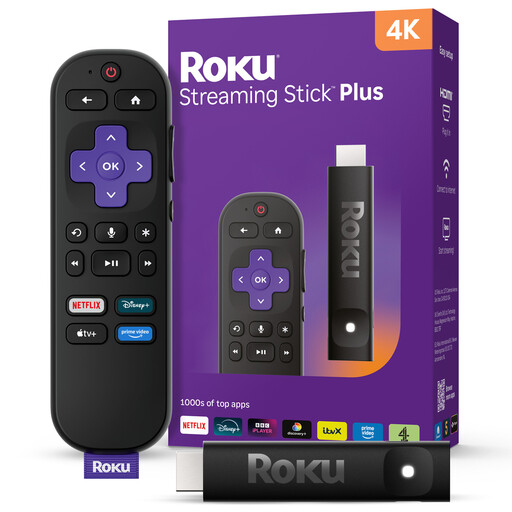
Roku Streaming Stick 4KPlus
Consider this 4K streaming stick if a compact installation and convenient remote control matter to you. Check its HDR formats against your TV, and confirm support for the competition app and any wired connection you need.
View on Joybuy
Common questions
Will a 4K HDR streamer automatically improve a competition in a dark room?
No. The TV, HDMI connection, service plan and individual competition stream must support the relevant format too. Netflix also notes that slow or unstable internet can reduce playback quality.
Is Ethernet worth considering for a live dance competition?
Yes, if a cable can reach the TV area and you want to avoid relying on the streamer’s Wi‑Fi connection. Ethernet cannot guarantee the quality supplied by the service or resolve problems elsewhere in the internet connection.
Do I need a TV Licence to stream a live competition in the UK?
Yes, if you watch a TV programme live through a streaming service: TV Licensing says that viewing requires a TV Licence in the UK. Check the applicable viewing rules separately if you plan to watch on demand.
Will subtitles or audio description work for every competition?
Not necessarily. Ofcom identifies subtitles, signing and audio description as access services, but their availability depends on the programme and service. Check the event page and app settings before watching.


