Viewers focused on the picture
If you watch for the colours and detail in gardens and landscapes, check which picture formats your TV and programmes support. A streamer’s HDR specification alone cannot determine how the picture looks in a dark room.


Choose a streaming device that works with your TV and carries the services showing the gardening programmes you watch. A compatible 4K HDR setup may make higher-format streams available, but it will not improve a TV’s dark-room picture by itself; private listening, a usable remote or a wired network connection may matter more to you.
If you watch for the colours and detail in gardens and landscapes, check which picture formats your TV and programmes support. A streamer’s HDR specification alone cannot determine how the picture looks in a dark room.
If others are sleeping, the way headphones connect may matter more than additional video formats. Roku documents a mobile-app Headphone Mode, although its setup conditions and each player’s other headphone options need checking.
If you usually know the broadcaster but want to reach a programme quickly, check the platform’s UK apps and search controls. Amazon lists BBC iPlayer, ITVX, Channel 4 and NOW for its Fire TV Stick 4K Select; access to a particular show or subscription is a separate question.
Start with the programme’s service and your TV’s capabilities, then decide whether quiet listening or a dependable connection will make the greater difference to how you watch.
| Concern | What to check | Who this matters to |
|---|---|---|
| Picture compatibility | Check the TV’s resolution, HDR formats and free HDMI input, as well as the format offered by the programme. | I want garden colours and textures to look good in a dark room, but I do not want to choose a video format my TV cannot show. Around 29% of consumers put picture compatibility first. |
| Quiet listening | Check the exact device’s headphone route and setup conditions. Roku’s mobile-app Headphone Mode needs the player and phone or tablet on the same wireless network. | When I watch late, I need sound that will not disturb anyone nearby. For around 21% of consumers, private listening is the primary concern. |
| Programme access | Check the current UK app selection for your broadcaster and whether the particular show requires a subscription. | I want to get to the gardening programmes I follow without choosing a platform that lacks their service. Finding the right content comes first for around 29% of consumers. |
| Setup and connection | Confirm Wi-Fi coverage, an available HDMI input and cable requirements. If you need Ethernet, check the exact device or adaptor and whether a cable can reach the TV. | I would rather avoid connection problems or discover an essential accessory is missing when I set up the TV. Around 21% of consumers prioritise straightforward, reliable setup. |
A streamer can send only formats supported by the rest of the viewing setup. Apple specifies a 4K HDR TV for 4K HDR streaming, and the programme must also be available in a suitable format.
Check your TV model and the service’s programme format before making HDR support a deciding factor.
Amazon’s description of motion-activated backlit buttons concerns the separately identified Alexa Voice Remote Pro, not every Fire TV Stick remote.
If you need to see buttons in a dim room, check the exact remote model and box contents.
An upgraded compatible remote may require a separate purchase.
Roku’s mobile-app Headphone Mode sends sound to headphones connected to a phone or tablet and mutes the TV speakers. The mobile device and Roku player must share a wireless network; direct Bluetooth support varies by model.
Decide whether using a phone suits you, or check the exact player and remote for another headphone option.
A wired connection helps only if a network cable can reach the TV area. Google TV Streamer has built-in Ethernet, while Apple’s Gigabit Ethernet port belongs to its Wi-Fi + Ethernet variant.
Check the TV’s HDMI input, what comes in the box and the connection you can actually make at the TV.
Google specifies a separately sold certified HDMI 2.1 cable for Google TV Streamer; Apple also specifies a separately sold HDMI cable for Apple TV 4K.
Google TV Streamer (4K) is a set-top option if you want a built-in wired-network connection alongside smart-home integration.
Fire TV sticks suit viewers considering a compact HDMI device with Alexa voice controls and named UK catch-up apps.
Apple TV 4K is a box to consider if you use Apple devices and want to choose between Wi-Fi-only and Wi-Fi + Ethernet hardware.
Roku is worth considering when headphone listening is central to watching without disturbing others.
These two Roku sticks are options to consider for a compact streaming setup. If private listening decides your choice, check each model’s headphone arrangement rather than assuming the two sticks work alike.
 No image available
Consider this 4K stick if picture compatibility is your priority. Check the HDR formats supported by your TV and the gardening programmes you watch; if quiet listening is essential, confirm this exact stick’s headphone options before choosing it.
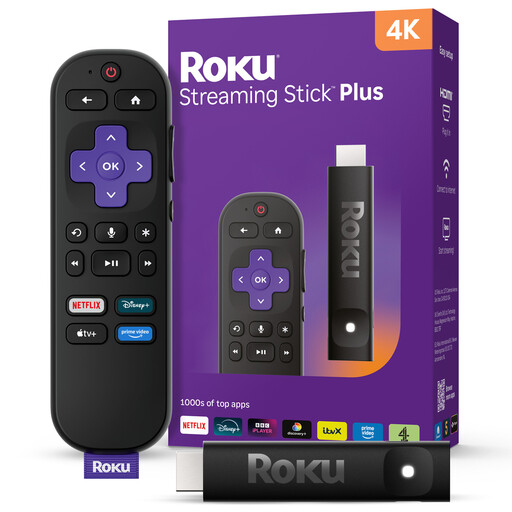 No image available
Consider this stick if quiet viewing is a priority. Check the included remote and its headphone setup before buying, and confirm the HDR formats and UK apps you need for your programmes.
Not by itself. A streamer’s 4K HDR output is useful only when the TV supports the relevant format and the programme is supplied in it. Apple specifies a 4K HDR TV for 4K HDR streaming; check your display before choosing a device for its picture formats.
Yes, if the device and your preferred headphone setup support it. Roku’s mobile-app Headphone Mode sends streaming audio to headphones connected to a phone or tablet on the same wireless network as the Roku player, while the TV speakers are muted. Check the exact model for other headphone options.
Check the show’s current broadcaster or streaming service, then confirm that service’s app and any subscription requirement on the device you plan to buy. Amazon lists several UK catch-up apps for Fire TV Stick 4K Select, but an app listing does not establish that a particular programme is included.
You need a suitable Ethernet-equipped device or compatible adaptor and a network cable that can reach the TV area. Google TV Streamer has built-in Gigabit Ethernet; for Apple TV 4K, select the Wi-Fi + Ethernet variant if you need its built-in port.