What to check before choosing
Smart TV
Choose when: You need to replace or change the screen as well as add built-in online viewing.
Trade-off: You replace the display and use the interface built into that TV; check the exact model’s apps and features.
Streaming stick
Choose when: Your current picture still suits you and the TV has a suitable HDMI input, power and network connection.
Trade-off: It uses an input and adds another device and software platform to your setup.
Streaming box
Consider when: A box’s confirmed features, such as built-in Ethernet, suit the TV’s position and network setup.
Trade-off: Allow space for the box and cables; Google says its TV Streamer’s HDMI cable is sold separately.
Console you already own
Consider when: A console already connected to the main TV supports the services your household uses.
Trade-off: Individual app features may still be limited; ITV says regional-live content is unavailable on PS4 and PS5.
For UK consumers deciding how to watch online video on their main household TV, the checks below reflect five distinct primary priorities.
| Concern |
What to check when buying |
Who this matters to |
| Required apps and features |
Check the exact UK model, software version and service support information for each essential app feature, including profiles or regional-live viewing. |
If a service or feature is essential in my household, I need the exact TV or player to support it, not just display an app icon. Consumers who put required apps and in-app features first account for around 28% of this buying scenario. |
| Keeping the current screen |
Check for a free HDMI input, suitable power and physical clearance; match any 4K or HDR requirement to the TV’s supported formats. |
If my current TV still suits us, I want to know whether adding a player is practical before replacing the screen. Consumers whose main priority is keeping or replacing the screen account for around 22% of this buying scenario. |
| Reliable playback |
Check the connection where the TV sits and whether Ethernet is available if a cable can reach the device. |
If streaming is unreliable at the main TV, I want to check the connection there before focusing on a player’s maximum resolution. Consumers who put reliable playback first account for around 17% of this buying scenario. |
| Controls and accessible viewing |
Try the remote navigation and check how required apps present subtitles and audio-description controls. |
If someone in my household needs accessible navigation or viewing options, I want to check the remote and the settings inside the relevant apps. Consumers who prioritise accessible controls account for around 17% of this buying scenario. |
| Accounts and software support |
Check each service’s profile and simultaneous-viewing terms, then review the manufacturer’s applicable minimum security-update information. |
If viewers share the TV, I need to understand each service’s account rules; if we plan to keep the device, I also want to know its stated security-support period. Consumers who put shared accounts and software support first account for around 16% of this buying scenario. |
Relevant brands and platforms
These examples relate to particular products or product lines; their features and support terms should not be treated as guarantees for every model from a brand.
Roku
Streaming-stick option for adding a separate player to a TV with HDMI.
- Roku says its Streaming Stick 4K works with an HDMI TV that lacks 4K or HDR, although that TV will not display those formats.
- Roku lists March 2028 as the minimum security-update date for 3820X and 3820X2 variants. Check the exact device and the required app features separately.
Google
Box-style Google TV Streamer (4K) for a TV position where a separate player and Ethernet connection suit the setup.
- Google specifies gigabit Ethernet and five years of security updates for the TV Streamer (4K).
- Google says the HDMI cable is sold separately. ITV’s general support information does not expressly identify this specific model, so check any essential app on the exact device.
Samsung
Built-in smart-TV route, with the UE50U8000HKXXU documented as a 2026 Tizen example.
- Samsung says One UI Tizen supports OS upgrades for up to seven years and separately states at least three years of security software updates from product launch.
- Those are different commitments. Check whether the stated terms apply to the exact TV and whether it supports the services and features you need.
LG
Built-in webOS route, with the 50NU800B6LC documented as a 2026 smart-TV example.
- LG says app availability can vary by country, product and region, making an exact-model app check important.
- ITV says regional-live content is unavailable on LG smart TVs from the 2025 model year onwards. Check the services and features that matter on the specific TV.
PlayStation
An existing console may serve as a streaming device if its apps cover the household’s needs.
- Sony lists Netflix for PS5, and ITV lists PS5 support for ITVX.
- ITV says regional-live content is unavailable on PS4 and PS5. Check other required app features before relying on a console.
Joybuy products for online TV viewing
This selection covers adding a Roku streaming stick to a suitable existing TV or replacing the screen with a TCL Google TV. Check essential apps and features on the exact device before choosing.
 No image available
TCL 50V6C 50-inch 4K HDR Smart Google TV
For a household replacing its screen while adding built-in online viewing; check essential apps and features on the exact model.
50-inch screen; 4K HDR; Google TV.
Joybuy
 No image available
TCL 65V6C 65-inch 4K HDR Smart Google TV
For a household replacing its screen while adding built-in online viewing; check essential apps and features on the exact model.
65-inch screen; 4K HDR; Google TV.
Joybuy
 No image available
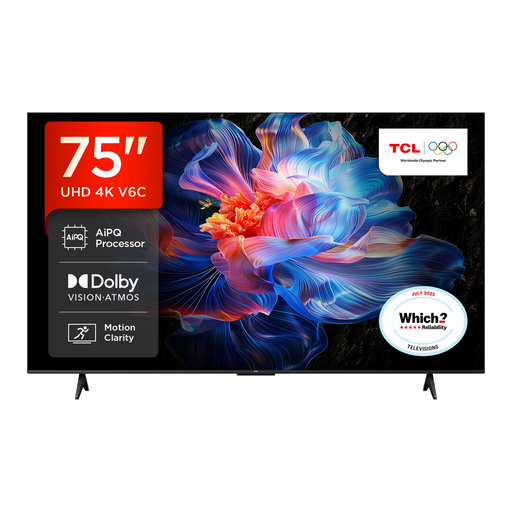
TCL 75V6C 75-inch 4K HDR Smart Google TV
For a household replacing its screen while adding built-in online viewing; check essential apps and features on the exact model.
75-inch screen; 4K HDR; Google TV.
Joybuy
 No image available
TCL 65Q7C 65-inch QD-Mini LED 4K HDR Smart Google TV
For a household replacing its screen while adding built-in online viewing; check essential apps and features on the exact model.
65-inch screen; QD-Mini LED; 4K HDR; Google TV. The product name also lists up to 2048 local dimming zones and a 144Hz native refresh rate; these details do not confirm app support.
Joybuy
 No image available
Roku Streaming Stick 4K
For adding a streaming player to a TV with a suitable HDMI input; check that the exact device supports the apps and features your household needs.
Streaming stick; 4K; HDMI connection.
Joybuy
Frequently asked questions
Can an HDMI streaming stick make an HD television show 4K?
No. Roku says its Streaming Stick 4K works with an HDMI TV, but a TV without 4K or HDR support will not display those formats. Check the television’s capabilities as well as the player.
What should I check before installing a player behind the TV?
Check for a free HDMI input, physical clearance, suitable power and a reliable connection at the TV. Roku advises using the supplied cable for model 3820 because it contains the Wi-Fi receiver, and recommends a wall outlet if the TV’s USB port cannot supply enough power. Google says its TV Streamer’s HDMI cable is sold separately.
Will a new streaming device let everyone use the same subscription at once?
Not necessarily. Simultaneous-viewing limits depend on the service and plan, not only on the device. Netflix says the number of screens depends on the membership, while ITV publishes platform-specific information for its profiles.
Does an ITVX listing guarantee regional-live viewing or profiles?
No. ITV publishes separate information for supported devices, profiles and regional-live content. For example, ITV lists ITVX on PS5 but says regional-live content is unavailable there; check the specific feature and device conditions you need.
Do security-update promises mean every app will keep working?
No. A manufacturer’s security-update or operating-system commitment is not a guarantee of ongoing support from every video service. Check the applicable support information for the exact device and confirm essential apps and features separately.


