Side-seat wildlife viewers
If you usually sit well off-centre, assess the picture from that seat before changing players. RTINGS explains that a TV’s viewing angle affects when its picture starts to look inaccurate off-centre.


Check the TV from your side seat before choosing a streaming device: a stick or box cannot correct colour, brightness or contrast changes caused by the screen’s viewing angle. Then choose a player that works with your TV and intended streaming service; 4K and HDR also depend on the connection, plan, programme and network.
If you usually sit well off-centre, assess the picture from that seat before changing players. RTINGS explains that a TV’s viewing angle affects when its picture starts to look inaccurate off-centre.
If picture format matters to you, check the TV, HDMI connection, streaming plan and individual programme alongside the player. A player’s listed formats alone do not determine what appears on screen.
If streams buffer or drop in quality, consider the connection before prioritising more video formats. Netflix says a slow or unstable connection can reduce streaming quality; a wired player is an option where your home setup permits it.
Start with the picture from your usual seat, then check the complete playback chain and the reliability of your home connection.
| Concern | What to check | Who this matters to |
|---|---|---|
| Picture from a side seat | View the existing TV from your intended seat; check whether changing its angle improves the picture. | I sit off-centre and want the wildlife footage to retain its colour and detail without buying a player to fix a screen problem. Around 42% of consumers put side-seat picture accuracy first. |
| 4K and HDR playback | Check the TV’s formats, the HDMI path, your plan and the programme’s quality label. | I want the programme’s available 4K or HDR format to play on my TV, rather than relying on a badge on the device box. For around 33% of consumers, compatible 4K or HDR playback is the main concern. |
| Stream stability | Check connection stability and whether a wired connection is practical for the player you choose. | If my connection varies, I would rather keep the programme playing reliably than gain another listed format. Stable streaming comes first for around 25% of consumers. |
A player cannot change how the TV panel looks off-centre. RTINGS identifies viewing angle as a property of the TV picture.
Look at your current screen from the intended seat and, if practical, angle it towards that seat before replacing the player.
Playback depends on the programme and service as well as the plan, player, TV, HDMI connection and network. Netflix notes that connection conditions can reduce video quality.
Check the programme’s in-app quality label and each part of the playback chain before choosing a player for a particular format.
Roku warns that some TV USB ports cannot supply enough power to its Streaming Stick 4K model 3820.
Follow the power instructions for your exact model; use a wall outlet if the TV USB port proves insufficient.
In the UK, TV Licensing says a TV Licence is required for BBC iPlayer programmes, whether live or on demand.
If the wildlife series is on BBC iPlayer, account for that requirement before watching.
Apple TV 4K is a box-style option for viewers choosing between video-format support and, on one variant, a wired connection.
Roku Streaming Stick 4K model 3820 is an HDMI-stick option with a TV-control voice remote.
The first-generation Fire TV Stick 4K is a stick-style option with formats listed on its Amazon UK product information.
These Roku sticks are options for streaming a wildlife programme on a compatible TV. Neither changes how the TV picture looks from a side seat.
 No image available
Consider this stick for a compatible TV if your intended streaming app carries the wildlife programme.
The product name specifies 4K. Check the exact model and the programme’s available format before choosing it for a particular viewing setup.
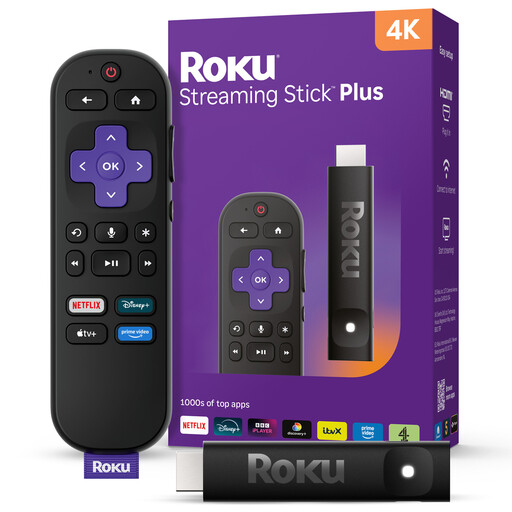 No image available
Consider the 4KPlus variant if you want a Roku stick for a compatible 4K viewing setup.
Check its exact model, supported HDR formats and availability of your intended app before relying on it for a particular programme.
No. A streaming device cannot correct the TV panel’s off-centre picture behaviour. Assess the picture from your usual seat and try changing the screen’s angle where practical.
The particular programme and plan must offer the format, and the player, TV and connection must support it. Check the in-app quality label and your HDMI path; for Netflix 4K on Apple TV, Netflix specifies a compatible 4K TV and an HDMI port supporting HDCP 2.2 or later.
Follow the power instructions for your exact Roku model rather than assuming the TV’s USB port is sufficient. For model 3820, Roku advises using a wall outlet if the TV USB port cannot provide enough power.
Yes. TV Licensing says a TV Licence is required in the UK to watch BBC iPlayer programmes, including on-demand programmes.