
24/7 Customer Support

Free returns

Same-day & Next-day Delivery

Quality Guaranteed

Unlock Your Welcome Offers: FREE Delivery | Up to 80% OFF | Free 30-day JoyPlus trial
Download the APP
Choosing streaming equipment can quickly become confusing. Product listings often focus on impressive-sounding features while leaving out the details that affect everyday use. A microphone may mention noise reduction but not explain its connector. A webcam may advertise high resolution without stating whether your computer can handle it. A streaming controller may look useful but require software you do not intend to use.
For UK creators, gamers, podcasters, vloggers and remote workers, three common buying traps deserve attention.
Higher resolution does not automatically mean a better stream. A 4K camera can require more bandwidth, storage and computer processing than a 1080p model. Similarly, a microphone’s frequency range or sound-card feature does not guarantee that it will suit a noisy room.
Think about your actual environment first. A bedroom, home office or shared flat may benefit more from a directional microphone and sensible positioning than from a long list of sound modes.
Many live streaming accessories are designed for a particular device. A wireless lavalier microphone with a Type-C receiver may work with compatible Android phones, tablets and computers, but it may not connect directly to an iPhone with a different port. An iOS-interface microphone is not interchangeable with a Type-C model.
Before ordering, check:
Portable equipment is convenient, but battery life depends on use, volume, wireless transmission and charging habits. A compact gimbal or microphone can be suitable for short sessions yet inconvenient for a full-day production if it cannot be charged while operating.
For equipment used outdoors, also check the stated environmental limitations. Water resistance, dust protection and shock resistance are specific product features, not a guarantee that a device can be used in every weather condition.
For spoken content, a microphone’s connection type is one of the first details to verify. A USB XLR microphone gives you two connection routes: USB for straightforward computer use and XLR for a mixer or audio interface. With the FIFINE K688CT, the built-in controls are available in USB mode, while XLR operation requires control through a compatible mixer or interface.
A directional or cardioid pickup pattern generally focuses more on sound in front of the microphone than behind it. This can help reduce some nearby room noise, although placement and room acoustics remain important. A headphone monitoring socket is also useful when you need to hear your input without relying on delayed software playback.
For phone recording, confirm the interface before purchase. Type-C, iOS and 3.5mm products are not automatically cross-compatible.
A streaming webcam should be assessed by more than its pixel count. Check whether it includes a stable clip, whether it fits your monitor or laptop and whether the camera software works with your preferred video-call or streaming platform.
A 2K QHD webcam can provide additional image detail, but lighting still affects skin tones, shadows and overall clarity. Place the main light in front of you rather than behind you, and test the camera at the distance you will use during calls or broadcasts.
For phone-based vlogging, a smartphone gimbal stabiliser needs to match your handset’s width and weight. The Verbex C16 supports smartphones measuring 67–84mm wide and uses a two-axis stabilisation system. Its foldable design and stated battery life of up to eight hours suit mobile filming, but the phone must be secured correctly before movement.
A streaming controller is worthwhile when you regularly trigger scenes, launch applications or adjust media. Check the number of programmable keys, knob functions and software compatibility before buying. The AJAZZ AKP03E has six LCD macro keys, three knobs and three toggle switches, with configuration intended for platforms including Streamlabs, Twitch and YouTube.
For home entertainment, a Roku 4K streaming stick should be matched with a TV that has a suitable HDMI port and a dependable Wi-Fi connection. The Roku Streaming Stick 4K Doly Vision supports 4K Ultra HD, Dolby Vision, HDR10+ and HDR, with access to services including Netflix, Prime Video, Disney+, YouTube and BBC iPlayer. Availability of individual apps can depend on region and service subscription.
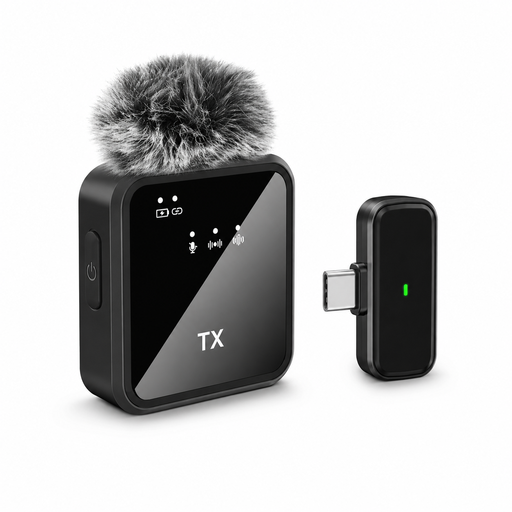
Why This Fits Their Persona: A compact option for new creators recording interviews, video calls or short live sessions with a Type-C device.
The listing identifies a single microphone, Type-C interface and stated three-to-six-hour battery range, making the intended setup clearer.
Mini format, windproof design and Type-C compatibility for supported devices.
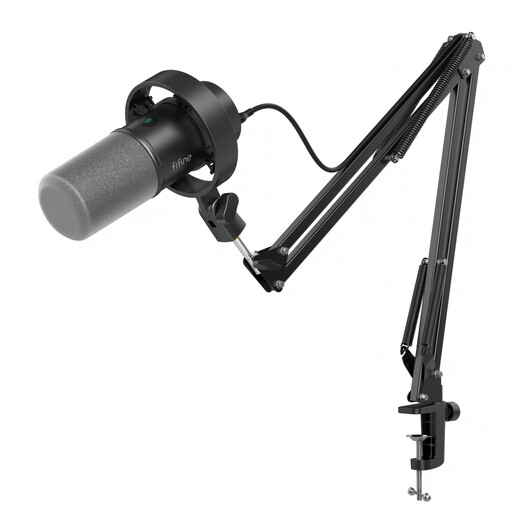
Why This Fits Their Persona: Suitable for podcasters, streamers and voice-over users who want a desk-mounted microphone with room to develop their setup.
It clearly separates USB and XLR operation, so buyers can choose plug-and-play use or connect an audio interface later.
Dynamic microphone, boom arm, mute button, gain control and headphone monitoring jack.
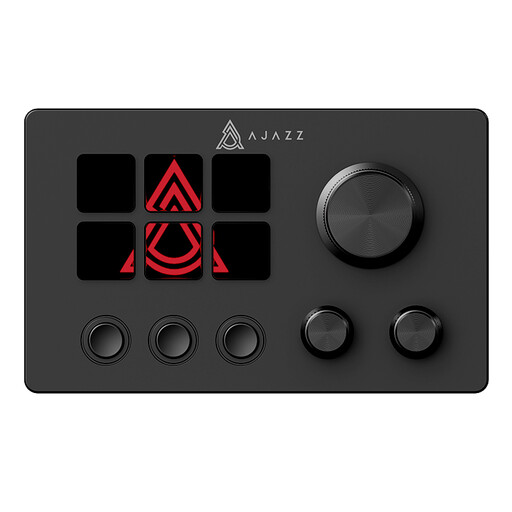
Why This Fits Their Persona: Designed for creators and gamers who frequently switch scenes, launch applications or manage media during broadcasts.
Its six programmable LCD keys, three knobs and three toggle switches are specified, rather than relying on a vague “professional control” description.
Customisable macros and stated integration with Streamlabs, Twitch and YouTube.

Why This Fits Their Persona: A compact choice for UK households wanting app-based TV streaming without adding a larger set-top box.
The product description states its HDMI plug-and-play format, long-range Wi-Fi support and included voice remote.
4K support with Dolby Vision, HDR10+ and access to common streaming apps.
We have compiled a complete, real-time list of products that fully satisfy these strict selection criteria and UK safety regulations.
Small accessories can solve practical problems. A USB sound card such as the HOCO 2-in-1 adapter can add 3.5mm headphone and microphone connections to a compatible USB computer. Its 15cm cable and 17g weight make it suitable for travel or temporary workstations.
For monitoring, Type-C headphones can help users hear calls, recordings or game audio from devices without a traditional headphone socket. Check whether your device supports audio through its Type-C port, and keep volume at a comfortable level during extended sessions.
A portable Bluetooth speaker is more appropriate for casual listening, background audio or group use than for precise microphone monitoring. The Sony ULT Field 3 includes Bluetooth connectivity, a stated battery life of up to 24 hours and an IP67 rating. Do not place it in conditions outside the manufacturer’s safety guidance.
A practical starter setup usually includes a compatible microphone, a webcam or phone, headphones and stable internet. Add a USB sound card, lighting or streaming controller only when your workflow requires it. Checking ports and software compatibility first can prevent unnecessary purchases.
Neither connection is suitable for every user. USB is generally simpler for a computer-based setup, while XLR can work well with a mixer or audio interface. A USB XLR microphone offers flexibility, but remember that some on-microphone controls may only operate in USB mode.
Lifespan depends on construction, storage, cable strain, battery care and frequency of use. Keep microphones and adapters away from moisture, avoid sharply bending cables and use the supplied charging equipment where instructed. Before buying, check replaceable accessories, warranty information and whether the product remains compatible with your operating system and devices.