What to check before buying
Streaming player
Choose it when: Your HDMI television still meets your display needs and adding apps is the main goal.
Accept that: The player cannot improve the screen itself, and its power arrangement and essential apps need checking.
Freely-enabled box
Choose it when: You want a more unified route to supported UK live and catch-up TV over broadband on your existing television.
Accept that: Broadband is essential, and Freely access does not establish support for every separate streaming app.
Replacement smart TV
Choose it when: You also want to change the screen, or the existing television has no practical external-device setup.
Accept that: Built-in apps still depend on the exact television platform and continued service support.
For an older main television, decide what matters most: access to particular apps, keeping the screen, internet-delivered UK television, or replacing the display itself. The proportions below describe consumers by their primary need, not by every feature they might value.
| Concern | What to check | Who this matters to |
|---|
| Essential apps |
Check each service’s current UK support information against the exact device and operating-system version. |
If my household relies on particular catch-up or streaming apps, I need those services to work on the device I choose. Around 33% of consumers put essential-app compatibility first. |
| Keeping the screen |
Check for a usable HDMI input, accessible power and a suitable internet connection at the TV. |
My television still works for us, so replacing the display just to add streaming would not meet my main need. Keeping the existing screen comes first for around 27% of consumers. |
| UK live TV and catch-up |
Confirm that the device is Freely-enabled and that broadband meets Freely’s stated 10Mbps minimum for live internet channels and on-demand viewing. |
Without an aerial or dish, I want live channels and catch-up viewing through a straightforward broadband setup. Around 27% of consumers prioritise this UK TV route. |
| Display replacement |
Assess the existing screen and HDMI connection; if you want 4K or HDR, check both the new display and the viewing setup. |
Adding apps would not resolve my problem if the screen itself no longer suits us. A display upgrade is the primary need for around 13% of consumers. |
Joybuy product choices
These choices cover two ways to approach the older-TV question: Roku sticks for keeping a suitable screen, and smart TVs for replacing it. Match the device to your essential apps and existing connections before choosing a model.
 No image available
Roku Streaming Stick 4K Doly Vision
Consider this streaming stick if you want to keep a television with a usable HDMI input. Its name identifies a 4K variant, but 4K viewing requires a compatible screen; check your essential apps, Wi-Fi and power arrangement for this model.
View on Joybuy
 No image available
Roku Streaming Stick 4KPlus
Another stick to consider when the existing screen still suits you. Check this model’s HDMI and power setup, as well as current support for the UK apps your household needs; its 4K name does not change the television’s display capability.
View on Joybuy
 No image available
Haier H43S80GUF 43-inch 4K QLED TV with Freely and Fire TV
This is a replacement-TV choice if you need a 43-inch screen as well as internet viewing. The product name specifies 4K QLED, HDR10+, Freely and Fire TV. Check the exact model’s support for essential apps and ensure your broadband suits Freely viewing.
View on Joybuy
 No image available
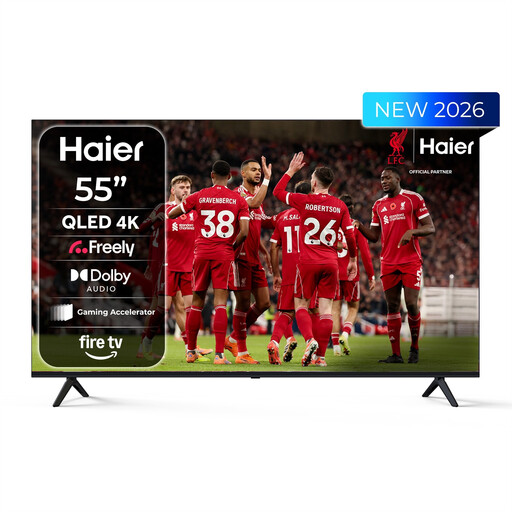
Haier H55S80GUF 55-inch 4K QLED TV with Freely and Fire TV
Consider this replacement if a 55-inch screen fits your viewing needs. Its product name specifies 4K QLED, HDR10+, Freely and Fire TV. Confirm the apps you use on this exact model and check the broadband requirement for Freely live or on-demand viewing.
View on Joybuy
 No image available
Coocaa CTQH38 40CTQH38ZUK 40-inch Full HD QLED TV with Freely and TiVo
This 40-inch replacement may suit a household that wants built-in Freely on a Full HD screen rather than a 4K display. The product name also identifies QLED, HDR10 and TiVo; check current support for your required apps and broadband for Freely viewing.
View on Joybuy
Frequently asked questions
Can I add streaming to an older TV without replacing it?
Yes, if the television has a working HDMI input and you can provide power and internet for a compatible device. Roku says its streaming players work with HDMI-equipped televisions; an external device will not change the screen’s own picture capability.
Will a 4K streaming stick make my older TV show 4K or HDR?
No. Roku says its 4K players can connect to an HDMI television, but 4K viewing needs a compatible 4K TV and HDR viewing needs a compatible HDR TV.
How can I check whether ITVX or Channel 4 will work?
Check each service’s current UK supported-device information for the exact model and software version you plan to use. ITV lists platform-specific conditions for ITVX, while Channel 4 has withdrawn support from selected older devices.
What broadband speed does a Freely streaming device need?
Freely states a minimum of 10Mbps for live internet channels and on-demand viewing. Also check that Wi-Fi reaches the television reliably, or whether your chosen device offers a practical wired connection.
Do I need a TV Licence to stream in the UK?
You need a TV Licence if you watch live TV on any service or use BBC iPlayer, according to TV Licensing. Watching only on-demand programmes on other services, such as ITVX or Netflix, does not by itself require one.


