Owners of a usable HDMI TV
If the picture still suits you but the built-in apps do not, a separate player may let you keep the display. Check the services you need, an available HDMI input and the player’s power requirements.


If your TV’s picture is still satisfactory but its apps are the problem, check whether a streaming player can run the services you use before replacing the display. Consider a new TV when the display itself is limiting you; address unreliable playback or sound separately, because neither a 4K player nor a soundbar fixes an incompatible app or an unstable connection.
If the picture still suits you but the built-in apps do not, a separate player may let you keep the display. Check the services you need, an available HDMI input and the player’s power requirements.
If video buffers or its quality fluctuates, examine the connection at the TV before changing the display. Netflix notes that slow or unstable connections can reduce playback quality.
If your services already work but dialogue or compatible surround sound is the priority, check the TV’s ARC or eARC connection and the audio formats supported throughout the setup. Dolby identifies the connection between TV and soundbar as part of that route.
Identify what is actually limiting viewing before choosing equipment: the apps, the display, the sound or the connection may call for different purchases.
Consider it when: The existing display has a usable HDMI input and an acceptable picture, but its app platform no longer meets your needs.
Trade-off: It keeps the display in use but needs an HDMI input, power and a suitable connection; it cannot turn an HD-only screen into a 4K display.
Consider it when: The display itself, its available inputs or its built-in platform no longer meets the household’s needs.
Trade-off: Replacing the screen is a larger change than adding a player, and app support still depends on the precise TV model and software.
| Concern | What to check | Who this matters to |
|---|---|---|
| UK app access | Check each required service’s current support list for the exact device, platform and applicable software version; confirm that a separate player can use an available HDMI input. | If my TV still looks fine, I need a way to watch the broadcaster and subscription apps I actually use. Around 33% of consumers put app compatibility first. |
| TV sound | Find the TV’s ARC or eARC socket and check the soundbar, source and content against the audio format you want. | When I can already watch my programmes, clearer dialogue or a compatible surround setup matters more than changing the picture. Sound is the primary concern for around 20% of consumers. |
| Connection stability | Test playback where the TV sits; check whether the chosen device offers Ethernet, a compatible adaptor or a workable Wi-Fi connection. | I want interruptions and shifting picture quality addressed before I spend money on another screen. Around 20% of consumers prioritise a dependable connection. |
| Display and 4K/HDR | Check the display, relevant HDMI connection, service plan and content for the intended format, alongside the network connection. | If I am replacing a screen for its picture, I need the rest of my setup to deliver the format I want to watch. Picture capability comes first for around 27% of consumers. |
ITVX lists support by platform and, for some TVs and players, by model year or firmware. A device’s display specification does not establish app compatibility.
List your required services and check each provider’s current support information for the exact device before buying.
Netflix says a slow or unstable connection can cause playback at a lower quality. A more capable screen alone will not correct that connection.
Test playback at the TV, then check Wi-Fi conditions and whether a wired connection is practical for the device you plan to use.
Dolby’s setup guidance makes the source, content, output settings and connection path relevant to Atmos playback; a soundbar label alone does not establish that the whole setup supports it.
Check the TV’s ARC or eARC socket, the soundbar connection and the format available from your viewing source.
TV Licensing says watching live TV through a streaming service or using BBC iPlayer requires a TV Licence regardless of whether you use a TV, stick or another device.
Check your viewing activity against TV Licensing’s current guidance rather than assuming a different device changes the requirement.
A compact HDMI-player route for a TV you plan to keep. Amazon’s UK listing for Fire TV Stick 4K Max names services including BBC iPlayer, ITVX, NOW, Netflix and Prime Video.
A set-top-box option where the distinction between Wi-Fi-only and wired-network configurations matters.
Google TV Streamer (4K) is a set-top-box option for someone who wants a built-in wired-network connection.
Roku lists UK streaming sticks with different stated picture-format capabilities, making the intended display and content useful starting points.
These streaming sticks suit a decision to keep a usable TV; the smart TVs represent replacing the display. Match either route to your required apps and connections before choosing a model.
 No image available
Consider this player if you want to keep an HDMI TV and add a separate streaming platform.
The named model is a 4K streaming stick; Roku lists Dolby Vision support for Streaming Stick 4K. Confirm your required apps and firmware, and remember that 4K/HDR viewing also depends on the display, content and connection.
 No image available
Consider this separate player if your existing TV has a usable HDMI input and its built-in streaming platform is the limitation.
The product name identifies the 4KPlus variant. Check service support for that exact model and confirm the network connection options if you need a wired route; a 4K result also depends on the rest of your setup.
 No image available
Consider a full TV replacement if the existing display, rather than just its apps, is limiting your viewing.
The product name specifies a 50-inch 4K TV with Freely, Fire TV and HDR10. Check that this model fits the room and supports each service you use; 4K/HDR content and connection conditions still matter.
 No image available
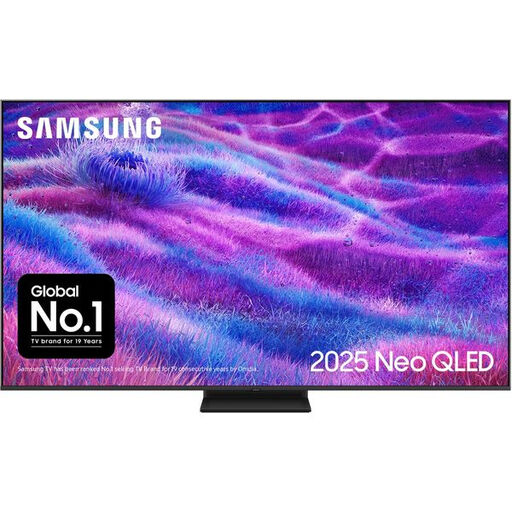
Consider this display replacement if you need a 55-inch TV rather than an add-on for the screen you have.
The product name identifies the QE55QN80F Neo QLED 4K model. Check its exact software support for your services, the connections you need and whether a 55-inch screen suits the room.
No: TV Licensing says the device does not determine the requirement. Watching live TV on a channel or streaming service, or using BBC iPlayer, requires a TV Licence; watching other on-demand programmes alone does not trigger that requirement.
Check ITVX’s current supported-device information for the precise platform and any model, TV-year or firmware condition. ITVX lists several streaming-player platforms but also identifies unsupported devices and software requirements, so a general platform name is not enough.
Start by locating the TV’s HDMI socket labelled ARC or eARC and checking the matching soundbar connection. Dolby’s soundbar guidance describes this audio-return path; for a particular surround format, also check the source, content and output settings.
Only if the display and the relevant content, service conditions and connection support the format. Netflix notes that device, plan, HDMI path and network conditions can limit playback quality, so check the complete setup before choosing a player for 4K/HDR.
Check that the powered device comes with product documentation and safety information appropriate to where it will be used. UK government electrical-equipment guidance distinguishes Great Britain from Northern Ireland, so do not assume that guidance for Great Britain applies unchanged across the whole UK.