What matters when choosing?
Streaming stick
Choose it when: The existing screen is satisfactory and the household mainly needs a different streaming interface or app access.
Trade-off: The stick cannot add picture or audio capabilities that the connected TV and sound system lack.
Separate media player
Choose it when: A particular ecosystem, model-specific wired connection or more deliberate audio setup matters to the household.
Trade-off: It still relies on a suitable display and connection chain; Apple TV 4K also requires a separate HDMI cable, according to Apple.
New smart TV
Choose it when: The screen or its connections need changing along with the built-in streaming platform.
Trade-off: Replacing the set does not settle app availability, account rules or compatibility with an existing sound system.
For a shared main screen, identify the issue that drives your purchase, then check the requirements of the devices that would remain in use.
| Concern |
What to check |
Who this matters to |
| TV and HDMI compatibility |
Check for a free HDMI input and whether the TV supports the picture formats you want. For protected 4K playback on Fire TV, check Amazon’s applicable HDMI and HDCP requirements across the connection chain. |
If my current TV still looks good, I need to know that a stick will connect and display the picture I expect. Around 33% of consumers put existing-TV compatibility first. |
| Services and household access |
Confirm required apps on the exact device, its setup requirements and each service’s household and simultaneous-screen terms. |
When several people use our main TV, I want their services and account arrangement to work before choosing an interface. Platform and household access come first for around 27% of consumers. |
| TV sound |
Check the TV, streamer and sound product as a chain, including the available ARC or eARC connection and the requirements of the desired audio format. |
If following dialogue together is the problem, changing the streaming interface may leave my main concern untouched. Around 20% of consumers prioritise the audio route. |
| Keeping or replacing the TV |
Decide whether only app access needs updating or whether the screen and its connections also need changing. |
I would consider a new set when several parts of our current TV setup limit shared viewing, rather than replacing it just for different apps. For around 20% of consumers, that whole-system decision takes priority. |
Joybuy product choices
These choices cover three different decisions: adding streaming to an existing HDMI TV, replacing the main television, or changing its sound setup. Match the product to the problem you are trying to solve rather than treating the devices as interchangeable.
 No image available
Roku Streaming Stick 4K
Consider this stick if you want streaming access on a television whose screen you plan to keep. Check the TV’s HDMI input and the availability of your required services on this device; viewing in 4K also requires a compatible TV and content.
View on Joybuy
 No image available
TCL 55P8K-UK QLED 4K HDR PRO Smart TV
Consider this model when replacing the screen and built-in streaming platform together. Its listed features include QLED, 4K HDR PRO, an ONKYO 2.1 sound system and Google Cast; check the required apps and connections for your household. If gaming refresh rate matters, confirm the precise mode before choosing it.
View on Joybuy
 No image available
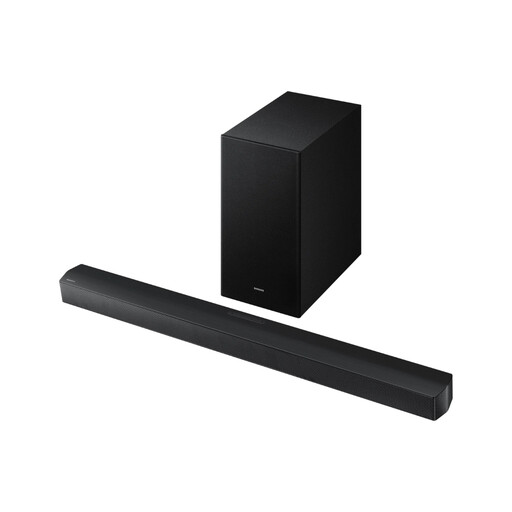
Samsung HW-B650F/XU 3.1-channel soundbar with wireless subwoofer
Consider a separate sound product if TV audio, rather than app access or the screen, drives the change. This model is listed as a 3.1-channel soundbar with a wireless subwoofer; check its connection options against your TV and where both components would sit.
View on Joybuy
 No image available
TCL 50V6C Direct LED 4K HDR Google TV
Consider this replacement route if you need a different screen as well as built-in streaming. The listed model is a 50-inch Direct LED 4K HDR Google TV; its 120Hz Game Accelerator designation is qualified as FHD, not 4K. Check the apps and audio connections you need.
View on Joybuy
 No image available
Bose Smart Ultra Soundbar — Arctic White
Consider this soundbar when the existing display and streaming access suit you but the audio setup does not. Confirm that its connections match your TV and that the complete connection path supports any audio format you intend to use; a soundbar does not change the TV’s picture or app support.
View on Joybuy
Common questions
Do I need a new TV to get streaming apps on the main screen?
No, if the existing screen is suitable and has an available HDMI input, an external stick or player may provide the streaming platform you need. Roku says its Streaming Stick 4K works with an HDMI television, but check the exact device’s power requirements, required apps and picture-format conditions.
Will a 4K streaming device make an older television show 4K?
No. The television must support 4K to display a 4K picture, and HDR needs compatible display support too. Amazon also specifies HDMI and HDCP conditions for protected 4K playback on Fire TV, so check any equipment between the streamer and screen.
Can several people and TVs use one Netflix account?
They can use an account within Netflix’s household and the simultaneous-screen limits of its membership plan; buying another device does not change those conditions. Netflix says accounts cannot be shared outside the Netflix Household, so check the current plan and household terms for the intended viewing locations.
Does an Atmos soundbar require eARC?
The connection required depends on the intended streamer, audio format and equipment. Apple says its high-bandwidth Dolby Atmos implementation does not work over ARC; check the TV, soundbar or receiver and full HDMI path for the particular setup you want.
Does using a streaming stick require a TV Licence in the UK?
Buying or using a streaming stick does not by itself determine the requirement. TV Licensing says UK viewers need TV Licence cover to watch live TV on any channel or service, or to use BBC iPlayer; watching only on-demand programmes on other services does not by itself require one.


