Viewers who want an unobtrusive setup
If you mainly want to open streaming apps on a bedroom TV without another visible box, a plug-in stick is worth considering. Check that the HDMI input is accessible and that you can provide suitable power.


For watching short films on a bedroom TV, start with a streaming stick if you want a compact setup and have an accessible HDMI input, nearby power and suitable Wi-Fi. A separate box becomes more relevant when you will use wired Ethernet, casting or smart-home features; whichever form you choose, check how you will listen at night and whether your TV can display the picture formats offered.
If you mainly want to open streaming apps on a bedroom TV without another visible box, a plug-in stick is worth considering. Check that the HDMI input is accessible and that you can provide suitable power.
If you watch while others are asleep or the bedroom is far from the router, check your intended headphone setup and the Wi-Fi signal at the TV. A box with Ethernet is an option only if you can run a cable to the room.
If your bedroom TV supports 4K HDR, or you regularly cast from other devices, the supported formats and platform features may affect your choice. Match them to the TV, services and devices you actually use.
Check the TV connection and power first, then decide whether late-night listening, network access, picture formats or connected-home features should drive the choice.
| Concern | What to check | Who this matters to |
|---|---|---|
| Simple setup | Check for an accessible HDMI input and a suitable power source near the TV. | I want to open short films without adding a visible box or complicated cabling. Around 31% of consumers put straightforward bedroom-TV setup first. |
| Quiet viewing and connection | Check the Wi-Fi signal at the TV and how your intended headphones connect; consider Ethernet only if a cable can reach the room. | If others are asleep or the router is distant, I need a workable listening setup and dependable access to streams. Roughly 31% of consumers make these bedroom-viewing needs their main concern. |
| TV picture formats | Match the TV’s resolution and HDR formats to the device, streaming service and film. | I do not want to choose 4K HDR features that my bedroom TV cannot display. Around 23% of consumers chiefly care about matching picture capability to their screen. |
| Casting and platform features | Check compatibility with the devices you cast from and whether you would use Ethernet or smart-home functions. | When I already use connected devices or services, I want the streamer to fit that setup rather than just launch video apps. About 15% of consumers prioritise those platform features. |
An HD-only or non-HDR television cannot display 4K HDR output from a streaming device. Apple specifies a compatible 4K HDR TV for 4K HDR streaming on Apple TV 4K.
Check the bedroom TV’s resolution and HDR support, then check whether the films and service you use offer the intended format.
Roku warns that many TV USB ports do not provide enough power for its Streaming Stick 4K.
Follow the device’s power instructions and check for a usable socket near the bedroom TV.
Picture and audio formats depend on compatible equipment, the streaming service and the film. Amazon states that Dolby Atmos on Fire TV Stick 4K Plus is available with compatible equipment on selected services.
Check the full TV and audio setup, as well as the formats offered by the short films you plan to watch.
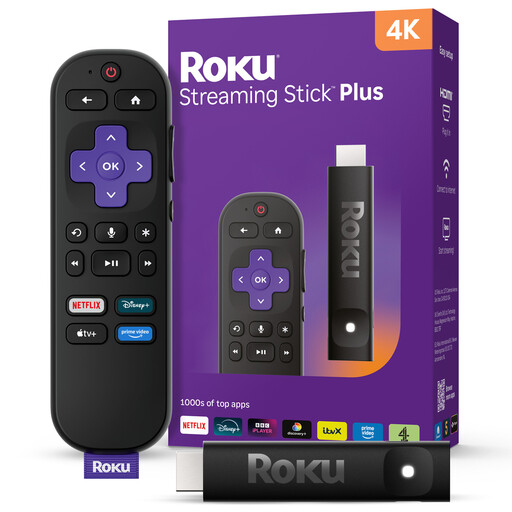
Roku offers streaming sticks for viewers who want a device plugged directly into a bedroom TV.
Fire TV Stick 4K Plus is a stick option for viewers who want the Fire TV interface and Wi-Fi 6 support.
Google TV Streamer (4K) is a separate box for viewers interested in casting, wired networking or compatible smart-home devices.
Apple TV 4K is a box to consider when the bedroom setup already uses Apple devices or services.
These Roku sticks are choices for adding streaming to a bedroom TV while keeping the device compact. Check the connections, power and listening arrangement for the particular model before choosing.
 No image available
A compact choice for adding streaming to a bedroom TV with an accessible HDMI input.
Roku lists 4K, Dolby Vision and HDR10+ support for Streaming Stick 4K. The TV and content must support the intended format; check the power arrangement and Wi-Fi signal at the TV.
 No image available
A Roku stick to consider if a compact device suits your bedroom TV.
Before choosing it for late-night viewing, confirm the HDMI and power requirements and how your intended headphones would connect. Check the Wi-Fi signal where the TV sits.
Roku says Streaming Stick 4K works with an HDMI television, including one that is not 4K. An HD or non-HDR screen will not display 4K HDR, so check that its HDMI input is free and accessible before choosing the stick.
Google TV Streamer (4K) requires a certified HDMI 2.1 cable sold separately, and Apple says Apple TV 4K needs an HDMI cable sold separately. Roku Streaming Stick 4K plugs directly into HDMI; check the space around the TV’s port as part of your setup.