Who each TV route suits

Keeping an older main TV

If the screen still suits you but its built-in apps are missing or no longer useful, compare HDMI add-ons before replacing the display. Freely’s setup guidance and ITV’s supported-device information make checking the exact connection and app support important.

Seeking UK live TV online

If you want broadcaster live channels alongside catch-up viewing, distinguish an ordinary app streamer from a Freely-enabled device or a service-linked box. Freely describes service and player limitations, so check the current details for the device you are considering.

Replacing the whole screen

If you want a different display as well as streaming, check the exact TV model’s connections, built-in platform and support for the apps you use. A “smart TV” label alone does not confirm that a particular service is available.

What to check before choosing

HDMI streaming device

Consider when: Your existing TV is satisfactory and you want to add apps without changing the screen.

Trade-off: The TV still determines the picture it can display, and app support depends on the exact device and software.

Freely-enabled box

Consider when: You want Freely’s live-channel and on-demand interface on a suitable existing HDMI TV.

Trade-off: Freely specifies a minimum broadband speed of 10 Mbps for live internet channels or on-demand viewing and notes that some players, content and features may be unavailable.

Service-linked set-top box

Consider when: The provider’s integrated TV service and app experience are what you want.

Trade-off: Sky Stream is subject to Sky service-plan conditions, so check the current plan rather than treating the puck as a standalone app streamer.

Connected TV

Consider when: The display, its condition or its available connections also need to change.

Trade-off: App availability still depends on the exact TV model and platform; check required services individually.

Concern What to check when buying Who this matters to
Keep the existing screen or replace it Check the TV’s condition and available HDMI inputs; if replacing it, check the exact new model’s connections. If my TV still suits me, I want to add apps without changing the screen; consumers prioritising a screen-preserving upgrade make up around 33%.
Get the required apps and live-TV experience Check the current UK support list for the exact device and software, and decide whether you want individual apps, a live guide or a particular service. ITV notes model and software qualifications for some devices. When I need a particular app or live-TV interface, I want to confirm it is supported before buying; consumers putting service access first make up around 27%.
Make the setup work at the TV Check for a free HDMI input, power requirements and Wi-Fi at the TV; confirm whether the exact device needs a separately supplied cable or has Ethernet. Freely specifies a 10 Mbps minimum for its live internet channels or on-demand viewing. I want the HDMI, power and network setup to work where the TV stands; consumers prioritising connection fit make up around 20%.
Choose a replacement TV with suitable streaming Check the screen you want, its connections and built-in operating system, then confirm support for each required service on the precise model. If the display itself needs changing, I want streaming built into the replacement; consumers prioritising a whole-TV replacement make up around 20%.

Buying pitfalls to avoid

  • Assuming “smart” or “4K” guarantees the app and picture you want

    A 4K-capable streamer does not make a TV panel display 4K. ITV’s support information also includes model and software qualifications for some devices.

    Check the required app against the exact device and software version, then check what your TV can display.

  • Treating all boxes as interchangeable with a streaming stick

    A Freely-enabled device, a general app streamer and a service-linked box offer different viewing setups. A device may also have specific connection or service requirements.

    Decide which viewing experience you need, then check the exact box contents, connection requirements and any applicable service terms. Google specifies a certified HDMI 2.1 cable sold separately for Google TV Streamer.

  • Replacing the TV solely because an older built-in app is missing

    An HDMI add-on can provide a separate connected-TV platform while keeping a satisfactory screen, provided the connection and required apps are compatible.

    Check the TV’s inputs and condition before deciding whether the display itself needs replacing.

Brands relevant to these TV routes

Roku

Roku Streaming Stick 4K is an HDMI add-on option for households keeping an existing TV.

  • Roku specifies HD, 4K and HDR output for this model.
  • ITV lists Roku support with firmware conditions. Check the exact model, current software and required apps; the TV determines the displayed resolution.

Google

Google TV Streamer (4K) is an add-on option with Wi-Fi or wired Ethernet connectivity.

  • Google specifies Android TV OS, Ethernet, output up to 4K HDR at 60 FPS and five years of security updates for this model.
  • Google specifies a certified HDMI 2.1 cable sold separately. Check support for the UK apps you need on the exact device.

Manhattan

The Aero 4K TV Streamer is a Freely-enabled set-top option for an existing HDMI TV.

  • Manhattan describes Aero as combining Freely with named streaming apps through TiVo OS.
  • Those are manufacturer descriptions, not a guarantee that every app or programme will remain available. Freely notes that some players, content and features may be unavailable.

Sky

Sky Stream is a service-linked HDMI box for households considering Sky’s integrated TV offering.

  • Sky specifies HDMI setup and Wi-Fi or Ethernet connectivity.
  • The box is subject to Sky service-plan conditions. Check the current plan and included services before choosing this route.

Hisense

The Hisense 43E78QTUK illustrates a connected-TV replacement route.

  • Hisense specifies a 43-inch 4K display and VIDAA Smart OS for this exact model.
  • These specifications do not establish that every service is available on this model. Check support for the apps you need.

Joybuy connected-TV choices

These Joybuy choices are connected TVs for households replacing a screen while adding built-in streaming.

TCL 50V6C 50-inch 4K HDR Smart Google TV

TCL 50V6C 50-inch 4K HDR Smart Google TV

A connected-TV replacement option if you also want to change the screen and add built-in streaming.

50-inch display; 4K HDR; Direct LED; Google TV.

View on Joybuy

TCL 65V6C 65-inch 4K HDR Smart Google TV

TCL 65V6C 65-inch 4K HDR Smart Google TV

A connected-TV replacement option if you also want to change the screen and add built-in streaming.

65-inch display; 4K HDR; Direct LED; Google TV.

View on Joybuy

TCL 55V6C 55-inch 4K HDR Smart Google TV

TCL 55V6C 55-inch 4K HDR Smart Google TV

A connected-TV replacement option if you also want to change the screen and add built-in streaming.

55-inch display; 4K HDR; Direct LED; Google TV.

View on Joybuy

TCL 43V6C 43-inch 4K HDR Smart Google TV

TCL 43V6C 43-inch 4K HDR Smart Google TV

A connected-TV replacement option if you also want to change the screen and add built-in streaming.

43-inch display; 4K HDR; Direct LED; Google TV.

View on Joybuy
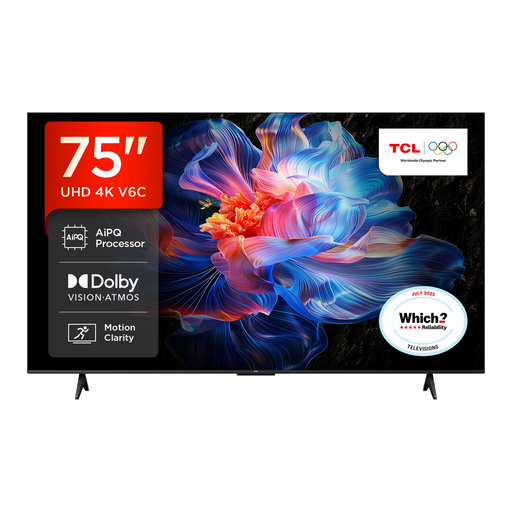
TCL 75V6C 75-inch 4K HDR Smart Google TV

TCL 75V6C 75-inch 4K HDR Smart Google TV

A connected-TV replacement option if you also want to change the screen and add built-in streaming.

75-inch display; 4K HDR; Direct LED; Google TV.

View on Joybuy

Frequently asked questions

Will an HDMI streaming device add apps to a non-smart TV?

It can, if the TV has a suitable available HDMI input and the device can be powered and connected to the internet. Check support for the exact device and app; the add-on does not change the screen’s native resolution.

Does every smart TV or streaming platform support ITVX?

No. ITV’s supported-platform information includes exceptions for some models and software versions, so identify the exact device and check current support before buying.

Can I get Freely without replacing my TV or installing an aerial?

Freely says its enabled streaming devices can connect to a suitable HDMI TV and internet connection without an aerial or dish. Freely specifies a minimum broadband speed of 10 Mbps for live internet channels or on-demand viewing and notes that some players, content and features may be unavailable.

What extra items or service terms should I check?

Check what is included with the exact device: Google specifies a certified HDMI 2.1 cable sold separately for Google TV Streamer. If you are considering Sky Stream, check its current service plan; app support and subscription entitlements are separate from hardware compatibility.

Does streaming mean I no longer need a TV Licence?

In the UK, TV Licensing says a licence is needed to watch or record live TV on any channel or streaming service, and to watch BBC iPlayer live or on demand, regardless of device. It says on-demand programmes on services such as Netflix, ITVX and YouTube do not by themselves require a licence.