Households keeping a usable TV
If the screen still suits the room but its smart interface or app access does not, check whether an HDMI add-on solves that problem before replacing the television.


If your main TV still meets the household’s screen needs and has a usable HDMI input, adding a streaming stick or media player avoids replacing the display; an HDMI device you already own may also do the job if its apps and controls suit everyone. Consider a new smart TV when the screen, connections, sound or accessibility controls remain unsuitable, and check the complete video and audio setup before buying.
If the screen still suits the room but its smart interface or app access does not, check whether an HDMI add-on solves that problem before replacing the television.
If several people use the main screen, profile switching and everyday remote use may matter as much as the app list. Google TV and Apple document profile features on supported devices, but each streaming service has its own account rules.
Check menus, voice guidance, captions, audio description and the route to headphones or other speakers on the exact setup. Samsung documents Voice Guide for supported TVs, while Amazon documents the VoiceView screen reader for Fire TV devices; neither establishes what every model or programme offers.
Begin with what the current TV cannot do. An existing HDMI-connected device is worth checking before another purchase; a soundbar or headphones address an audio need alongside, rather than instead of, a workable video route.
| Concern | Buying checks | Who this matters to |
|---|---|---|
| Keep the current TV | Confirm a free HDMI input, suitable device power and workable Wi-Fi or a supported wired-network option. Check required apps on the exact device. | If my TV still suits the room, I want streaming without changing the screen or its installation. About 33% of consumers put keeping a usable TV first. |
| Share the interface | Check profile switching and remote controls; confirm service-account rules separately from device profiles. | When several of us use one TV, I want each person to find their viewing without repeatedly changing someone else’s settings. For about 25% of consumers, managing shared use is the primary need. |
| Hear and navigate comfortably | Check the exact device’s accessibility controls and the TV’s audio outputs; confirm captions or audio description in the desired content. | If dialogue is hard to follow or menus are difficult to use, starting a video is only part of the job. Sound and accessibility come first for about 25% of consumers. |
| Replace an inadequate screen | Measure the available space, then check the exact TV’s inputs, audio connections, accessibility controls and required apps. | When the display or its connections no longer meet our needs, an extra streaming device would leave the underlying problem in place. About 17% of consumers primarily need to replace the TV. |
An HDMI input lets many external players connect, but does not establish app availability, account setup, picture formats, audio routing or remote-control behaviour. Hardware variants can differ, too.
Check the TV input and your required apps against the exact device, then confirm its power, network and audio requirements.
Google specifies a separately sold Ultra High Speed HDMI 2.1 cable for Google TV Streamer setup; confirm what your chosen device needs before installation.
A new smart TV also changes the screen and installation, while its built-in app selection still depends on the model and region.
If the current display works for everyone, compare an HDMI add-on first. If replacing it, check placement and ask the retailer about collection or recycling arrangements for the old TV.
Profiles can organise a shared screen, but they do not change a service’s membership terms. Netflix says its account may not be shared outside the Netflix Household.
Set up supported device profiles for people using the TV, and check each service’s current household and simultaneous-viewing terms separately.
A video device’s picture specification does not establish whether everyone can navigate its menus, follow dialogue or use the preferred headphones or speakers.
Check the exact TV and device controls, the TV’s audio output, and caption or audio-description availability in the content you intend to watch.
Fire TV sticks offer an HDMI add-on route for a household keeping its current screen.
Google TV Streamer is an external-player route; Google TV is also available on supported displays.
Apple TV 4K is a separate media player with Wi-Fi-only and Wi-Fi-plus-Ethernet hardware variants.
Samsung offers Tizen-based smart TVs for households replacing the display as well as its streaming interface.
LG’s webOS televisions provide an integrated streaming route when a new screen is needed.
These products cover streaming sticks for keeping an existing TV and smart TVs for replacing the screen. Choose between those routes based on what the current television still does well.
 Image unavailable
Consider this stick if the current TV is satisfactory and you want to add a separate streaming interface. Its listed variant is 4KPlus; check the exact model’s required UK apps, headphone-listening arrangement, TV controls and accessibility settings, along with your TV’s HDMI input and power options.
 Image unavailable
This integrated TV route is relevant if you need to replace the display, not just add apps. The product name specifies a 65-inch Direct LED screen, 4K HDR and Google TV; measure the installation space and check the exact model’s UK apps, audio connections and accessibility controls.
 Image unavailable
This is another stick route for a TV whose screen you want to keep. The listing names a 4K variant; confirm the exact model’s picture-format support, required UK apps, accessibility settings and audio route, as well as available HDMI, power and Wi-Fi at the television.
 Image unavailable
Consider a replacement TV such as this when an add-on would leave the current screen’s limitations unresolved. Its product name specifies a 65-inch QD-Mini LED screen, 4K HDR, Google TV and a 144Hz native refresh rate; check room fit, UK apps, audio connections and accessibility controls on the exact model.
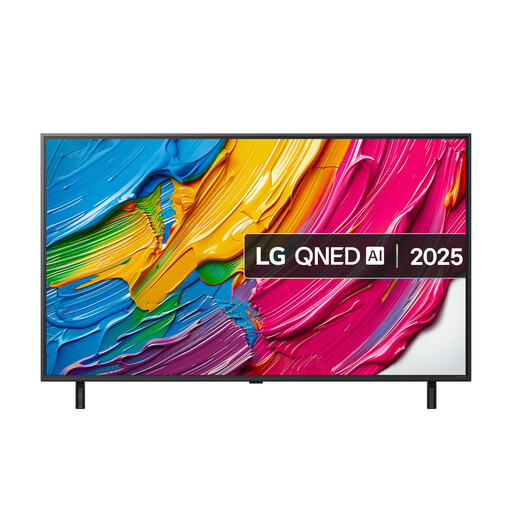 Image unavailable
This integrated route suits a household already planning to change its TV. The product name specifies a 50-inch QNED 4K UHD screen, webOS and eARC; check dimensions, the exact model’s UK apps and accessibility controls, and whether its audio connections suit your equipment.
Keep a satisfactory TV and consider an HDMI add-on if its input and the device’s setup requirements work for you. A separate player is worth considering when its particular interface, profile features or supported network variant meets a household need. Replace the television when the screen or its connections, sound or accessibility remain unsuitable.
Google specifies an HDMI display, a separately sold Ultra High Speed HDMI 2.1 cable, internet access, mains power, a Google account and a compatible mobile device for Google TV Streamer setup. Apple TV 4K needs an HDMI cable sold separately; check your TV’s picture-format compatibility and whether you need the Wi-Fi-only or Wi-Fi-plus-Ethernet variant.
Supported Google TV devices offer multiple profiles, while Apple says switching Apple TV 4K profiles refreshes watchlists and recommendations in its TV and Music apps. Neither feature means every service app changes profiles with the device, so check the apps your household uses.
No. Netflix says an account may not be shared outside the Netflix Household, which it defines around devices connected to the internet at the main place the account is watched. Check its current terms separately from the TV or streaming device’s profile settings.
Ask the retailer which electrical-waste take-back or recycling arrangement applies to your old TV and how collection would work. GOV.UK describes free in-store take-back for qualifying same-type electrical equipment; home collection arrangements should be confirmed separately.