For on-demand viewing, start with the smart TV you already own and add an HDMI streamer only if it lacks the apps you need; choose a new smart TV if you also need a screen, or use a laptop with a compatible display connection. For live UK channels without an aerial, choose equipment that specifically supports the service you want, such as Freely, and check the broadband requirements. TV Licensing says a licence is required for watching or recording live TV on any channel or service and for any use of BBC iPlayer; on-demand viewing on other services alone does not require one if you do not watch live TV.
Who this setup may suit
On-demand viewer with a working TV
You want your chosen apps on an existing screen without replacing it; check support on that exact TV before adding an HDMI streamer. Ofcom’s connected-TV report and Samsung’s Smart Hub guidance describe why platform and model support matter.
Aerial-free live-channel viewer
You want live UK channels as well as catch-up viewing; check the service, compatible equipment, broadband and TV Licence conditions. Freely / Everyone TV describes its internet-delivered service, while TV Licensing explains the viewing rules.
New-screen or flexible-setup buyer
You need to choose a display, or would rather reuse a laptop or tablet; check the available connections and support for the services you want before deciding whether a separate player is needed.
What to check before choosing
Smart TV
Choose when: You need a screen as well as streaming, or your current smart TV already supports the apps you want.
Trade-off: App availability depends on the exact model, and a general smart-TV label does not mean it supports Freely.
Streaming media player or box
Choose when: You want a separate interface for an existing TV with a compatible HDMI input; a Freely-enabled box is an option if its live-channel guide suits you.
Trade-off: Check the exact apps, power requirements and whether an HDMI cable is included; Google TV Streamer (4K) has Ethernet, which is useful only if a network cable can reach the TV.
Streaming stick
Choose when: Your TV has a spare HDMI input and a compact, Wi-Fi-based add-on suits your setup.
Trade-off: Check power, Wi-Fi reception at the TV and the apps supported by the exact stick; a stick’s resolution should match the display you have.
Laptop or tablet connected to a display
Choose when: A device you already own runs the service you want and can connect to the display.
Trade-off: Confirm the device’s video output, any adapter and the display input; you will use the computer or tablet for navigation rather than a dedicated TV remote.
Check these four points against the screen, services and connection you expect to use.
| Concern |
What to check when buying |
Who this matters to |
| Access to intended apps |
List the services and programmes you want, then check support for the exact TV model, streamer or computer. |
If I already have a working TV, I want my usual services on it before adding another box. Around 36% of consumers put access to their intended apps first. |
| Live channels and licensing |
Check whether the device supports the live-channel service you want and whether anyone in the household will watch live TV or use BBC iPlayer. |
If live UK channels matter, I need to know which service and viewing rules apply before choosing equipment; around 29% of consumers put live channels and licensing first. |
| Fit with existing equipment |
Check the TV’s HDMI input and built-in apps, or confirm that a computer or tablet can output video to the display. |
If my screen or computer already works, I want to reuse it rather than replace it unnecessarily. Around 21% of consumers prioritise fitting their existing equipment. |
| Connection and setup |
Check Wi-Fi reception where the TV will sit; for Freely, Freely / Everyone TV specifies a minimum broadband speed of 10 Mbps. Confirm whether the exact model includes the required cable and power accessories. |
If the router is far from the screen, I want a connection and setup that will work in that spot. Around 14% of consumers put connection and setup requirements first. |
Common buying pitfalls
-
Assuming an aerial-free setup is automatically licence-free
In the UK, the TV Licence requirement depends on what you watch, not whether the signal comes through an aerial or the internet.
Before choosing a setup, check whether anyone will watch or record live TV on any channel or service, or use BBC iPlayer.
-
Assuming every smart TV or stick has the same live-channel guide
Freely requires a Freely-enabled TV or streaming device, and app availability can differ by model.
If you specifically want Freely, confirm support for the exact model rather than relying on a general smart-TV or streaming-stick description.
-
Buying a 4K player without checking the screen or box contents
A 4K-labelled player cannot make an HD screen display 4K, and some devices require a separately sold HDMI cable.
Match the player to the display’s inputs and resolution, then check what is included with the exact model.
Relevant streaming brands
These brands illustrate different equipment routes; check the apps and features of the specific model you are considering.
Roku
Streaming sticks for adding an app interface to a TV with an HDMI input.
- Roku describes its UK Streaming Stick Plus as compact, powered by the TV’s USB port and compatible with dual-band Wi-Fi.
- Check the exact model, desired UK apps and whether the TV’s USB port supplies adequate power; this model information does not establish an integrated Freely interface. (Roku UK and Roku Support)
Amazon Fire TV
HDMI streaming sticks for viewers who want the Fire TV interface.
- Amazon’s setup guidance specifies an available HDMI input, an internet connection, an Amazon account and power accessories for Fire TV Stick setup.
- Check the generation and supported apps of the particular stick rather than assuming all models have the same features. (Amazon Customer Service)
Google
Google TV Streamer (4K) is a separate HDMI player with a wired-network option.
- Google specifies Ethernet and 4K HDR capability for this model.
- Google specifies that a certified HDMI 2.1 cable is sold separately; Ethernet is useful only if a cable can reach the TV. (Google Store UK)
Manhattan
The Aero 4K TV Streamer is a Freely-enabled box for an HDMI-equipped TV.
- Freely / Everyone TV lists an HDMI cable in the box and support for Wi-Fi or Ethernet.
- Check that the desired channels and services suit you, and remember that watching live TV requires a TV Licence.
Samsung
Some Samsung smart TVs provide apps through Smart Hub, depending on the exact model.
- Samsung says signing in to a Samsung Account gives access to more Smart Hub options, including app downloads.
- Freely / Everyone TV guidance dated 21 August 2026 says Freely is not currently built into Samsung TVs; check the exact TV and whether a separate Freely device is needed.
Joybuy smart TVs
These Joybuy listings are smart TVs for consumers who need a screen with streaming built in. Check the apps and live-TV service support of the exact model before buying.
 No image available
TCL 98Q6C-UK 98-inch QD-Mini LED 4K HDR Google TV
For a buyer who needs a new screen as well as streaming; check the exact apps you want are supported on this model.
98-inch display; 4K HDR; Google TV; 144Hz native refresh rate; up to 512 dimming zones.
View product
 No image available
TCL 55P8K-UK 55-inch QLED 4K HDR PRO Google TV
For a buyer choosing a new screen with streaming built in; check the exact apps you plan to use before deciding.
55-inch display; QLED; 4K HDR PRO; Google TV; 288Hz Game Accelerator.
View product
 No image available
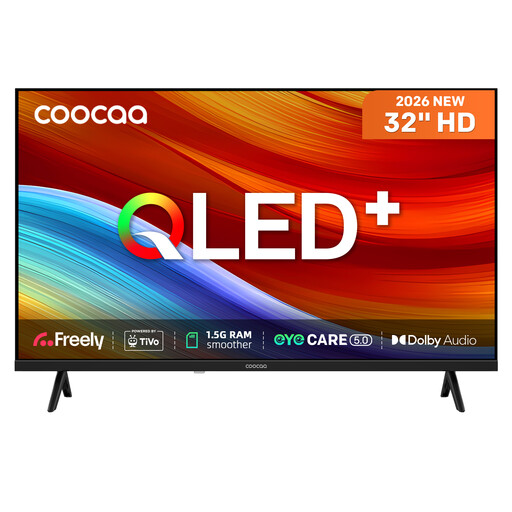
Coocaa 32CTQH38ZUK 32-inch HD Smart TV with Freely and TiVo
The product name identifies Freely and TiVo; check the services and viewing modes you want on the exact model.
32-inch HD display; Wi-Fi; two HDMI inputs; HDR10; Dolby Audio.
View product
 No image available
TCL 75Q7C 75-inch QD-Mini LED 4K HDR Google TV
For a buyer who needs a new screen as well as streaming; confirm support for the apps you intend to use.
75-inch display; 4K HDR; Google TV; up to 2,048 local dimming zones; 144Hz native refresh rate.
View product
 No image available
TeeView TV70UUW 70-inch QLED 4K HDR Smart TV with Tizen OS and Freeview Play
For a buyer choosing a new screen with built-in streaming; check that the exact apps and services you want are supported.
70-inch display; QLED; 4K HDR; Tizen OS; Freeview Play; three HDMI inputs.
View product
Frequently asked questions
Does having no aerial mean I do not need a TV Licence?
No. In the UK, watching or recording live TV on any channel or service, or using BBC iPlayer, requires a TV Licence regardless of whether the picture arrives through an aerial or the internet. On-demand programmes on other services alone do not require one, provided you do not watch live TV. (TV Licensing and GOV.UK)
Can I watch live UK channels over broadband without an aerial?
Yes, if the service and equipment you choose support them. Freely / Everyone TV says its enabled TVs and streaming devices deliver live and on-demand viewing over Wi-Fi without an aerial, and specifies a minimum broadband speed of 10 Mbps. Watching live channels still requires a TV Licence.
What should I check before buying a streaming stick or box?
Check for a spare HDMI input, suitable power, internet access where the TV will sit and any account required by the platform. Amazon specifies an Amazon account for Fire TV Stick setup, and Roku says its devices need a Roku account for activation. Google specifies that the HDMI cable for Google TV Streamer (4K) is sold separately.
Do streaming devices include access to every programme service?
No. Check that the exact TV or player supports the services you intend to use, and check separately whether those services require an account or subscription. A device’s streaming interface does not by itself establish access to every app or programme.


